




phone charger falls behind bed nightstand
If your phone charger falls behind the bed or nightstand, the problem is usually cord retention: nothing is stopping the cable from sliding off the edge. A clip or anchor can keep the connector within reach, while better routing reduces the tug that sends it overboard.
Key Takeaways
- Gravity is undefeated, and a smooth cable draped over the edge of a nightstand will eventually lose the fight.
- Routing your cable along the back of the nightstand instead of over the edge removes the tug that pulls it to the floor.
- A simple clip or anchor keeps the connector parked right where your hand expects to find it.
- Weighted or grippy accessories can stop a charger from sliding around before it ever leaves the nightstand.
- A few seconds of setup saves you the nightly fishing expedition behind the bed.
Check where the cable slips, how far the outlet sits from the bed, and whether the phone rests on a hard surface while charging. The right fix depends on your setup, not on blaming the cable for making a break for it.
Why Your Phone Charger Falls Behind the Bed (It's Not the Cable's Fault)
Secure the cable near the nightstand edge with a cord clip, anchor, or hook, then leave enough slack to reach the phone without pulling the connector. If the cable has already disappeared, turn on a light and retrieve it without yanking. Charge on a hard, flat nightstand rather than bedding. Apple advises keeping an iPhone and its power adapter or wireless charger in a well-ventilated area during use or charging.
The Cord-Retention Problem, Explained
You set your phone down, the connector slips off the nightstand, and the cable vanishes into the gap beside the bed. The cord did not necessarily fail. The furniture simply has no feature holding it in place, so gravity wins when the connector’s weight pulls it over the edge.
Check where the cable rests when the phone is unplugged. If the loose end hangs freely, a small movement can send it down the side of the table or behind the bed. Repeated pulling at an awkward angle can also wear the cable near its connector over time.
Why Short Cables and Slick Nightstands Make It Worse
A short cable leaves little slack, so shifting the phone or reaching for it can tug the connector. A smooth tabletop gives the cable little to catch on. Add an outlet below or behind the nightstand, and the cord is pulled toward the gap instead of staying within reach.
How to Rescue a Cable That Already Fell Behind the Bed
Use a flashlight to find the cable, then move the nightstand or bed enough to reach it safely. Pull the cord by its body, not its connector. Check for fraying, exposed wires, a bent plug, or unusual heat before using it again. If anything looks damaged, stop using it and replace it. Route the retrieved cable along the furniture edge and secure it near the plug-in spot.
Six Ways to Keep Your Charger on the Nightstand
Choose a fix based on the furniture, outlet location, and whether you can alter the nightstand. A good setup catches the cable before it reaches the edge, leaves enough slack for the phone, and keeps the charging area tidy. Try an option below and adjust it if the cord still pulls or slips.
-
Adhesive and Magnetic Cord Clips
Attach a cord clip near the tabletop edge and guide the cable through its slot. It keeps the connector from dropping when unplugged. Magnetic versions hold only cables fitted with a compatible magnetic piece, so check the design before buying. Clean and dry the surface first, then follow the adhesive instructions.
-
Cable Routing: Grommets and Drilled Holes
A grommet gives a cable a smooth passage through a furniture opening and keeps it from sliding across the top. Check the nightstand’s construction and measure the connector before making a hole. Drilling is permanent, so avoid it on rented furniture or pieces with hidden supports. Protect the cable from sharp edges.
-
Under-Nightstand Charging Shelf or Basket
A small shelf or basket beneath the tabletop can hold a power adapter and extra cable, clearing surface space. Secure the cable underneath so the connector reaches the phone without hanging loose. Keep the adapter accessible and allow airflow around charging equipment rather than enclosing it tightly.
-
Velcro Ties, Hooks, and Command Strips
Bundle extra length with a reusable tie, then guide the cable along the back or underside of the nightstand with a hook or removable strip. Leave a gentle loop near the tabletop so the phone can move without tugging the plug. Follow the strip’s surface and weight directions; paint and finish can be delicate.
-
Longer Cables That Reach Instead of Fall
If the cord is stretched tight between outlet and phone, a longer cable can reduce tension and give you room to route it neatly. Measure the path around furniture rather than guessing from a straight line. Even a longer cord needs a clip or route to keep its connector from sliding off the nightstand.
-
Weighted Cable Anchors
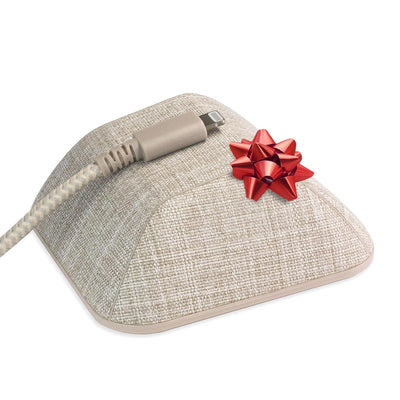
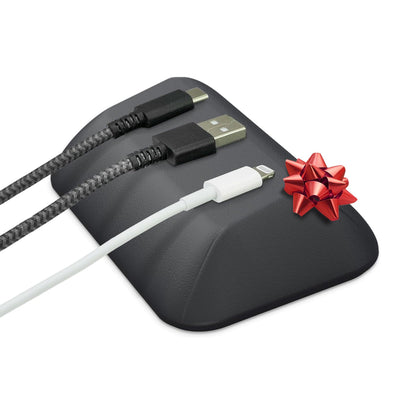
Set an anchor on the tabletop and pass the cable through its channel. Its weight helps keep the connector from slipping away when you unplug your phone. Place it near the charging area but clear of the phone, and check that the channel fits without pinching the cable.
For a bedside outlet, use a wall charger intended for indoor outlets, not a vehicle accessory. The Charge Shack - 2-Port 32W USB & USB-C Car Charger is a car charger, so it is not the right choice for plugging into a nightstand wall outlet. Keep the Charge Shack - 2-Port 32W USB & USB-C Car Charger for a compatible car charging setup; choose an appropriate wall adapter for bedside use.
Renter-Friendly vs. Permanent Fixes: Which Setup Fits Your Nightstand?
The right setup depends on whether you can alter the furniture, how often you move, and where the outlet sits. A removable clip may be enough for a smooth tabletop; a built-in cable opening can suit a nightstand you own and plan to keep. Either way, secure the cable without pinching it and leave enough slack to reach your phone. The aim is a tidy route that keeps the connector accessible, not a furniture project that takes over your weekend.
No-Drill Options for Renters and Dorms
For rental furniture, dorm rooms, or a nightstand you may replace soon, start with removable cord clips, a weighted anchor, or a cable hook attached with a surface-safe adhesive. A reusable tie can gather extra length beneath the tabletop. These options are easy to reposition and leave furniture unchanged, though adhesive may not hold well on dusty, textured, or delicate finishes. Clean and dry the surface, follow the manufacturer’s directions, and test a small, hidden area if you are unsure about the finish.
Permanent Setups Worth the Screwdriver
If you own the nightstand, a grommeted opening or secured shelf beneath the tabletop can keep cords routed neatly and reduce loose cable on the surface. Measure the plug and cable before making an opening, and check for supports or hardware in the planned path. A drilled hole is difficult to undo, making it a poor fit for rented furniture or a piece you might sell. Keep adapters accessible; do not seal charging equipment inside a tight, unventilated compartment.
Choosing the Right Fix by Budget and Setup
A small clip is a low-effort starting point; a mounted basket or built-in route takes more planning and changes to the furniture. Compare the trade-offs:
| Setup | Best fit | Upside | Trade-off |
|---|---|---|---|
| Removable clip or anchor | Rentals, dorms, frequent moves | Easy to place or remove | Adhesion depends on the surface |
| Tie and underside hook | Loose cable beneath the tabletop | Uses the furniture’s existing edges | Needs a clear route and careful placement |
| Grommet or fixed shelf | Owned furniture and a lasting setup | Keeps routing in a set location | Requires tools or a permanent change |
For bedside charging, use a wall adapter intended for an indoor outlet. The Charge Shack - 2-Port 32W USB & USB-C Car Charger is a car charger, not a wall adapter, so it is not the right choice for a nightstand outlet. The Charge Shack - 2-Port 32W USB & USB-C Car Charger belongs in a compatible car setup; choose a suitable indoor wall charger for bedside use.
How Long Should a Bedside Charging Cable Be?
A six-foot charging cable is a practical starting point for most bedside setups. Choose a longer one if the outlet sits across the room or the cable must travel around furniture. It should reach your phone without pulling tight, with the connector still easy to reach from bed. Extra cord can create clutter, so measure the route before buying rather than guessing from the distance between outlet and nightstand.
The Cable Length Math: Why 6 Feet Is the Minimum
A cable’s listed length covers its full span, not just the open space between outlet and phone. Measure from the outlet to the nightstand, then follow the route up or around the furniture and across the tabletop. Add slack for the phone’s position and gentle movement. Six feet often gives enough reach for a typical bedside route, though outlet height, furniture placement, and phone position all matter. A taut cord can tug at its connector and wear it over time.
When a 10-Foot Cable Earns Its Keep
A ten-foot cable can help if the outlet is across the room, the bed is far from the wall, or the cord must follow a longer route around furniture. It gives more freedom to place the phone without stretching the cable. The trade-off is extra length to manage: route the surplus along the wall or nightstand rather than leaving a loop across a walking path. If six feet reaches without tension, a longer cable may only add clutter.
Matching Cable Length to Your Outlet Position
Measure the complete path, including the vertical distance from a low outlet and turns around furniture. Check that the cable reaches the phone’s resting spot with a little slack, then secure the route so the connector does not bear the cord’s pull. Six feet may be more than enough for an outlet beside the nightstand; ten feet may suit one across the room. Measure first, then buy to fit your room.
Charging Safely at Night: Keep the Phone Off the Fabric
Charge your phone on a hard, flat surface with room for air to circulate, not on a mattress, pillow, blanket, or sofa. Soft fabric can trap heat around charging equipment. Apple advises keeping an iPhone and its power adapter or wireless charger in a well-ventilated area during use or charging, such as a nightstand. The cable can reach the bed; the phone should rest on the nightstand.
Why a Charger on a Bed or Sofa Gets Hot
Charging creates heat, and soft bedding can hold it around a phone, adapter, or wireless charger. Fabric may also cover equipment when someone shifts during sleep. If a phone or charger feels unusually hot, disconnect it and let it cool on a clear, hard surface. Check the cable and adapter for damage, and stop using them if you see fraying, exposed wires, or a damaged connector. Avoid charging on papers or clutter that can block airflow.
The Hard-Surface Rule for Overnight Charging
Use a stable tabletop made of wood, metal, or hard plastic, and keep the phone and charging gear uncovered. Leave open space around the adapter instead of tucking it beneath bedding or into a tightly packed drawer. This is a practical placement rule, not a reason to panic about ordinary charging: keep equipment ventilated, use undamaged accessories, and follow the device maker’s guidance. The Charge Shack - 2-Port 32W USB & USB-C Car Charger is designed for a compatible car setup, not a bedside wall outlet. The Charge Shack - 2-Port 32W USB & USB-C Car Charger is not the adapter to plug into the nightstand outlet.
A One-Cable Bedside Setup for Phone, Watch, and Earbuds
Route a phone cable to the tabletop, then use a suitable charging station or separate compatible cables for a watch and earbuds. Place each device on the hard surface while charging, with adapters and charging pads uncovered and ventilated. Gather spare cable beneath or behind the nightstand, away from feet and bedding. If you need a car charger for a drive, keep the Charge Shack - 2-Port 32W USB & USB-C Car Charger in the vehicle rather than treating it as bedside charging equipment.
Frequently Asked Questions
Why does my phone charger keep falling behind my bed or nightstand?
Your phone charger falls behind the bed because nothing holds the cable in place, so gravity wins when the connector's weight pulls it over the edge. Short cables, slick tabletops, and outlets tucked behind furniture all make the slip worse.
How do I keep my charger from sliding off the nightstand?
Secure the cable near the nightstand edge with a cord clip, magnetic clip, or weighted anchor, then leave enough slack to reach your phone without tugging the connector. Charging on a hard, flat surface instead of bedding also helps.
How do I rescue a charger that already fell behind the bed?
Grab a flashlight, shift the bed or nightstand just enough to reach, and pull the cable by its body, not the connector. Before using it again, check for fraying, exposed wires, a bent plug, or unusual heat. If anything looks off, replace it.
Is leaving a phone charger plugged in a fire hazard?
A charger plugged in overnight is generally low risk if the cable and adapter are undamaged and charging happens in a well-ventilated spot. Apple advises keeping an iPhone and its power adapter in a well-ventilated area during charging, so avoid stuffing them under pillows or blankets.
Is it safe to use a wireless charger next to your bed?
Yes, a wireless charger is fine bedside when it sits on a hard, flat nightstand with airflow around it. Avoid charging on bedding or enclosed spaces, and route the cable so the connector stays within reach instead of diving behind the furniture.
What are the best no-drill fixes for charger cables in a rental or dorm?
Start with removable cord clips, weighted cable anchors, or a hook attached with surface-safe adhesive, plus a reusable tie to bundle extra length under the tabletop. These reposition easily and leave furniture untouched, though adhesive may not grip every finish.
Should I buy a longer charging cable for my nightstand?
A longer cable helps when the cord is stretched tight between outlet and phone, because tension is what tugs the connector overboard. Measure the path around furniture rather than guessing, and still add a clip so the connector doesn't slide off the edge.