





cable organizer for multiple devices no adhesive
A cable organizer for multiple devices no adhesive should hold cords in place without leaving marks or locking you into a setup. Magnetic holders, weighted organizers, reusable clips, storage boxes, and adjustable ties can all help. The right mix depends on your desk, devices, and how often you move things.
Key Takeaways
- Adhesive-free organizers protect your surfaces and let you rework your setup whenever your gear changes.
- Magnetic holders and weighted bases give cables a landing spot without any commitment to one desk layout.
- Reusable clips and adjustable ties work well for bundling multiple cords into one tidy route.
- Storage boxes hide power strips and excess cable length, which keeps things clean when you have several devices charging at once.
- Match the organizer to how often you move things around: frequent rearrangers should stick with magnets and ties, not permanent fixtures.
Start by separating cables you use every day from cords that can stay tucked away. That makes a desk with charging leads and power bricks easier to use and change.
Why Cables End Up All Over the Place (And Why Adhesive Isn't the Answer)
To organize several cables without drilling holes or using adhesive, combine removable holders and reusable bundling tools. Give frequently used charging cords an easy-to-reach home, then gather longer leads and power-brick cords under or behind the desk. A cable organizer for multiple devices no adhesive works best when it suits the furniture and leaves room to unplug, move, or replace devices.
The Real Cost of a Tangled Multi-Device Setup
Each device brings its own cord, charger, and preferred spot. Add a phone, earbuds, laptop, monitor, and oversized power brick, and cords can slide behind the desk, cross a walking path, or vanish under accessories. Finding the right plug takes time, and moving one device can tug other cables out of place. Sort cords by device and use to see which leads need to stay within reach and which can be gathered out of sight.
Why Adhesive and Drilling Fail: Rented Apartments, Standing Desks, and Sticky Residue
Adhesive mounts can leave residue or lift away from a surface, while screws and drilled cable trays make furniture less flexible. That is a poor fit for rental apartments, shared desks, and standing desks that move throughout the day. Cords need slack for height changes, so a fixed route can pull against a plug or snag as the desktop rises. Removable, adjustable organizers avoid committing to one cable path and leave room for changes, like adding a monitor or swapping a charger.
What Actually Works: The No-Adhesive Toolkit
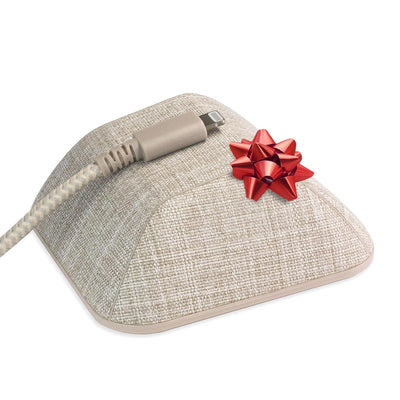
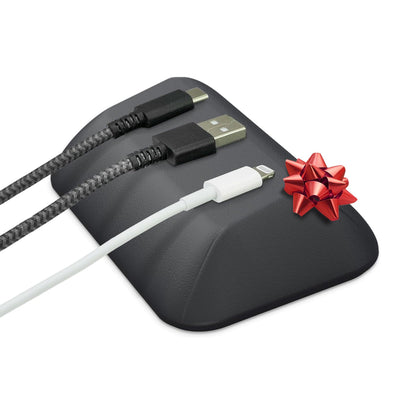
Build around reversible tools: a weighted holder for loose charging ends, clips to guide cords along an edge, a box or tray for power bricks, and reusable ties for bundled slack. Each tool handles a different part of the tangle. The Cable Wrangler - Magnetic Cord Organizer is a desk-friendly example for keeping frequently used cords close. Smartish describes its magnetic design as accommodating different cable thicknesses and staying in place until moved.
The 5 Types of No-Adhesive Cable Organizers (And What Each One Is Best For)
A phone cord you grab several times a day has different needs from a monitor lead that stays connected or a power brick that takes up space under a desk. Match each tool to its job, and combine types when they solve separate problems. For a cable organizer for multiple devices no adhesive, check how it rests on the surface, how easily cords release, and whether it can move with your furniture.
Magnetic Cable Holders: Grab-and-Go Charging Spots
Magnetic holders keep cable ends in a familiar place, handy for phone, tablet, and earbud chargers that might slip behind a nightstand or desk. They suit cords you connect and disconnect often, not power bricks or an entire cable run. Smartish’s Cable Wrangler - Magnetic Cord Organizer features a Powerful magnetic design for secure cord attachment, Keeps cables neat and organized, Easy snap-in-place functionality, and Attractive and sleek design. It gives cord ends a landing spot where they are ready to grab.
Weighted Desktop Organizers and Cable Slugs
A weighted holder uses its own mass to keep cable ends from sliding off a desktop. It needs no adhesive and can be repositioned when your layout changes, making it useful beside a laptop dock or charging area. Some weighted organizers hold several cords; HuffPost describes a model weighing a quarter pound. The trade-off is footprint: it occupies desk space and will not conceal a power strip or long wire runs. Check that the slots suit your cord thicknesses before buying.
Clip-Based Solutions (Tension Clips, Screw-Clamps, and the Humble Binder Clip)
Clips guide a cord along a desk edge, shelf, or furniture leg. Tension clips and binder clips can be removed without a drilled hole, while screw-clamps grip an edge through pressure. They work well for routing a mouse, monitor, or charging cable. Check the clip’s contact points and fit, especially on delicate finishes. One that grips too tightly can mark a surface; one that is too loose may let the cable slip free.
Cable Boxes and Under-Desk Trays: Corralling Power Bricks and Surges
A cable box hides a power strip and charger blocks inside a ventilated container, while an under-desk tray supports cords below the work surface. Both help when bulky adapters create a knot a small holder cannot fix. Freestanding boxes avoid wall or furniture attachment but take floor or desktop space. Trays can keep cords off the floor, though many attach with screws or adhesive, so check the mounting method for a no-drill setup. Leave access for plugs and avoid packing heat-producing equipment into a closed space.
Reusable Ties and Sleeves: Velcro, Silicone, and Neoprene Bundling
Reusable hook-and-loop ties, silicone straps, and fabric sleeves gather excess length without making a permanent bundle. They suit monitor leads, charger cords, and travel kits where cables may need to be separated later. Unlike single-use zip ties, adjustable wraps can be opened and reused; users report cutting zip ties off and replacing them when a setup changes. Sleeves tidy several cords together, though identifying or replacing one may mean opening the bundle. Keep device leads distinguishable with labels or separate ties.
Quick Trade-Offs
Pros
- Magnets and weighted holders keep everyday cable ends reachable without permanent mounting.
- Reusable clips and ties adapt when devices or furniture positions change.
- Boxes and sleeves help contain bulky adapters and groups of cords.
Cons
- Desktop holders take up surface area, and clips require a suitable edge.
- Some trays still rely on screws or adhesive, so mounting details matter.
- Bundling too tightly makes it harder to identify, unplug, or replace a cable.
No-Adhesive Cable Organizer Comparison Table
A setup often combines tools: one for cords you grab often, another for excess length, and a separate solution for bulky adapters. Compare how each option sits on your desk, whether it adjusts, and how easily you can reach plugs. The Cable Wrangler - Magnetic Cord Organizer is designed to keep frequently used cable ends within reach, while adjustable ties and sleeves gather longer runs without fastening anything to furniture.
| Organizer type | Typical capacity | Reusable? | Portable? | Surface or setup risk | Typical price |
|---|---|---|---|---|---|
| Magnetic holder | Several loose cable ends, depending on design | Yes, repositionable | Easy to move between desks | Low; check that it stays put on your surface | Varies by design |
| Weighted organizer | Multiple charging cords | Yes | Portable, though its weight adds bulk | Low; occupies desktop space | Varies by size and materials |
| Edge clip or clamp | One or a few routed cables per clip | Usually; depends on attachment style | Good for a home or office desk | Check clamp pressure and surface finish | Varies by clip type |
| Freestanding cable box | Power strip and several adapters, depending on box size | Yes | Moveable, but less convenient to pack | Low; needs floor or desk space | Varies by size and compartments |
| Reusable ties or sleeve | A bundle of cords | Yes, if designed to open and close | Easy to pack and reuse | Low; avoid tightening around cables | Varies by material and bundle size |
Price depends on size, materials, and how many pieces come in a set, so compare the specific package. For a changing workstation, prioritize reusable parts and easy access to plugs. A box suits power bricks that can stay together; separate holders and ties fit setups where devices are rearranged often.
Step-by-Step: Set Up a Multi-Device Desk Without Drilling or Adhesive
Organize desk cables without drilling holes, sticking mounts to furniture, or moving the desk. Separate cords that need to move during the day from those that can stay routed in place. Use removable organizers that rest on the desk, grip an edge, or bundle cords together. Keep power bricks accessible and leave enough slack for plugs to disconnect without pulling other cables along.
Step 1: Unplug, Audit, and Group Cables by Device and Length
Unplug devices you can safely disconnect, then trace each cord from its device to the power source. Group cables by purpose, such as laptop power, monitor connection, phone charging, or audio accessories. Separate frequently used leads from those that rarely move. Note unusually long cables and bulky adapters that need room near the outlet. This audit helps you avoid bundling unrelated cords, which can make a charger change feel like untangling a fishing line.
Step 2: Route and Hide Excess Cable Length Under the Desk
Choose a path along the back or side of the desk, then guide cords toward the power source. Use removable clips that fit the desk edge or reusable ties to hold slack in a loose bundle. For a standing desk, keep a generous loop between the moving desktop and the outlet. Raise and lower the desk to check that cords do not snag, stretch, or drag. A freestanding cable box can gather a power strip and adapters beneath or beside the desk, as long as plugs remain reachable and equipment has appropriate ventilation.
Step 3: Assign Each Device a Home (Magnets for Daily Plugs, Clips for the Rest)
Give cords you unplug often a designated spot near the desk edge. The Cable Wrangler - Magnetic Cord Organizer uses magnets to keep supported cable ends ready to grab, with snap-in-place functionality. Use clips to guide less frequently handled leads along a chosen route. Check the holder or clip against the cord thickness, and position it so you can reach the connector without pulling the cable from its route.
Step 4: Bundle and Label for a Setup You Can Actually Maintain
Gather only the slack that belongs together, using reusable ties or an openable sleeve. Avoid cinching cords tightly, and leave room to identify and remove a single cable. Add simple labels at the ends of similar-looking leads, especially behind a monitor or power strip. Before plugging devices back in, check that every cord reaches comfortably and no adapter is trapped beneath a tight bundle.
- Keep daily-use charging leads easy to reach.
- Leave slack where a standing desk moves.
- Use adjustable ties instead of single-use ties when you expect changes.
- Keep power bricks accessible and avoid enclosing equipment without suitable ventilation.
A tidy desk should still be easy to change. If a new device arrives, open the ties, adjust the route, and reset only what needs moving. That is the practical advantage of a cable organizer for multiple devices no adhesive: the arrangement can adapt without adhesive or furniture modifications.
Smart Picks and Long-Term Habits: Choosing, Traveling, and Staying Tangle-Free
Choose organizers around how you use your gear. A frequently unplugged phone charger needs a reachable spot; travel cables need to pack neatly; connected cords need a route that allows access and adjustment. For loose cable ends on a desk, the Cable Wrangler - Magnetic Cord Organizer fits the no-adhesive brief: its magnetic design holds compatible cords without fastening the organizer to furniture. Choose something you can keep using when your setup changes.
A Quick Checklist for Picking the Right Organizer for Your Setup
Before buying, check the surface, cable mix, and how much your setup moves. A standing desk needs enough slack to move freely; a crowded shared workspace may call for portable pieces that can be cleared away. For cords used throughout the day, choose easy access over a tight bundle. For cables that rarely move, a reusable wrap can keep them together while allowing later changes.
- Surface: Can the organizer rest on the desk or grip an edge without marking it?
- Cord fit: Will its slots or closures hold your cable thicknesses?
- Adjustability: Can you open it again when a device or cable changes?
- Movement: Does the route allow slack for a rising desk or a device you move?
- Access: Can you reach connectors and power bricks without taking everything apart?
Travel-Friendly Cable Organization for Phone, Charger, and Earbuds On the Go
For a travel pouch, keep the phone charger, earbuds, and spare leads in separate reusable ties or small compartments. That makes it easier to find a cable without pulling the whole kit apart. Wrap cords loosely, and store power adapters where their prongs will not press into screens or delicate accessories. The Cable Wrangler - Magnetic Cord Organizer is made for keeping cable ends in place on a desk, so pack it only if its size and your destination setup make it useful. A compact tie may suit a bag with limited room better.
Keeping It Clean: Dust, Re-Tensioning, and a 5-Minute Monthly Reset
Dust gathers around desk edges, trays, and cable bundles, so wipe those areas during a workspace tidy-up. Check reusable ties for loosened closures and adjust them without squeezing cords tightly. During a monthly reset, remove unused leads, return active cables to their spots, and make sure plugs remain easy to reach. If the desk moves, check cable slack through its full range of motion. Small adjustments can keep an orderly setup from drifting back into a knot.
Frequently Asked Questions
How can I organize multiple cables without using adhesive or drilling holes?
Combine removable holders and reusable bundling tools. A magnetic or weighted organizer keeps daily charging cords within reach, clips route cables along a desk edge, and Velcro-style ties bundle the slack you rarely touch. Nothing gets glued, screwed, or stuck with residue.
What are the best no-adhesive cable organizers for desks with multiple devices?
The best setup mixes tools by job: magnetic holders for cords you plug in daily, weighted desktop organizers for loose ends, clips for desk edges, boxes or trays for power bricks, and reusable ties for bundling. Match each tool to the cable, and combine types when they solve separate problems.
How do I hide cables under my desk without moving it or drilling?
Use a freestanding cable box or a tray that mounts without screws or adhesive. A ventilated box hides a power strip and charger blocks, while a tray keeps cords off the floor. Check the mounting method first, since many trays attach with screws, and leave access for plugs.
What can I use instead of zip ties for reusable cable management?
Reusable hook-and-loop ties, silicone straps, and fabric sleeves bundle cables without a permanent hold. Unlike single-use zip ties, they open and close again whenever your setup changes, so you're not cutting anything off the next time you swap a charger.
How do I keep cables organized on a standing desk?
Skip fixed routes and use removable, adjustable organizers that move with the desktop. Cords need slack for height changes, so a fixed path can pull against a plug as the desk rises. Magnetic holders and clips near the edge keep things tidy without locking in one cable path.
Do magnetic cable holders work with thick and thin cords?
Yes, a good magnetic cord organizer handles different cable thicknesses and keeps cords in place until you move them. The Smartish Cable Wrangler, for example, gives cable ends a snap-in landing spot so your charger is always ready to grab, no adhesive required.
Why should I avoid adhesive cable organizers in a rented apartment?
Adhesive mounts can leave residue or lift off surfaces, and drilled trays make furniture less flexible. That's a rough fit for rentals and shared desks. Removable organizers let you add a monitor or swap a charger without turning it into a furniture project.