



One Charging Spot for the Whole House (or Gaming Setup): Organizing 4+ Cables Without Adhesive (Bigger Cable Wrangler)
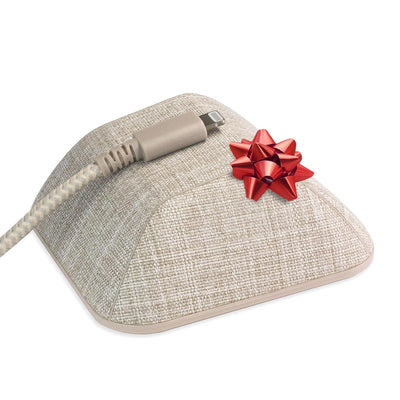
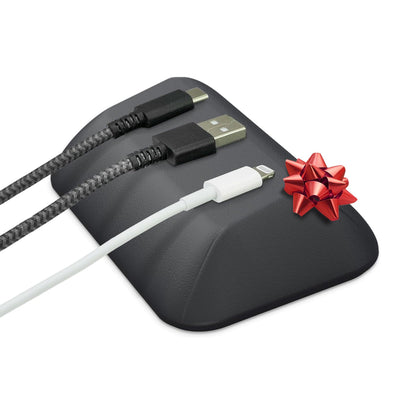
One Charging Spot for the Whole House (or Gaming Setup): Organizing 4+ Cables Without Adhesive starts with a simple fix: gather the cords where you use them, then keep their ends in reach with a grippy-base magnetic organizer. The Bigger Cable Wrangler is made to hold 6+ cables, so it can handle a shared charging area without adhesive on your furniture.
Key Takeaways
- A magnetic base keeps cable ends right where you left them, so grabbing a charger becomes a one-handed move instead of a floor search.
- The Bigger Cable Wrangler holds 6 or more cables, which makes it a solid fit for family charging stations or multi-controller gaming setups.
- Because it relies on weight and grip instead of sticky pads, you can move it around without leaving residue on nightstands, desks, or entertainment centers.
- Gathering every cord in one spot cuts down on the mystery-cable problem and gives shared spaces a little less clutter.
- It pairs nicely with a central charging hub, keeping both the cables and the devices they feed organized in one place.
The key is capacity, not just tidiness. A phone cable and a thick laptop charger take up different space, and an organizer should keep cords accessible without sliding around. Here’s how cable clutter happens and how to choose a size that fits your setup.
Why Cables Go Rogue (and Why One Spot Fixes It)
For four or more cords, place a magnetic organizer with a grippy base near the outlet or power strip you already use. The magnet holds cable ends in place, while the base stays put without adhesive. That makes one shared charging point easier to use than cords scattered across multiple outlets or held by clips that attach to furniture.
The Runaway Cable Problem, Explained
A cord only needs to slip off a desk or nightstand once to become a retrieval mission under the furniture. When several devices charge in the same area, loose ends can disappear behind a table, get tangled with each other, or pull out of reach when someone moves a device. Keeping the cable ends gathered at a single spot makes them easier to find and return after each use.
Why Scattered Outlets Lose to One Charging Hub
Separate outlets can spread phone, tablet, laptop, and gaming cords around a room without solving the loose-end problem. A shared hub gives those cables a home near the place you actually charge. The Bigger Cable Wrangler holds 6+ cables, according to its product listing, offering room to group a larger set rather than leaving cords to wander between furniture and outlets.
The Adhesive Trap: Sticky Regret on Wood and Renting Walls
Adhesive clips can be a poor fit for anyone who wants to avoid residue or changes to a furniture finish. A grippy-base organizer offers another option: the Bigger Cable Wrangler has a magnetic top to hold cable ends and a grippy bottom to help keep the organizer in place. It does not use sticky adhesives, so it can be relocated without adhesive residue.
Capacity Math: How Many Cables Can One Organizer Actually Hold?
For a charging spot serving several people or devices, check the stated cable capacity before choosing an organizer. The standard Cable Wrangler holds five cords and includes two cable clips; the Bigger Cable Wrangler holds 6+ cables, according to the product listings. That extra room can make the larger version a better fit when your lineup includes a phone, tablet, laptop, and gaming gear. Capacity describes how many cables it can organize, not how many devices it can charge.
Cable Wrangler vs. Bigger Cable Wrangler: Side-by-Side
Both sizes organize cords with a magnetic top, and both can accommodate non-magnetic cables using the included magnetic collars. Choose by counting the cords you want gathered in one place, then allow some room for the cable ends you use most often. The standard size is listed for five cords; the larger option is listed for 6+.
| Organizer | Listed capacity | Useful fit |
|---|---|---|
| Cable Wrangler | 5 cords | A smaller group of everyday charging cables |
| Bigger Cable Wrangler | 6+ cables | A shared spot with more devices or gaming cords |
What Counts as a Cable: Phone, Tablet, Laptop, and Gaming Cords Aren’t Equal
Capacity is a useful starting point, but cable thickness and the shape of the connector affect how neatly cords sit together. A slim phone charging cord takes up less room than a bulkier laptop power cable. For an honest count, include each cord you plan to leave in the organizer, such as a tablet cable, controller lead, headset cord, or charging cable for a laptop. The organizer holds cables in place; it does not include them or supply power.
Holding Heavy Cables: Laptop Chargers and Thick USB-C
Heavier cables put more pull on the spot where they rest, so a weak hold can let the connector slide away. The magnetic top grabs cables, while the grippy bottom helps hold the organizer firmly in place without slipping. The product works with charging cables that are not magnetic, too: two magnetic collars are included to help those cables snap into place. For a bulky laptop charger, check that the cable sits securely in its collar and has enough slack to reach the device without tugging.
Build Your Charging Spot: A Step-by-Step Setup Guide
Start with the spot where devices already land, then keep cable ends within reach there. A desk may need room for a laptop and phone; a nightstand may serve a phone and tablet; a living room hub might gather family devices and a controller. The Bigger Cable Wrangler can hold 6+ cables, according to its product listing. Its magnetic top holds cable ends, and its grippy base stays put without adhesive.
Placement Map: Desk, Nightstand, and Living Room
At a desk, set the organizer beside the power strip, close enough for laptop and phone cables to reach without stretching across your work surface. On a nightstand, place it near the outlet side of the table so charging ends stay clear of the bed and out of the gap behind the furniture. In a living room, choose a stable table near the outlet used for shared devices. In each case, leave enough cable slack for normal use, but avoid long loops that can catch on a chair, drawer, or passing foot.
Numbered Setup: Position, Route, and Anchor Each Cable
Gather the cords you want in the charging area before setting up. This quick sequence gives each one a route and a home, without attaching anything to the furniture.
- Position: Put the organizer on a flat, stable surface near your power source.
- Sort: Group cables by device, such as phone, tablet, laptop, controller, or headset.
- Route: Connect each cable to the power source and guide it toward the device’s usual resting place.
- Anchor: Set each cable end in the magnetic top. Use one of the included magnetic collars for a cable that is not magnetic.
- Check: Pick up and return each device. Adjust any cord that pulls on its connector or crosses a walkway.
Pairing With Your Power: One Hub vs. a Pile of Wall Adapters
A cable organizer manages cords; it does not provide power or replace a charger. Pair it with the outlet, charging hub, or power strip you already use, making sure that power source has the right ports and capacity for your devices. A shared USB charging hub can reduce the number of separate adapters, while a power strip may suit larger plugs. Keep the power source accessible and follow its instructions. The organizer simply keeps cable ends gathered nearby, so devices are easier to connect without cords spreading across the room.
Two Real Setups: Gaming Battlestation and Family Charging Zone
A useful charging spot reflects the room’s routine: which devices charge there, where people sit or sleep, and how far the outlet is from the furniture. A gaming station and a shared family hub need different cable routes, even if both benefit from keeping loose ends together. The Bigger Cable Wrangler holds 6+ cables, making it an option for setups that need space for several charging cords. Count the cables you plan to park before choosing a location.
Gaming Setup: Console, Controller, Headset, and Phone in One Spot (No Wall Damage)
Before: A controller cable slips behind the desk, a headset cord crosses the play area, and a phone charger ends up wherever an outlet is free. After: Place the organizer on the desk or media shelf near the existing power source. Route controller, headset, and phone cables along the back edge, leaving enough slack to reach the chair or couch. Keep console power and other device cords arranged separately as needed; the organizer holds cable ends, not the console or charging equipment. No holes or adhesive are needed to place it.
Whole-House Hub: Phone, Tablet, Laptop, and Kid Chaos
Before: Phone and tablet cords collect by one outlet, a laptop charger reaches from another, and someone has to fish a cable out from under the table. After: Set a shared hub on a stable counter or side table near the power source. Gather the phone, tablet, and laptop charging cords there, plus any other cables used in that spot. Give each cord a consistent route and leave room for devices to rest safely while charging. For a family area, choose a location away from walkways and places where cords could snag.
Renter-Friendly and Furniture-Safe: Zero Holes, Zero Residue
A grippy base gives you a way to keep cable ends organized without attaching the organizer to a wall, desk, or nightstand. The Bigger Cable Wrangler does not use sticky adhesives, so you can move it when the room layout changes without adhesive residue. For finished wood or other delicate surfaces, keep the area clean and dry, and follow any care guidance for the furniture. Before settling on a spot, check that the base sits flat and the routed cables do not tug the organizer toward an edge.
- Choose a stable surface near the power source.
- Keep cords clear of walkways and moving furniture.
- Leave enough slack for devices to reach their usual charging place.
- Move the organizer by lifting it, then check the surface underneath.
Buyer Checklist: Choosing a No-Adhesive Organizer for 4+ Cables
For a shared charging area, choose an organizer by cable count, how it stays in place, and whether it can hold the cable ends you actually use. The Bigger Cable Wrangler is listed for 6+ cables and uses a magnetic top with a grippy bottom, without sticky adhesives. It works with non-magnetic charging cables using two included magnetic collars. Before buying, count your cords and check that the setup suits your furniture and charging routine.
Five Things to Check Before You Buy
- Capacity: Match the listed cable count to the cords you want gathered, including gaming and laptop cables.
- Cable hold: Check how cable ends are kept within reach, including whether non-magnetic cords need collars.
- Base contact: Look for a grippy or weighted base that rests on the surface without adhesive.
- Placement: Confirm there is a flat spot near your power source, with enough slack for each device.
- Room to adjust: Consider whether you may want to move the organizer as your setup changes.
Why a Grippy Weighted Base Beats Adhesive Clips
A grippy base keeps an organizer in place through contact with the surface, while adhesive clips attach directly to furniture or a wall. A weighted block can also stay put, but it may not hold cable ends magnetically. The Bigger Cable Wrangler pairs a grippy bottom with a magnetic top, and its base can be relocated without adhesive residue. That can suit renters or anyone who prefers not to attach organizers to finished furniture. Check the trade-offs before choosing:
| Organizer approach | What to consider | Good fit when |
|---|---|---|
| Grippy-base magnetic organizer | Holds cable ends and rests on the surface without adhesive | You want movable placement and gathered cords |
| Adhesive clips | Attach to a surface; removal may leave residue or affect a finish | You are comfortable fixing clips to that surface |
| Weighted block | Relies on weight to stay put; check whether it also retains cable ends | You need a freestanding holder and do not need magnetic retention |
For four or more cords and a surface you want to leave unmarked, the Bigger Cable Wrangler is a practical choice: its listing states capacity for 6+ cables, and its magnetic collars accommodate non-magnetic cables. Choose another approach if you need attachment to a vertical surface or a charging device rather than a cable organizer.
Frequently Asked Questions
How can I organize 4 or more charging cables in one spot without adhesive?
Use a magnetic organizer with a grippy base, like the Bigger Cable Wrangler, placed near the outlet or power strip you already use. Its magnetic top holds cable ends in reach, and the grippy bottom keeps it in place with no sticky residue on your furniture.
What is the best no-damage cable organizer for a gaming setup?
The Bigger Cable Wrangler works well for gaming setups because it holds 6+ cables without attaching anything to your desk. Phone cords, controller leads, headset cables, and a thick laptop charger can all sit in one spot, ready to grab when you need them.
Can a magnetic cord holder hold heavy laptop charger cables?
Yes. The Cable Wrangler's magnetic top grabs cables and the grippy bottom keeps the organizer from sliding, so heavier cables stay put. For a bulky laptop charger, just make sure the cable sits securely in its collar and has enough slack to reach your device without tugging.
How do I keep charger cables from falling behind the nightstand or desk?
Gather your cable ends in one spot near where you charge, using a magnetic organizer placed on a flat surface by the outlet. When a cable end always has a home on the organizer, it can't slip off the desk and become a retrieval mission under the furniture.
What is the difference between the Cable Wrangler and the Bigger Cable Wrangler?
Capacity is the main difference. The standard Cable Wrangler holds five cords, while the Bigger Cable Wrangler holds 6+ cables for shared charging spots with more devices or gaming gear. Both use a magnetic top and work with non-magnetic cables using the included magnetic collars.
How many cables can the Bigger Cable Wrangler actually hold?
The Bigger Cable Wrangler is listed to hold 6+ cables, according to the product listing. Keep in mind that capacity describes how many cables it can organize, not how many devices it can charge, and thicker laptop cables take up more room than slim phone cords.
Does a cable organizer work with non-magnetic charging cables?
Yes. The Bigger Cable Wrangler works with all charging cables, including non-magnetic ones. Two magnetic collars come included, so any cable can snap into place on the magnetic top. The organizer holds cables, it doesn't supply power or include cables.