








Key Takeaways
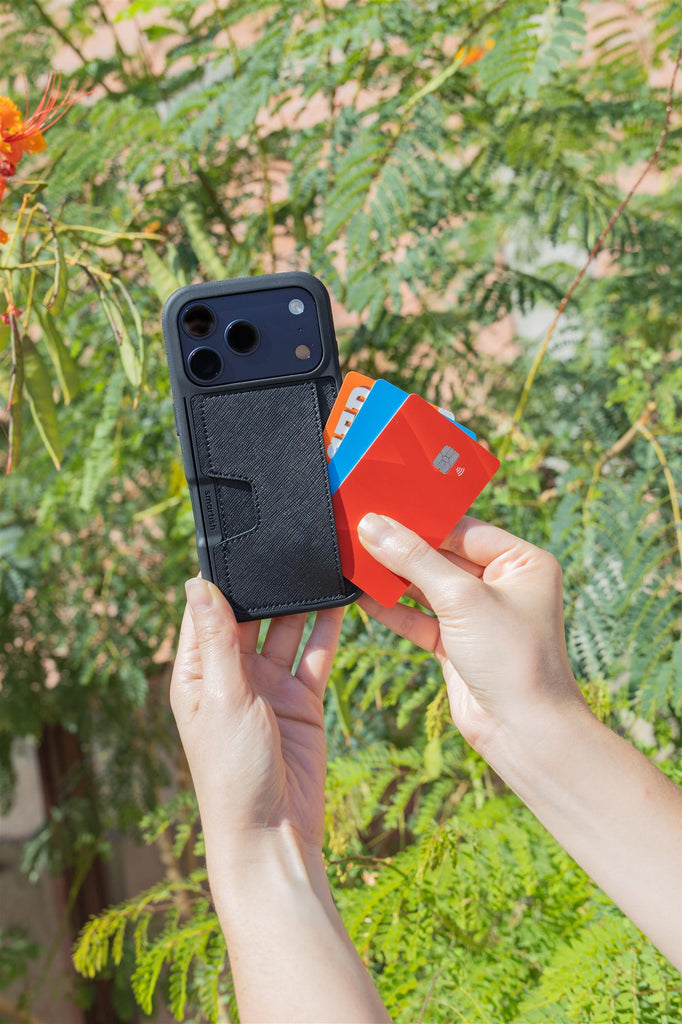
- Wallets for iPhone combine phone protection with card and cash storage.
- They eliminate the need to carry a separate wallet, simplifying your daily routine.
- These cases offer a sleek and streamlined alternative to bulky accessories.
- Wallet cases serve as lifestyle upgrades that enhance convenience and organization.
Table of Contents
- Types of iPhone Wallet Cases & How They Work
- Key Features to Consider When Choosing a Wallet for iPhone
- Wallets for iPhone vs. Digital Wallets: What's the Real Difference?
- iPhone Wallet Cases by Use Case: Which is Best for Your Life?
- MagSafe Wallets vs. Non-MagSafe Wallet Cases: Detailed Comparison
- Practical How-To: Using, Installing, and Maintaining Your iPhone Wallet Case
- Common Problems & Smart Solutions With iPhone Wallet Cases
- Best of the Best: Top iPhone Wallet Case Picks for 2025
- Wrapping Up: Should You Make the Switch to an iPhone Wallet Case?
Wallets for iPhone: The Essential Guide to Card-Carrying Convenience
Tired of juggling your phone and wallet every time you leave the house? Wallets for iPhone solve this daily dance by combining your device protection with card and cash storage in one sleek package. Wallets for iPhone are available in a variety of styles to fit the latest devices, including the newest iPhone 17 models.
The concept emerged from a simple frustration: why carry two separate items when one could do both jobs better? Modern iPhone wallet cases range from minimalist card slots to full-featured folios, each designed to match different carrying styles and protection needs. Learn more about the latest iPhone 17 and how wallet cases are evolving to keep up with new features.
Digital vs. Physical: The Key Difference
Apple Wallet handles contactless payments and digital tickets, but physical wallet cases store the cards Apple Wallet can't, your driver's license, insurance cards, and emergency cash that still matter in the real world.
Types of iPhone Wallet Cases & How They Work
Understanding your options helps narrow down what works for your lifestyle. Each wallet case type operates differently and serves distinct needs.
Folio Style Cases
Best for: Maximum protection and storage capacity. These flip-cover designs protect your screen when closed and typically hold 3-6 cards plus cash. Perfect for parents who need extra storage or anyone wanting all-around protection.
Slot & Sleeve Cases
Best for: Minimalists who carry 1-3 essential cards. Cards slide into dedicated slots on the back, keeping your setup slim. The Smartish Wallet Slayer Vol. 1 exemplifies this approach, clean lines, secure storage, no unnecessary bulk.
Elastic Attachment Cases
Best for: Variable capacity needs. Stretchy fabric or elastic bands adjust to hold different card combinations. Great for people whose daily carry changes based on activities.
MagSafe Detachable Wallets
Best for: Flexibility lovers. Magnetic attachment lets you remove the wallet portion when you don't need it. Works with MagSafe-compatible cases like Gripmunk and Gripzilla, but requires the right case foundation.
Each type balances protection, capacity, and convenience differently. Consider how often you access your cards and whether you prioritize quick removal or permanent attachment.
Key Features to Consider When Choosing a Wallet for iPhone

Quick Answer: Top 5 Features to Prioritize
- Card capacity that matches your daily essentials (1-3 cards for most users)
- Drop protection with air-pocket corners and raised edges
- Material quality that ages well (vegan leather, durable silicone)
- Precise cutouts for buttons and ports
- MagSafe compatibility if you use wireless charging
Protection Features That Matter
Look for air-pocket corners that absorb impact and raised screen edges (approximately 1mm) that prevent face-down damage. A raised camera ring protects your lenses when the phone sits on its back. These aren't marketing gimmicks, they're engineering solutions for real-world drops during commutes and outdoor adventures.
Material Considerations
Vegan leather offers premium feel with easy cleaning. Quality silicone provides grippy-not-sticky handling that improves over time. Avoid materials that feel low quality initially, they'll look worse after daily use.
Capacity & Compatibility
Most wallets for iPhone handle 1-3 cards comfortably, with some folios extending to 6+ cards. Check exact iPhone model compatibility, including newer releases like iPhone 17. MagSafe compatibility affects wireless charging, Gripmunk and Gripzilla support it, while Wallet Slayer models prioritize integrated storage over magnetic features.
Customization options let you match your style without sacrificing function. Even clear cases now resist yellowing, maintaining their fresh appearance longer. For more ways to personalize your device, see these crossbody lanyards for iPhone that add both flair and function.
Wallets for iPhone vs. Digital Wallets: What's the Real Difference?
Apple Wallet excels at contactless payments, boarding passes, and loyalty cards, but physical wallet cases fill crucial gaps that digital solutions can't address.
| Scenario | Physical Wallet Case | Digital Wallet (Apple Pay/Wallet) |
|---|---|---|
| ID Verification | Always works - driver's license, insurance cards | Limited - few states support digital IDs |
| Emergency Situations | Cash backup, cards work without power | Requires phone battery and signal |
| Small Business Payments | Physical cards accepted everywhere | Depends on merchant's contactless setup |
| Travel Abroad | Universal card acceptance | Variable international support |
| Scenario | Digital Wallet (Apple Pay/Wallet) | Physical Wallet Case | Winner |
|---|---|---|---|
| Coffee shop payment | Tap and go, loyalty points automatic | Pull card, insert/tap manually | Digital |
| Airport security/ID check | Limited digital ID acceptance | Physical license always accepted | Physical |
| Emergency cash needed | No cash storage capability | Bills tucked behind cards | Physical |
| Phone battery dies | Complete payment failure | Cards still functional | Physical |
| Concert/event tickets | Instant access, screen brightness | Physical tickets if required | Digital |
The smart approach combines both: use Apple Wallet for daily transactions while keeping essential physical cards in your iPhone wallet case as backup. This hybrid strategy covers every real-world scenario without forcing you to carry a separate traditional wallet.
iPhone Wallet Cases by Use Case: Which is Best for Your Life?
Your daily routine determines which wallet case delivers the most value. Here's how different lifestyles align with specific wallet case features.
Active Lifestyle & Outdoor Adventures
Best choice: Gripzilla with integrated card storage. Drop-tested protection handles hiking mishaps and gym sessions, while air-pocket corners absorb impact during outdoor activities. The raised camera ring protects lenses during backpack storage.
Daily Commuters
Best choice: MagSafe-compatible cases like Gripmunk paired with detachable wallets. Quick access to transit cards while maintaining wireless charging capability. Card slot orientation allows tap-and-go without removing cards completely.
Urban "Cards-and-Coffee" Users
Best choice: Wallet Slayer Vol. 1 for streamlined daily carry. Holds 2-3 essential cards without bulk, perfect for users who've mastered the art of minimal essentials. Clean design matches professional environments.
Parents & Family Users
Best choice: Wallet Slayer Vol. 2 with kickstand functionality. Extra storage for kids' emergency cards, easy-to-clean materials for sticky finger incidents, and hands-free viewing for entertaining children during waits.
Organization Tip: Tidy Wallet, Tidy Mind
Place your most-used card in the easiest-access slot. Keep emergency cash folded once (not multiple times) to prevent wear. Replace cards showing edge damage, worn cards get stuck more easily.
For those who want to keep their screen as protected as their wallet, check out the most protective screen protector for iPhone for added peace of mind.
MagSafe Wallets vs. Non-MagSafe Wallet Cases: Detailed Comparison

MagSafe technology uses magnets built into iPhone 12 and newer models to attach accessories. Understanding the trade-offs helps you choose the right attachment method.
| Feature | MagSafe Wallets | Non-MagSafe Wallet Cases |
|---|---|---|
| Attachment Method | Magnetic connection to compatible case | Integrated into case design |
| Card Capacity | Usually 2-3 cards maximum | 1-6+ cards depending on style |
| Wireless Charging | Remove wallet, charge case | Varies by case thickness |
| Flexibility | Detach when not needed | Always integrated |
| Security | Strong magnets, occasional detachment | Permanent attachment |
Gripmunk and Gripzilla support MagSafe accessories while maintaining their protective features. The Wallet Slayer series prioritizes integrated storage over magnetic compatibility, offering secure card storage that never detaches accidentally.
Choose MagSafe if: You frequently switch between wallet and no-wallet modes, or use multiple MagSafe accessories. Choose integrated if: You want permanent card access without worrying about magnetic attachment strength.
For more on optimizing your iPhone setup, see our guide to chargers for iPhone 17 to keep your device powered up and ready for anything.
Practical How-To: Using, Installing, and Maintaining Your iPhone Wallet Case
Proper installation and maintenance extend your wallet case's lifespan while ensuring reliable card access.
Installation Process
Start with the bottom corners, pressing air-pocket corners into place first. Work upward, ensuring precise cutouts align with buttons and ports. The case should snap securely without forcing, if you're struggling, double-check your iPhone model.
For those who use their iPhone for content creation or calls, you might also want to explore the best mic for iPhone to enhance your audio experience.
Common Problems & Smart Solutions With iPhone Wallet Cases
Even the best wallets for iPhone can hit snags. Here's how to solve the most common hiccups without breaking a sweat.
Quick Fix Alert: Most wallet case issues stem from improper installation or overloading. Check these two factors first before assuming a defective product.
Wireless charging not working: Remove all cards and cash, then test charging. Metal strips in credit cards block wireless signals. For MagSafe wallets, detach completely before charging. Clean both your phone's back and the charging pad, dust kills connectivity.
Cards falling out: You're likely inserting them wrong. Slide cards in with slight downward pressure, not straight back. For elastic slots, stretch the opening wider during insertion. If cards still slip, the case may be stretched beyond its useful life.
Bulk concerns: Wallet cases like the Wallet Slayer Vol. 1 and Vol. 2 are inherently thicker, that's physics, not a flaw. Start with just one card and your most-used cash to minimize bulk. The material will soften with use, reducing perceived thickness.
Cards bending: Insert cards face-up with magnetic strips toward the phone. Never force thick items like folded receipts into card slots. For rigid cases, ensure you're not overstuffing beyond the recommended capacity.
Button responsiveness: Quality cases like Gripmunk and Gripzilla cover buttons with responsive material rather than cutting them out. Press firmly and directly over button centers. If buttons feel mushy after months of use, the case material may need replacement.
Case wear and tear: Clean with mild soap and water monthly. For leather-style cases, avoid harsh chemicals that crack material. Small scuffs on corners are normal, they show your case is doing its job protecting your phone during daily use.
Best of the Best: Top iPhone Wallet Case Picks for 2025

After testing dozens of options, these wallets for iPhone rise above the pack. Each excels in specific scenarios, so match your pick to your lifestyle.
Slim/Minimalist: Gripmunk
Best for: Users who want card storage without bulk
The Gripmunk proves you don't need thickness for functionality. Its precise card slots hold 2-3 cards securely while maintaining MagSafe compatibility. Air-pocket corners and raised screen edges provide solid protection, and the grippy texture prevents slips. Available in multiple colors for personalization.
Drop Protection Champion: Gripzilla
Best for: Active lifestyles and outdoor adventures
Gripzilla combines wallet functionality with serious protection. The rigid backplate and reinforced corners handle drops that would crack other cases. Despite the protective build, it maintains MagSafe compatibility and precise port access. The finger grooves provide exceptional grip during one-handed use.
High-Capacity Winner: Wallet Slayer Vol. 2
Best for: Users replacing traditional wallets entirely
This case holds up to 4 cards plus cash comfortably. The integrated kickstand transforms your phone into a hands-free viewing station, perfect for video calls or content consumption. While thicker than slim options, the added functionality justifies the bulk for heavy wallet users.
Customization King: Clear Cases
Best for: Personal expression and phone color showcase
Smartish clear cases feature anti-yellowing technology that keeps them crystal clear over time. The transparent design lets your iPhone's color shine through while providing full wallet functionality. Customize with stickers or artwork between the case and phone.
| Feature | Gripmunk | Gripzilla | Wallet Slayer Vol. 2 |
|---|---|---|---|
| Card Capacity | 2-3 cards | 2-3 cards | 4+ cards + cash |
| MagSafe Compatible | Yes | Yes | No |
| Drop Protection | Standard | Maximum | Standard |
| Kickstand | No | No | Yes |
| Best For | Everyday carry | Active users | Wallet replacement |
All options work with iPhone 16 and iPhone 17 models, ensuring your investment stays relevant through your next upgrade cycle. For those seeking even more rugged protection, consider researching third-party reviews on the best iPhone cases for additional expert recommendations.
Wrapping Up: Should You Make the Switch to an iPhone Wallet Case?
The decision comes down to your daily routine. If you're constantly juggling a phone and wallet, or find yourself leaving one behind, wallets for iPhone solve a real problem. For a broader look at the latest trends and accessories, check out this guide to the best iPhone accessories for 2025 and beyond.
Frequently Asked Questions
What are the main differences between MagSafe wallet cases and non-MagSafe wallet cases for iPhone?
MagSafe wallet cases attach magnetically to your iPhone, offering easy on-and-off convenience without adding bulk, while non-MagSafe wallet cases are typically integrated or attached by other means. Both types provide card storage, but MagSafe wallets allow more flexibility if you want to switch cases or remove the wallet quickly.
How do iPhone wallet cases compare to digital wallets like Apple Wallet in terms of card storage and convenience?
iPhone wallet cases store physical cards like your driver’s license, insurance, and cash, items digital wallets can’t hold. Digital wallets handle contactless payments and tickets, but physical wallet cases combine device protection with real-world card storage for everyday convenience.
What key features should I look for when choosing the best wallet case for my iPhone?
Look for secure card slots, reliable phone protection with raised edges and air-pocket corners, precise cutouts for buttons and ports, and compatibility with your iPhone model. Additional perks like RFID protection, MagSafe compatibility, and slim design can also enhance convenience.
Which type of iPhone wallet case is best suited for someone who needs both protection and ample card storage?
Folio style cases are ideal for those who want maximum protection and room for multiple cards and cash. Their flip-cover design shields the screen and typically holds 3-6 cards, making them perfect for users needing both security and storage.