


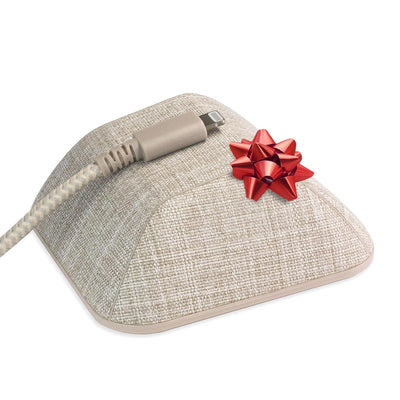

Charging cable holder
A Charging cable holder keeps a cord within reach instead of letting it slip behind your desk, pile up beside a charger, or sprawl across a counter. Choose one based on the problem: a small clip for a single cord, a desktop station for several devices, or a secure mount for a heavier cable.
Key Takeaways
- Pick your cable holder by matching it to the actual problem: a clip for one cord, a desktop station for a multi-device setup, or a weighted mount for thicker cables.
- Small adhesive clips work best on smooth surfaces like desks and nightstands, while clamps grip table edges where adhesive would peel off.
- Wall-mounted holders shine near outlets and in the kitchen, keeping cables off wet counters and right where you plug in.
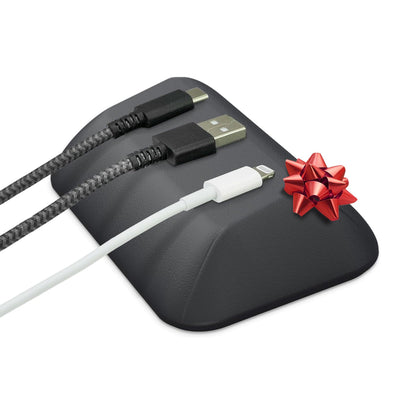
- Weighted desktop organizers stay put on their own, so you can reposition them without leaving sticky residue behind.
- One small holder per charging spot beats one big organizer, since it keeps each cable exactly where you expect to find it.
The right fit depends on cable thickness, mounting surface, and how often you move the cord. Start with where the mess happens, then match the holder to the job.
Match Your Cable Chaos to the Right Charging Cable Holder
For a cable that keeps sliding off a nightstand, use a small adhesive or weighted clip near the edge. For several cords at a desk, look for a multi-slot organizer that separates charging leads. Thick, stiff, or heavy cables need a wider channel and a mount designed for their weight, not a tiny clip meant for a phone cord.
Cables Falling Behind the Desk or Nightstand
Place a clip close to the edge where you pick up the cable, leaving enough length to reach your device without pulling the mount loose. A single-slot cable holder suits one frequently used lead; a multi-slot version works for a bedside setup with a phone, watch, or tablet. Check the opening against the cable diameter: a narrow slot can pinch a braided cord or make it awkward to remove.
Messy Charging Stations and Desktop Clutter
When several devices charge together, use a desktop organizer with separate channels or a base that groups cords at the charging spot. This reduces cable crossings and makes it easier to identify each lead. Pew Research reports that the average U.S. household has more than five charging cables per person, so a small station can earn its counter space. Leave airflow around power bricks and avoid stacking chargers where heat can build up.
Thick Cables: Braided USB-C, Power Bricks, and EV Cords
Measure the cable at its widest point, including the strain relief near the connector. Braided USB-C leads may need a broader opening than thin charging cords. Keep bulky power bricks on a shelf or in a tray rather than forcing them into a clip. Vehicle charging cables need purpose-built support for their weight and outdoor exposure, not a small desk accessory.
Quick Comparison: Holder Types at a Glance
| Holder type | Best for | Check before choosing |
|---|---|---|
| Adhesive clip | One or a few lightweight cords | Surface compatibility and slot width |
| Screw-in mount | A fixed location needing a firm hold | Mounting surface and fastener fit |
| Desk clamp | Edge-of-desk cord routing without adhesive | Desk thickness and clamp reach |
| Magnetic or weighted holder | Quick access and easy repositioning | Magnet fit or base stability |
| Large wall hook or cradle | Thicker, heavier cords | Rated capacity and cable diameter |
Charging Cable Holder Types, Installation, and Materials
Adhesive Clips: Fast to Install, Wall-Safe When Done Right
Adhesive clips work on clean, smooth surfaces when the cord is light and the opening fits. Wipe the area as directed by the adhesive maker, let it dry, press the mount firmly, and wait the recommended set time before routing a cable through it. Strength varies by product and surface, so check the maker’s stated load limit. Painted walls may be vulnerable, and wallpaper can tear during removal; test an inconspicuous spot or choose a non-adhesive option.
Screw-In and Clamp Mounts: When You Need Real Holding Power
Screw-in mounts suit a permanent route on a surface that can take fasteners. Check for wiring or plumbing before drilling, and use hardware suited to the wall or furniture. A desk clamp avoids adhesive and holes, making it useful for a removable edge mount. Confirm it opens wide enough for the desk and has a protective pad to limit scratches.
Magnetic and Weighted Holders: Grab-and-Go Charging
Magnetic holders let you lift a cable out and return it to the same spot. They work best with compatible magnetic tips or cable ends that sit securely in the holder. Weighted bases need no wall attachment and can move between a desk and bedside table, but the base must be broad and heavy enough to stay put when the cord is tugged.
Materials Compared: Silicone, Plastic, and Metal Durability
Silicone flexes around cables and is gentle on their outer jackets, but a soft slot may loosen with repeated use. Molded plastic can hold its shape and comes in compact clip designs; check the opening for sharp edges. Metal mounts often suit rigid, fixed installations, but exposed edges should not rub against a cable. For a portable charging setup, the Crown Joule - Lightning Fast Charging Cable - 6ft - USB-C to USB-C and Lightning is a lightweight, tangle-free lead wrapped in braided nylon. A holder should support the cord without crushing its jacket or connector.
Removal Without Residue: Heat, Twine, and Wall-Safe Adhesives
Follow the adhesive maker’s removal directions and pull slowly rather than yanking the clip from the surface. Gentle warmth may soften some adhesives, but check the surface’s care guidance first and keep heat away from delicate finishes. On wallpaper or freshly painted walls, do not assume adhesive is safe: use a desk clamp, freestanding base, or tied-on mount instead.
Before mounting:
- Check cable diameter, weight, and how often you unplug it.
- Match the attachment to the surface and follow the maker’s load and removal instructions.
- Leave slack near connectors so the holder does not pull on the cable.
The Crown Joule - Lightning Fast Charging Cable - 6ft - USB-C to USB-C and Lightning has reinforced connectors designed to withstand bending, pulling, and drops. Pair it with a holder that guides the cord gently, keeps the connector accessible, and avoids a tight bend.
EV Charging Cable Holders: Heavy Duty, Outdoor, and Safe
Why EV Cables Need a Different Holder Entirely
An EV charging cable has more weight and bulk than a phone cord, and it may hang outdoors between charges. A small adhesive desk clip can loosen under that load. Choose a purpose-built wall hook or cradle with a stated capacity exceeding the cable’s weight, plus room for its diameter and connector. The research brief reports EV cables can weigh 5 to 10 pounds and recommends support rated for at least 15 pounds. Check the specific mount and cable instructions; that threshold does not replace manufacturer guidance.
Indoor vs. Weatherproof Wall Mounts
For a garage, select a mount suited to the installation surface and cable route. Outdoors, use a mount explicitly rated for the conditions at its location, including rain, sun, and temperature changes. Look for drainage-friendly placement and materials intended for outdoor use; a covered charging spot does not make an indoor-only holder weatherproof. Keep the cable off the ground and route it away from vehicles, doors, and foot traffic. Follow the charging equipment maker’s guidance for storage and outdoor use.
Weight Limits, Cable Diameter, and Safety Tips
Before mounting, check the cable’s weight, widest point, connector size, and the holder’s rated capacity. Confirm the fasteners suit the wall material, then inspect the mount periodically for looseness, cracks, or wear. Leave a relaxed curve rather than forcing a sharp bend, and do not hang the cable by its connector. Keep charging equipment and connections in the locations specified by their manufacturers.
Travel and DIY: Cable Holders Beyond the Wall
Packing Cables for Travel: Wraps, Pouches, and Wallet-Style Organizers
A travel cable organizer should separate cords, prevent sharp bends, and make the lead you need easy to find. Soft wraps work for one or two leads; a zippered pouch with dividers suits a charger, earbuds, and several cables. A wallet-style organizer stays compact in a backpack or carry-on, while elastic loops keep a coiled cord from unraveling. Choose a pouch with room for connector ends, without pressing them against hard objects. The Crown Joule - Lightning Fast Charging Cable - 6ft - USB-C to USB-C and Lightning is a lightweight, tangle-free cable designed for travel convenience.
DIY Holders from Household Items (Binder Clips, Hooks, Velcro)
A DIY charger cord organizer can be as simple as a binder clip attached to a desk edge, with the cord guided through a handle. Adhesive-backed hooks can route a lightweight lead along furniture, while reusable hook-and-loop ties gather spare cords in a drawer or bag. Check that metal edges do not pinch the cable jacket, and avoid tight ties around connector strain relief. These fixes are adjustable and low-cost to assemble, though they may look less tidy and need repositioning as cords change.
3D Printing Your Own Holder: Free Files and Best Filaments
A 3D-printed holder lets you tailor slot width, mounting holes, and channel count to a specific setup. Search a reputable model library for a file with clear dimensions, then compare the opening with your cable’s widest section before printing. PLA can suit indoor, low-stress use; PETG is often selected when a little more flexibility is useful. Filament behavior varies, so follow the material maker’s print settings. Do not use a printed part for heavy EV cables unless its design and tested capacity support that use. The research brief estimates material for a small printed holder can cost under $1, though printer access and failed prints affect the total.
Step-by-Step: Build a Nightstand Cable Catch in 5 Minutes
For a quick bedside fix, use a binder clip with smooth edges and a small piece of hook-and-loop tape. This keeps a lightweight charging lead near the tabletop edge without attaching adhesive to the wall.
- Choose a stable nightstand edge near the charging spot.
- Clip the binder clip onto the edge, with its handles facing up.
- Thread the cable through one handle, checking that it moves freely.
- Add a small loop of hook-and-loop tape around the clip and furniture if it shifts.
- Leave slack at the connector, then test that the cable stays accessible when unplugged.
The Crown Joule - Lightning Fast Charging Cable - 6ft - USB-C to USB-C and Lightning has reinforced connectors designed to withstand bending, pulling, and drops. Let the furniture support the connector rather than making the catch bear the cable’s pull.
How to Choose: Buying Checklist and Top Picks

Buying Criteria: Grip Strength, Cable Fit, and Surface Compatibility
Check three things before choosing a holder: cable diameter, how firmly it must stay put, and the mounting surface. The slot should hold the cord without squeezing its jacket or making removal awkward. For a wall mount, confirm the adhesive or fastener suits the surface and follow its load and removal instructions. Painted walls and wallpaper can be sensitive, so a desk clamp or freestanding base may be a lower-risk removable option. Leave enough slack for easy plugging and unplugging, and make sure the holder does not pull on the connector.
Best Charging Cable Holders by Use Case
For one desk or bedside cord, choose a small clip with an opening that matches the cable. A multi-slot desktop station suits several devices, while a clamp mount works for a desk edge where adhesive is not an option. For travel, use a pouch or wrap that separates cords and protects connector ends from getting crushed. If you also need a cable to pack, the Crown Joule - Lightning Fast Charging Cable - 6ft - USB-C to USB-C and Lightning is a lightweight, tangle-free option with a braided nylon wrap and reinforced connectors. It supports fast charging with a compatible charger. The Crown Joule - Lightning Fast Charging Cable - 6ft - USB-C to USB-C and Lightning is 6 feet long and works with compatible iPhone, iPad, Android, and other USB-C devices.
Quick Fit Check
Good fit when
- The slot suits the cord’s width and holds it without pinching.
- The mount matches the surface and the cord’s weight.
- The cable stays reachable without strain at the connector.
Think twice when
- Adhesive is going onto wallpaper or delicate paint.
- A small clip is expected to support a thick or heavy cord.
- The cable must bend sharply to reach the device.
Verdict: Pick the simplest holder suited to the cord, mounting surface, and daily routine. For a setup you may change, a clamp or weighted base avoids committing to a wall location. For a fixed route, verify the mount’s fit and load guidance before installation.
Frequently Asked Questions
What is the best charging cable holder for my desk?
The best desk holder depends on your setup: a multi-slot organizer works great for several cords, while a single adhesive clip handles one lead. Check the slot width against your cable diameter and pick a mount that fits your surface, whether that's adhesive, clamp, or screw-in.
How do I keep charging cables from falling behind my nightstand?
Place a small adhesive or weighted clip right at the edge of your nightstand where you grab the cable. Leave enough slack to reach your device without yanking the mount loose, and make sure the slot matches your cable's diameter so it releases smoothly.
Can I use cable clips on wallpaper without damaging it?
Skip adhesive clips on wallpaper, since it can tear during removal. A desk clamp, freestanding weighted base, or tied-on mount gets the job done without gambling with your walls. If you must test adhesive, try an inconspicuous spot first.
What's the best way to organize charging cables for travel?
Pack a lightweight, tangle-free cable like the Crown Joule, a 6-foot braided nylon lead with USB-C and Lightning connectors. Pair it with a simple clip or wrap to keep it coiled, and you'll skip the knotted-cable mystery bag entirely.
What holder works for thick cables like braided USB-C or EV cords?
Thick cables need a holder with a wider channel and a mount rated for their weight, not a tiny clip meant for a phone cord. Measure the cable at its widest point, including the strain relief, and match the holder's capacity to it.
How do I remove adhesive cable clips without damaging walls?
Follow the adhesive maker's removal directions and pull slowly instead of yanking. Gentle warmth can soften some adhesives, but check the surface's care guidance first and keep heat away from delicate finishes. On fresh paint or wallpaper, use a non-adhesive option instead.
Are magnetic cable holders worth it?
Magnetic holders are handy for grab-and-go charging since you can lift the cable out and snap it back in the same spot. They work best with compatible magnetic tips, and weighted bases need to be broad and heavy enough to stay put when the cord gets tugged.