



Phone Charger Keeps Falling Behind the Bed? How to Keep It on the Nightstand (Cable Wrangler)
Phone Charger Keeps Falling Behind the Bed? How to Keep It on the Nightstand (Cable Wrangler) starts with one small fix: give the cord a place to stop. Without an anchor, a cable can slide off a low nightstand or get tugged out of reach when you pick up your phone.
Key Takeaways
- A weighted cable holder like the Cable Wrangler keeps your charging cord within arm's reach, even when your phone leaves the nightstand.
- Low nightstands and short cords make chargers especially likely to slide out of sight, so placement matters as much as the fix.
- Assigning the cable one dedicated spot saves you from nightly fishing missions behind the headboard.
- Pairing a cable anchor with a grippy case or mount keeps your whole charging setup tidy and ready.
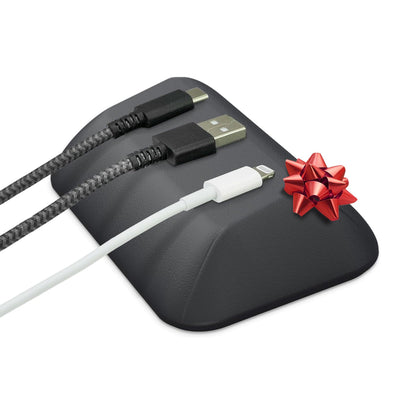
The Cable Wrangler is a magnetic cord organizer designed to keep a charging cable handy. Check the cord for damage first. A fraying cable or one with exposed wires needs replacing, not a bedtime repair with tape.
Why Your Charger Keeps Slipping Behind the Bed
The Physics of the Midnight Fumble
A charger usually disappears because nothing is holding the loose end in place. The cable bends toward the floor, and lifting your phone can draw more of it over the nightstand’s edge. Smooth wood, glass, or laminate gives the cord little friction to slow it down. Once it drops behind the bed, finding it in the dark becomes a nightly scavenger hunt nobody signed up for.
Why Gravity Always Wins on a Low Nightstand
A low table can leave the cable hanging at a steep angle, with the outlet and bed adding awkward turns. The cord may also recoil toward its original shape after you bend it around a lamp or tuck it behind furniture. Without an anchor near the edge, that movement can pull the connector out of reach. A cable holder gives the loose end a defined resting spot.
The Hidden Cost: Yanked Cables and Frayed Cord Safety
Repeated yanks can strain a cable near its connector and interrupt charging. Check the cable periodically, especially around the plug and any sharply bent area. If its outer covering is split or wires are visible, stop using it and replace it. Taping a damaged charging cable doesn’t make it safe overnight.
Bedside Cable Fix: Which One Actually Works
Choose based on how permanent a fix you want, how many devices you charge, and whether you can attach anything to the furniture. A magnetic holder offers a removable anchor; clips and clamps use different mounting methods. A routed cable or wireless stand can avoid a loose cord on the nightstand. Here’s a quick guide to keeping your phone charger within reach.
| Fix | Best fit | Trade-off |
|---|---|---|
| Magnetic cord organizer | A removable, easy-to-reach anchor for a loose cable | Check cable fit and how many cords you need to manage |
| Adhesive cable clips | A simple hold point on a suitable surface | Adhesion can weaken, especially if the surface is dusty or uneven |
| Screw-mounted clamps | A fixed setup on furniture you can modify | Requires drilling and leaves a permanent attachment |
| Tape or zip ties | Temporary cable bundling, not a damaged-cord repair | Can leave residue, restrict cable movement, or conceal damage |
| Wireless stand or routed cable | A charging spot that avoids a loose cable end at the bed | Needs compatible charging equipment or a practical route to the outlet |
Magnetic Cord Wrangler: The Set-It-and-Forget-It Pick
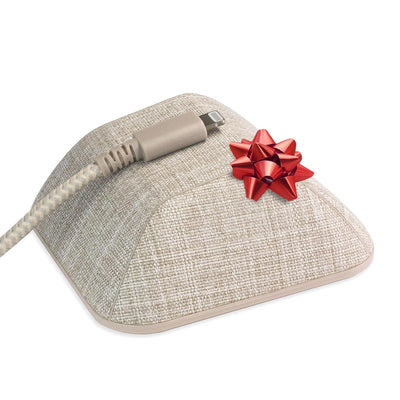
A magnetic cord organizer gives a cable a designated resting place without a screw-mounted clamp. Cable Wrangler is an organizer, not a charging cable, so you’ll still need a compatible cable and charger. It comes in multiple colors, and reviewers have been positive overall; a recurring request is for more magnetic clips. If you manage several cords, count the anchor points your setup needs.
Adhesive Cable Clips: A Removable Fix
Adhesive clips can work on a clean, smooth surface when you want a small cable guide without drilling. Place one near where you reach for your phone, then check that the cable moves through it without being pinched. Adhesion may weaken or leave residue, so clips are less appealing if you often rearrange your nightstand.
Screw-Mounted Clamps: Sturdy but Permanent
Plastic cable clamps screwed to the back of a nightstand create a fixed route for a cord. They can suit furniture you own and a setup you don’t expect to change, but they’re a poor match for many rentals or finished furniture you’d rather not drill. Check the clamp size against the cable, and route the cord so it doesn’t catch on a drawer or stretch tight.
Tape and Zip Ties: Why They Fail
Tape can lose adhesion, and tight zip ties can make a cable harder to move or inspect. They may bundle cords, but they don’t give the connector a convenient parking place. Neither is a safe fix for a frayed cable. Replace a damaged cord rather than covering it and leaving it plugged in overnight.
Wireless Stand or Routed Cable: When to Skip the Anchor
A wireless stand can remove the dangling-cord problem if your phone and charging setup support it. Or guide a cable behind the nightstand and along the furniture, away from walking paths and places where it could be pinched. If you still need a loose connector at the bedside, an anchor can keep it within reach. Phone Charger Keeps Falling Behind the Bed? How to Keep It on the Nightstand (Cable Wrangler) comes down to whether your setup needs a holder, a better route, or both.
The 5-Minute Nightstand Setup: Anchor, Route, Reach
A bedside cable works best when its loose end has a clear parking spot, the cord reaches without tension, and the route stays out of the way. Set up those three things, then test the arrangement by picking up and setting down your phone. The Cable Wrangler is one magnetic anchor option; you’ll need a separate charging cable. Adjust the steps for your furniture and outlet rather than forcing the cord into a tight bend.
Step 1: Pick the Anchor Spot Within Arm's Reach
Choose a spot where you can reach the connector from bed without leaning or pulling the cable. Keep it far enough from the edge that the holder won’t slide off, but close enough to connect your phone comfortably. Check that the anchor won’t block a drawer, lamp control, or the place you set a book or glass of water. Put the cable end in its holder and give it a gentle tug. It should stay parked while remaining easy to lift out.
Step 2: Match Cable Length to Your Outlet Distance
Measure the path from the outlet to the anchor, following the route around furniture. Choose a cord long enough to reach the phone without pulling the connector taut. Leave some slack for picking up the phone and moving it on the nightstand. Too short, and the cable strains at the plug; much longer than needed, and extra cord can gather behind the table or tangle with other charging leads. Check the full route before plugging in.
Step 3: Route the Cable Behind the Nightstand, Not Across the Floor
Guide the cord from the outlet behind the furniture, then bring it up to the anchor. Keep it clear of walking paths, bed-frame joints, and drawer slides that could pinch or snag it. Don’t trap the cable between the nightstand and wall, or bend it sharply at either end. Once routed, move the drawer and shift the furniture slightly, if practical, to confirm the cord stays free. The connector should remain within reach when you lift your phone, without dragging the cable across the floor.
Step 4: Add a Second Magnetic Clip for Watch and Earbuds Cables
If you charge a watch or earbuds near the bed, give each loose cable its own parking point. A second magnetic clip can keep those connectors separate, so one cable doesn’t pull another onto the floor. Reviewers have positively received Cable Wrangler, with a recurring request for more magnetic clips. Count your cables before arranging the nightstand: one anchor may suit a phone cord, while a multi-device setup may call for additional holders. Keep each connector easy to identify and remove.
Your Nightstand Charging Checklist
Before calling the setup done, check that the phone reaches its charging spot without stretching the cable and the connector returns to its anchor after use. Leave the cord visible enough to inspect, with no section trapped under furniture or pulled sharply around an edge. If you find a split covering, exposed wire, or other visible damage, unplug the cable and replace it rather than taping it.
- Anchor is reachable from bed and clear of drawers.
- Cable reaches the phone with a little slack.
- Route stays behind the nightstand, not across a walking path.
- Each extra device cable has a separate resting spot.
- Cord and connectors show no visible damage.
Keep Your Charger From Walking Off (Guest-Proofing Your Nightstand)
Why Chargers Disappear Into Guest Bags
A loose charger on a nightstand can look like a shared household extra, especially when a guest needs a quick battery boost. It may end up in a travel bag by mistake, or someone may assume it came with the room. A clear charging spot shows that the cable belongs at the bedside, ready to use, not roaming the house.
Anchor It, Label It, Charge It in Place
Give the cord a consistent home and make its purpose obvious. A small label such as “bedside charger” can help guests distinguish it from a personal cable. If it’s for shared use, invite guests to plug in at the nightstand and leave the cord there when they’re done. An anchored cable is less likely to disappear into a bag, and the next person won’t have to hunt through drawers or ask where it went.
One Cable Per Device: A Household Rule That Sticks
In a busy home, assign each regular charging spot a cable instead of letting one cord migrate from room to room. Keep phone, watch, and earbuds cables in separate, recognizable places, and return each connector to its parking spot after use. This makes it easier to spot a missing cord before bedtime. If several people share the nightstand, label cables by device or person, then agree that borrowed chargers go back to their marked spot.
The Simplest Lasting Fix: A Magnetic Cord Organizer on Every Nightstand
Why Magnetic Beats Everything Else for Overnight Charging
A magnetic cord organizer gives a loose connector a repeatable resting place without requiring a screw hole in the furniture. That can suit nightstands that may be rearranged, shared, or kept in a rental. Magnetic holders need to match the cable and surface, so check the organizer’s directions and test that the cord stays parked during ordinary use. The Cable Wrangler is a magnetic cord organizer, not a charging cable or charger. Reviewers have been positive overall, with a recurring request for more magnetic clips if you plan to manage several cords.
What to Look For in a Cord Wrangler (Hold Strength, Adhesive, Cable Fit)
Count the cables you want to park and check their thickness against the organizer’s stated cable fit. Consider whether the attachment surface suits the adhesive and whether the anchor is easy to reach from bed. An organizer manages cords; it doesn’t supply them. Cable Wrangler is available in multiple colors, including Black Tie Affair, Snow Day White, No 2 Pencil Gray, Lightly Toasted Beige, Teal Me More, Im Blushing, and Blue Jeanie. Its listed price is $34.99, with a discounted price of $29.99; check the current listing for today’s price and compatible options.
Replace, Don’t Repair: When a Frayed Cable Needs to Go
A cord organizer can keep an intact cable in reach, but it cannot make a damaged one safe. If the covering is split, wires are exposed, or the connector area shows visible damage, unplug the cord and replace it. Tape and zip ties are not repairs for a charging cable used overnight. Keep a replacement cord loosely routed, with no sharp bends or tension at the plug.
Key takeaways: Give each bedside cable a clear parking place, choose a holder that fits the cord and mounting surface, and replace damaged cables instead of covering them. For a simple magnetic anchor, Cable Wrangler helps keep the connector within reach; the charging cable and charger are separate.
Frequently Asked Questions
How do I keep my phone charger from falling off the nightstand?
Give the loose end of the cable a magnetic anchor near the edge of your nightstand. The Cable Wrangler is a magnetic cord organizer that parks your charging cable in one easy-to-reach spot, so picking up your phone doesn't drag the whole cord over the edge.
Why does my charging cable keep sliding behind the bed?
Nothing is holding the loose end in place, so gravity wins. Smooth surfaces like wood or laminate give the cable little friction, and lifting your phone pulls more cord over the edge until it drops behind the bed and becomes a nightly scavenger hunt.
Is it safe to use a phone charger with a frayed cable?
No, stop using a cable with exposed wires, a split covering, or other visible damage and replace it. Taping a damaged charging cable doesn't make it safe, and repeated yanking near the connector can strain the cord and interrupt charging.
What is the best bedside cable fix: magnetic holder, clips, or clamps?
A magnetic cord organizer like the Cable Wrangler is the easiest removable anchor for a loose cable. Adhesive clips work on smooth surfaces but can lose grip, and screw-mounted clamps are sturdy but permanent, which makes them a poor fit for rentals or finished furniture.
Do I need a special charging cable to use the Cable Wrangler?
No, the Cable Wrangler is an organizer, not a charging cable. You'll still need your own compatible cable and charger; the Wrangler just gives the loose end a designated parking spot so it stays within arm's reach.
How do I stop my charger cable from bending and fraying at the connector?
Reduce strain by routing the cable without tight bends or tension, and keep the connector anchored so it doesn't get yanked off the nightstand nightly. Check the cable around the plug and any sharply bent area, and replace it if the outer covering is split.
Where should I place a cord organizer on my nightstand?
Pick a spot where you can reach the connector from bed without leaning, but keep it far enough from the edge that the holder won't slide off. Make sure it doesn't block a drawer, lamp control, or your glass of water, then give the cable a gentle tug to test the setup.