



Magnetic cord holder
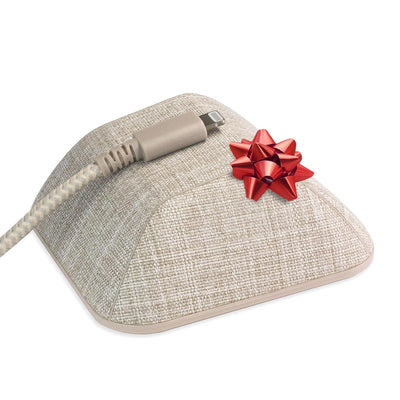
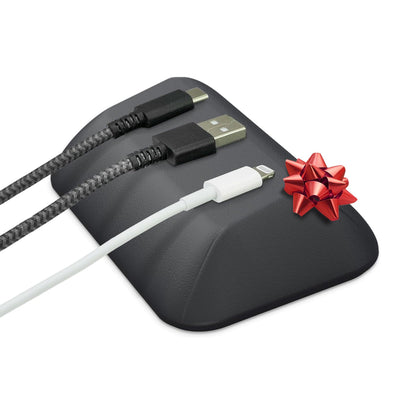
A Magnetic cord holder keeps charging cables within reach by using magnets to secure them to a holder or metal surface. Choose a setup that fits your surface, cable size, and number of cords. The Cable Wrangler - Magnetic Cord Organizer holds up to five cords plus two cable clips, with a weighted base to help keep it steady.
Key Takeaways
- Magnetic cord holders keep your cables right where you left them, so you're not fishing under the desk every time your phone needs a charge.
- Match the holder to your surface: weighted bases suit desktops and nightstands, while wall-mounted options free up flat space entirely.
- Think about how many cords you juggle. The Cable Wrangler holds up to five cords plus two cable clips, which covers most multi-device setups.
- A weighted base adds stability, so the holder stays put when you yank a cable free in a hurry.
- Check that the magnets can handle your actual cables, since thicker or heavier cords need a stronger hold than slim charging wires.
Its useful feature is easy adjustment: release a cable, move it, and snap it back into place. That helps prevent cords from slipping behind furniture without fixing an adhesive clip in one permanent spot.
What a Magnetic Cord Holder Is and How It Works
A magnetic cord holder uses a magnet, magnetic plate, or weighted base to keep cables organized and accessible. Depending on the design, it can hold cords on a metal surface or gather them on a desk or nightstand. Look for a secure fit that still lets you remove and reposition each cable easily.
The Simple Magnet-plus-Plate Setup
In a common design, a small magnetic piece attaches to or surrounds a cable, then connects to a magnetic base or plate. The base sits on a desk or attaches to a suitable surface. When you need to charge a phone, tablet, or other device, lift the cable free; when you are done, the magnet helps guide it back to its spot. Designs vary, so check how the cord attaches and whether the holder is intended for a metal surface, a flat tabletop, or both.
Types of Magnetic Cord Holders: Clips, Weighted Bases, and Wall Mounts
A magnetic cord clip usually manages one cable at a time and takes up little space. A weighted-base organizer holds several cords and relies on its mass for stability rather than a fixed mount. Wall-mounted styles keep cables off a work surface, but check their attachment method and intended use: a small cable guide is not automatically suited to a heavy extension cord. Match the holder to the cable load and installation spot.
Why Magnets Beat Adhesive Clips (No Residue, Fully Adjustable)
Magnetic attachment makes it easy to move a cable without peeling a clip from the surface. That helps if your desk layout changes or you switch between charging leads. Adhesive clips can guide a cable along a fixed route, but removing them may leave residue or require surface cleanup. A magnetic setup is not right for every surface: a weighted base needs a stable, level spot, while a wall-mounted holder still needs a secure mounting method.
Magnetic Holder Pros and Cons
Pros
- Reposition cords without repeatedly peeling and replacing adhesive clips.
- Keep charging leads visible and within reach.
- Some weighted designs organize multiple cables in one spot.
Cons
- A magnetic base may not attach to every surface.
- A weighted organizer takes up desk or nightstand space.
- Very thick or heavy cords may not fit a small clip securely.
Choosing a Magnetic Cord Holder by Room: Desk, Wall, and Nightstand

Desk Setups: Holding Charging Cables Within Reach
For a cord holder for desk use, start near the edge where you usually charge. A weighted base gathers several leads near a laptop or monitor; a small magnetic clip keeps one frequently used cable from disappearing behind the desk. Leave enough slack for a device to reach your hands without pulling the holder across the surface. If you use headphones, a phone, and a tablet at the same station, check the organizer’s capacity.
Wall Mounts: Taming Extension Cords and Power Strips
A cord holder for wall can guide a charging cable along a wall or keep it accessible near an outlet. Check the mounting method and intended cord size before placing it. A small magnetic clip is for cable management, not a substitute for a rated mount that supports a bulky power strip or heavy extension cord. Keep plugs easy to reach, avoid blocking outlets, and route cords away from walkways and places where doors or furniture can pinch them.
Nightstand Stations: One Spot for Every Device's Cable
A nightstand organizer works best when each charging lead has a predictable place. Choose a base that fits beside your lamp or book, then leave enough cord length to reach a phone on the bed without tugging. Separate connectors so you can identify the right cable in low light. The Cable Wrangler - Magnetic Cord Organizer has a weighted base and space for up to five cords plus two cable clips, making it a practical option for a shared charging spot.
Matching the Holder to Your Cable: USB-C, Lightning, HDMI, and Weight Limits
Connector type does not determine whether a cable will fit; its thickness, jacket, and weight do. Check the holder’s opening or clip size, especially for braided USB-C leads or thicker HDMI cables. A lightweight phone charger can sit in a small clip, while a stiffer video cable may need a wider guide and a more stable base. Treat any stated capacity as a limit, not a target to exceed.
- USB-C: Check the cable’s outer width and how easily it bends near the connector.
- Lightning: Choose a clip that holds the cord without pinching or sharply bending it.
- HDMI: Look for a wider guide; bulky connectors and stiff cable jackets need more room.
- Extension cords: Confirm the holder is made for that cord’s size and weight before mounting it.
Magnetic vs. Adhesive vs. Weighted Cord Holders: Quick Comparison
Choose an organizer based on whether you need to move cords often, keep them fixed along a route, or gather several leads in one spot. Magnetic attachments make repositioning simple, adhesive clips guide a cable along a chosen surface, and weighted bases stay in place through their own mass. A weighted organizer can work well on a desk or nightstand, but takes up surface area. Compare attachment method, cable fit, and stability with your setup.
Side-by-Side Comparison Table
| Holder type | How it stays in place | Best suited to | What to consider |
|---|---|---|---|
| Magnetic | Magnetic connection between the cable attachment and holder, or between the holder and a compatible metal surface | Cables you want to release and reposition regularly | Check cable fit and whether the holder needs a metal surface or a separate base. |
| Adhesive clip | Adhesive backing attached to a clean surface | A cable route that should remain in one location | Surface texture, dust, and placement affect how well it attaches; removal may leave residue. |
| Weighted base | The weight of the base keeps the organizer on a flat surface | Gathering several charging leads on a desk or nightstand | Allow room for the base and avoid pulling cables in a way that shifts it. |
Pros and Cons of Each Type
Magnetic styles suit changing routines because you can move a cable without peeling a mount from furniture. Adhesive clips keep a cable close to an edge or along a fixed path, but are less convenient if you rearrange your workspace. Weighted bases avoid attaching anything to the desk and can gather charging leads together. They need a stable, level surface with enough room to sit without crowding other items.
Which One Fits Your Setup
Choose a magnetic style for cords you move throughout the day, an adhesive clip for a steady route, and a weighted base when you want several leads gathered on a tabletop. The Cable Wrangler - Magnetic Cord Organizer is a weighted-base option for keeping cables neat and organized, with snap-in-place functionality. Its magnetic attachment lets you adjust cord positions, while the base needs a flat spot on the desk or nightstand. It is not a wall-mounting solution.
For a shared charging area, the Cable Wrangler - Magnetic Cord Organizer holds up to five cords plus two cable clips. Check that each cable fits its attachment and that the holder can sit close enough to your devices without the cords tugging it out of position.
Installation and Placement Tips for Every Surface
Choose the cable’s destination and route, then place the holder where the cord can reach without pulling tight. Keep the path clear of desk drawers, chair wheels, door hinges, and other pinch points. Check the holder’s instructions and make sure its attachment method suits the surface. A magnetic connection to metal and an adhesive-backed mount are different setups; do not assume one works in place of the other.
Metal Surfaces: Instant Stick-Free Setup
For a holder designed to attach magnetically to metal, clean and dry the contact area, then position it where the cable is easy to reach. Test the connection by lifting or releasing the cord as intended. If the holder shifts, try a flatter spot or add slack to reduce tension. Not every metal surface has the same magnetic response, and a weighted tabletop holder belongs on a surface rather than a wall.
Wood and Drywall: Adhesive Backing Done Right
For an adhesive-backed clip, follow its installation instructions and check that the surface is suitable. Dust, oil, moisture, and rough texture can interfere with contact. Wipe the area with a method that is safe for the finish, let it dry, and press the clip into place as directed. Give the adhesive the setting time specified by its maker before routing a cable through it. On painted drywall, consider possible finish damage during removal; choose a removable mounting option if preserving the paint is a priority.
Placement Mistakes That Cause Cable Slippage
Cables tend to slip when the holder is too small, the route pulls sideways, or the cable hangs with too little slack. A heavy or stiff lead can also shift a small clip or weighted base. Match the opening to the cable’s thickness, position the holder in line with the cord’s path, and leave enough slack for normal use.
What to Look For: Buying Criteria and Our Pick

A good choice matches your cable load, stays steady on its intended surface, and lets you adjust cord positions without fuss. Check the holder’s materials, attachment method, cable fit, and footprint. Consider how often your setup changes: a flexible charging station benefits from movable cable attachments, while a fixed route may call for a mount made for that surface. The right organizer keeps cords accessible without getting in the way of your workspace.
Magnet Strength, Base Weight, and Adjustability
The magnetic connection should hold a cable during normal use while still allowing easy removal. A weighted base adds stability on a level desk or nightstand, but needs room and should not be dragged around by a taut cord. Look for attachments that snap into position and can move as your devices or routine change. For thicker, stiffer cables, check that the holder accepts their size.
Price and Value Without the Sticker Shock
Judge value by how well the organizer handles your setup: the number of cords, the space available, and how often you rearrange them. A simple design that keeps charging cables in reach may be more useful than features you will not use. Confirm what comes in the package and whether the mounting method suits your surface.
Why Cable Wrangler - Magnetic Cord Organizer Passes the Ish Test
The Cable Wrangler - Magnetic Cord Organizer is a tabletop option for people who want cords organized and easy to reposition. Its Powerful magnetic design for secure cord attachment supports Easy snap-in-place functionality, while the weighted base helps it stay put on a suitable flat surface. It also Keeps cables neat and organized in an Attractive and sleek design. Choose it for a desk or nightstand, not as a wall mount.
My pick is the Cable Wrangler - Magnetic Cord Organizer for a shared charging spot where easy adjustment matters. Before ordering, check that its footprint fits your surface and that your cables suit its attachments. A tidy setup should make daily charging simpler, not add another thing to work around.
Frequently Asked Questions
What is a magnetic cord holder and how does it work?
A magnetic cord holder uses a magnet, magnetic plate, or weighted base to keep cables organized and within reach. A small magnetic piece attaches to the cable and connects to a base, so you can lift a cable free to charge and snap it back in place when you're done.
Are magnetic cord holders better than adhesive clips?
Magnetic cord holders win on repositioning: you can move a cable or the whole setup without peeling anything off your desk. Adhesive clips leave residue behind when removed and lock you into one fixed spot, while magnets let your setup change as often as your desk does.
How do I choose the right magnetic cord holder for my desk?
Start with your surface, then match cable capacity and fit. A weighted base gathers several charging leads near your laptop or monitor, while a small magnetic clip handles one cable. The Cable Wrangler holds up to five cords plus two cable clips, with a weighted base to keep it steady.
Can magnetic cord holders damage my cables or devices?
No, a magnetic cord holder is built to hold cables gently without pinching or sharply bending them. The main things to check are fit and bend: make sure the clip opening suits your cable's thickness and that the holder doesn't stress the connector near a stiff or braided jacket.
What's the best magnetic cord holder for a wall?
For a wall, look for a mount rated for the exact cord you're managing, since a small magnetic cable guide is not built to support a heavy extension cord or power strip. Wall-mounted styles keep cables off your work surface and near outlets, so route them away from walkways and doorways.
Will a magnetic cord holder work with thick cables like HDMI?
Thick cables like HDMI need a wider guide and a more stable base, since bulky connectors and stiff jackets don't sit well in small clips. Connector type matters less than thickness, weight, and how easily the cable bends near the connector, so always check the holder's opening size first.
Can I use one cord holder for all my charging cables at night?
Yes, a nightstand organizer gives every charging lead a predictable spot. The Cable Wrangler's weighted base holds up to five cords, so a phone, tablet, and headphones can each snap into place. Just leave enough slack to reach your device without tugging the holder across the nightstand.