




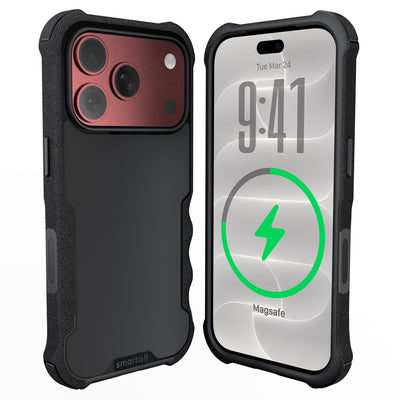




iPhone 18 Pro clear case
Shopping for an iPhone 18 Pro clear case means looking past the word “clear.” A case can show off your phone on day one and still turn yellow, cloudy, slippery, or cracked before the novelty wears off. The better question is whether it remains useful after real pockets, drops, and butterfingers.
Key Takeaways
- Look for a clear case with anti-yellowing materials or UV-resistant coatings so it doesn't turn cloudy after a few weeks in your pocket.
- Choose a case with textured side grips: a slick polycarbonate back shows off your phone but a slippery case is just asking for a drop.
- Make sure the MagSafe magnets are strong and built into the case, not just a thin ring that can't hold your wallet or charger in place.
- A matte or frosted back hides fingerprints and scratches better than a glossy finish, and it stays clearer longer when you toss it in your bag.
Some iPhone 18 Pro case details remain based on reported images and rumors, not an official Apple announcement. The buying process is less about guessing the final MagSafe shape and more about checking lasting clarity, dependable grip, edge protection, button access, and a design that does not cover your phone’s finish.
The Clear Case Conundrum: What to Expect (and Avoid) for iPhone 18 Pro
Look for a transparent case made from materials selected to resist yellowing and hazing, textured side rails for control, reinforced corners, raised screen and camera lips, and button covers that preserve the phone’s normal feel. MagSafe compatibility should mean reliable alignment and attachment, not a giant opaque marking that covers the color you paid for.
Breaking Down the Rumors: MagSafe's Mysterious Makeover
MacRumors reported that Apple could revise the clear case design around a ring or horseshoe-style MagSafe layout. Based on reported case images, the possible change appears aimed at reducing the large visible rear marking while keeping the magnetic connection functional. This is useful context, not a confirmed specification. Apple’s official announcement will determine the final case construction, accessory layout, and compatibility details.
Inspect the magnetic array, not only the marketing label. A case should keep chargers, wallets, and mounts centered without making the phone look like it has a white sticker underneath. Check whether the transparent back leaves the camera area open and whether the magnet sits in the correct position for the phone’s charging coil.
The iPhone 17 Pro White Panel Fiasco: A Lesson Learned
Customer research reports that Apple’s iPhone 17 Pro clear case used a large opaque panel across much of the lower rear area. Macworld covered the reported possibility that the iPhone 18 Pro clear case could lose that big white rectangle, while MacRumors also reported on a possible reversal of the design. The complaints make sense: people choose a transparent shell to see the phone’s color, finish, and hardware. Covering a broad section defeats part of the purpose.
Product photography deserves close inspection. Find images of the back, interior, camera surround, corners, and magnetic marking. A small product thumbnail can hide a lot of visual space. Clear should not mean “mostly clear, with a surprise billboard.”
Beyond 'Clear': What Really Matters in a Transparent Case
Transparency is only the starting point. TPU and polycarbonate blends can offer different balances of flexibility, scratch resistance, and impact response. The case should feel stable in your hand, slide into a pocket without catching, and hold its shape around the phone. Watch for cloudy patches, stress whitening near corners, hairline cracks, and edges that loosen after repeated removal.
Assess the details people touch all day: side texture, button travel, Action Button access, screen clearance, camera clearance, and interior lining. The Gripmunk with MagSafe® - Slim Case for iPhone 16 Pro illustrates that checklist with textured sides, a smooth pocket-friendly back, protective air-pocket corners, raised edges, and precise button access. It is designed for iPhone 16 Pro, so fit must match the phone model in your hand.
Your iPhone 18 Pro Clear Case Scorecard: Clarity, Grip, and Protection That Lasts
Material Science: How to Spot Anti-Yellowing & Anti-Hazing Tech
Yellowing often appears first along flexible edges, while hazing can make the back look gray or oily even when clean. Customer research identifies yellowing, hazing, and cracking as repeated clear-case complaints. Product descriptions should name the material or treatment used for optical clarity and explain how the case handles UV exposure, skin oils, heat, and repeated flexing. “Crystal clear” does not explain how the finish behaves after months of use.
Look for close-up photos with even lighting. A quality transparent back should show consistent clarity without ripples, cloudy corners, or a yellow cast. A microfiber lining can help reduce scratches and dings on the phone’s finish. Clean the case with mild soap and water, then dry it fully before reinstalling it. Dirt trapped between the shell and phone can look like permanent haze.
The Grip Factor: Why Slick Backs Are a Bad Idea
A smooth back slides easily into a pocket, but a fully slick shell can skate across a countertop or twist during one-handed typing. A useful middle ground is a smooth rear panel paired with textured sides. Your fingers get something to hold without making the case sticky or difficult to pocket.
Judge grip from the side texture rather than a studio photo. Check whether the rails feel secure with dry hands, lotion, or during a walk outside. The goal is controlled handling, not industrial-strength cling.
Dropping Knowledge: Real Protection Without the Bulk
Protection comes from flexible corners that absorb impact, a frame that keeps the phone from taking the hit directly, and raised edges that create space around the display and camera lenses. Air-pocket corners act like small airbags, while a solid bumper helps distribute force.
The Gripmunk with MagSafe® - Slim Case for iPhone 16 Pro uses protective air-pocket corners, raised screen and camera edges, and a soft microfiber interior. Its published product information states that it has been drop-tested 50 times from 6 feet with successful protection results. That testing is evidence, not a guarantee against every drop, surface, angle, or bit of sidewalk chaos.
Button Bliss: Tactile Feedback and Easy Access
Buttons should click without excessive force, mushiness, or awkward finger placement. Poorly fitted covers can make volume changes frustrating, mute controls harder to reach, and the Action Button difficult to use. Precise cutouts and reinforced edges preserve access while covering vulnerable areas.
Zoom in on the button area and camera surround. Look for clean openings, defined covers, and room for normal finger movement. A case that protects well but makes everyday controls annoying will spend more time irritating you than protecting your phone.
| What to inspect | Good signs | Warning signs |
|---|---|---|
| Clarity | Consistent transparency, named material details, clear close-up photos | Yellow tint, cloudy corners, vague “clear” claims |
| Grip | Textured rails with a smooth pocket-friendly back | Slick sides or a tacky surface that collects lint |
| Protection | Air-pocket corners, raised screen and camera edges | Flat rims, thin corner coverage, exposed lens glass |
| Controls | Responsive covers and precise Action Button access | Mushy clicks, narrow openings, blocked controls |
| MagSafe design | Centered magnetic hardware with restrained markings | Unclear alignment or a large opaque rear panel |
MagSafe Ready, Not MagSafe Ruined: Smart Design for Your Accessories
A useful iPhone 18 Pro clear case should keep MagSafe accessories aligned without covering the phone’s finish with a giant white target. Magnetic compatibility depends on layout, magnet strength, case thickness, and coil position, not only a ring printed on the back.
Understanding the New MagSafe Standards (and Avoiding the White Blotch)
MacRumors reported that Apple could move toward a ring or horseshoe-style MagSafe layout in its next clear case design. Macworld likewise reported the possibility of removing the large white rear panel seen in reported iPhone 17 Pro clear-case images. These details come from reporting and case images, not an official Apple announcement. The final design, markings, and accessory requirements remain unconfirmed until Apple publishes specifications.
Inspect the rear view before buying. The magnetic structure should support attachment while leaving as much of the phone’s color visible as possible. Close-up photography can show whether the marking is subtle, oversized, opaque, or hidden inside the case material.
Aligning Your Accessories: How Case Design Impacts MagSafe Functionality
MagSafe alignment depends on the case keeping its magnets centered over the phone’s charging coil. A misplaced or weak array can cause a charger to shift, a wallet to sit crooked, or a mount to lose its hold during ordinary movement. Look for information about built-in magnets, accessory compatibility, and wireless charging.
The Gripmunk with MagSafe® - Slim Case for iPhone 16 Pro uses built-in strong magnets for MagSafe accessories and high-speed wireless charging. It pairs a smooth back with textured sides, giving accessories a clean contact area while your hand gets extra control. Its fit is specifically for iPhone 16 Pro, so confirm model compatibility before treating it as a template for a future phone.
Camera Protection: Keeping Your Lenses Clear and Safe
A raised camera lip should keep lenses away from tabletops, grit, and other debris. Check for clearance around each lens, a stable frame that does not flex into the camera zone, and an opening that will not intrude into photos or flash performance. Product photos should show the camera surround from the side, not only a front angle.
Smartish's Approach: Solving Clear Case Annoyances Before They Happen
A clear case should earn its place through daily handling, not just a nice product photo. Smartish designs around slippery sides, awkward buttons, exposed corners, cloudy materials, and magnetic hardware that dominates the rear. The goal is practical protection with a little personality for pockets, countertops, commutes, and accidental drops.
Our 'Ish Test': How We Engineer for Longevity and Feel
The “Ish Test” asks whether a case solves the problem without creating three new ones. That means checking one-hand feel, edge stability, button response, and removal without stretching. Clear designs also need optical clarity, corner structure, camera clearance, screen lift, and sensible MagSafe placement. A case can look polished and still fail the couch-to-sidewalk test.
Gripzilla vs. Gripmunk: Finding Your Perfect Clear Fit
Gripzilla and Gripmunk suit different handling preferences. If you want a slim profile with a smooth back for easier pocket access and textured sides for control, the Gripmunk with MagSafe® - Slim Case for iPhone 16 Pro is the featured choice. Its air-pocket corners act like small airbags, raised edges help keep the display and camera away from surfaces, and the soft microfiber interior helps guard against scratches and dings.
The Gripmunk with MagSafe® - Slim Case for iPhone 16 Pro includes precise access to the iPhone 16 Pro Camera Control button, built-in strong magnets for MagSafe accessories, and support for high-speed wireless charging. Its published product information states that it has been drop-tested 50 times from 6 feet with successful protection results. Confirm the phone model before ordering, since this case is designed specifically for iPhone 16 Pro.
The Smartish Difference: More Than Just a Pretty (Clear) Face
The Smartish approach makes each visible detail do a job. Textured rails help reduce slips without making the case sticky. A smooth rear panel makes pocket entry easier. Raised borders separate vulnerable glass from surfaces, and a microfiber lining gives the phone’s finish a softer landing. The Gripmunk with MagSafe® - Slim Case for iPhone 16 Pro is available in Clearly Clear and other colors and patterns.
Your iPhone 18 Pro Clear Case Checklist & FAQ
Pre-Order Ready: What to Look for on Day One
Use this checklist before buying an iPhone 18 Pro clear case. Product images and reported designs can change before Apple’s official announcement, so inspect the final listing carefully.
- Confirm the exact phone model, camera layout, and button openings.
- Look for consistent transparency without yellow edges or cloudy patches.
- Check for textured side rails and a back that remains pocket-friendly.
- Verify raised screen and camera edges, plus reinforced corners.
- Inspect the MagSafe marking for centered alignment and minimal obstruction.
- Read cleaning and material guidance instead of trusting “crystal clear” alone.
For reported iPhone 18 Pro case details, treat images as provisional until Apple confirms the design. The best purchase decision rests on measurable fit, clear photography, button access, magnetic alignment, and a finish you will still enjoy after the first few weeks.
Frequently Asked Questions
Which iPhone 18 Pro clear case is best?
The best iPhone 18 Pro clear case should combine lasting clarity, textured side grip, raised screen and camera edges, reinforced corners, precise buttons, and a properly aligned magnetic array. Since iPhone 18 Pro details remain unconfirmed, treat early case images as clues and verify the model fit and MagSafe layout after Apple announces the phone.
Is an iPhone 18 Pro clear case worth it?
An iPhone 18 Pro clear case is worth considering if you want to show the phone’s finish while adding everyday drop and scratch protection. Choose one with anti-yellowing and anti-hazing claims, a smooth pocket-friendly back, controlled side grip, and enough edge clearance around the display and cameras.
Does Apple make a clear case for the iPhone 18 Pro?
Apple has not officially confirmed an iPhone 18 Pro clear case, so reported designs should not be treated as final product details. Possible changes to the MagSafe ring or rear marking have been reported, but Apple’s announcement will confirm the construction, magnetic layout, and compatibility.
What is the best iPhone clear case?
The best iPhone clear case stays visibly clear, feels secure in your hand, and provides raised protection around the screen and cameras without hiding the phone’s finish. The Gripmunk with MagSafe for iPhone 16 Pro adds textured sides, air-pocket corners, a microfiber lining, precise button access, and a 50-drop test from 6 feet.
Who makes the highest quality iPhone cases?
Smartish makes iPhone cases focused on practical grip, pocket-friendly handling, and everyday protection, including the Gripmunk with MagSafe for iPhone 16 Pro. That case uses air-pocket corners, raised edges, a soft microfiber interior, and strong built-in magnets, while its tested drop performance is not a guarantee against every type of damage.
How can I keep an iPhone 18 Pro clear case from looking cloudy?
An iPhone 18 Pro clear case stays cleaner when you select a design that names resistance to yellowing and hazing, then wash it with mild soap and water as needed. Dry the case fully before reinstalling it, since trapped dust, oil, or moisture can make the phone and case appear cloudy.
What should I check before buying an iPhone 18 Pro clear case?
An iPhone 18 Pro clear case should be checked for exact model fit, magnetic alignment, button access, side texture, corner coverage, raised edges, camera clearance, and the amount of opaque marking on the back. Inspect full-size product photos, since a small thumbnail can conceal a large panel that covers the phone’s color.