




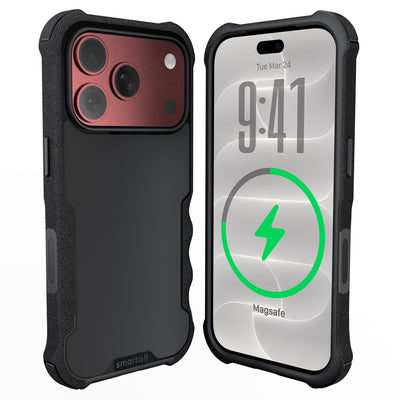




do magnets damage iPhone 18 Pro
Wondering do magnets damage iPhone 18 Pro phones, erase photos, or turn a camera into a tiny expensive paperweight? The short answer is no for normal magnetic accessories. Modern iPhones use solid-state storage and built-in magnetic alignment hardware, so everyday MagSafe-style mounts do not erase data.
Key Takeaways
- Everyday magnetic accessories, like MagSafe mounts, will not damage your iPhone 18 Pro or erase its data.
- Modern iPhones use solid-state storage, making them immune to data loss from common magnetic accessories.
- The built-in magnetic alignment hardware in iPhones means standard magnetic mounts are designed to be safe for your device.
The more realistic trouble comes from physical contact. A loose metal plate can scratch the back glass, and a thin case can pass a corner impact into the frame. Magnets get the blame because they are easy to point at, but drops and poor fitment are usually responsible.
Do Magnets Actually Wreck Your iPhone 18 Pro? Let's Find Out.
The Magnetic Mystery: What's the Big Fear?
Older electronics used magnetic media, such as hard disk drives and floppy disks. A strong magnetic field could disturb stored bits in those devices. That history made “keep magnets away from your phone” decent advice for a while, but it does not describe modern iPhone storage.
Current concerns usually involve four separate worries: erased memory, a ruined display, a drained battery, or a camera that can no longer focus. A magnetic car mount may also make a compass heading wobble while the phone sits beside it. These effects are not the same as permanent damage.
Smartish's Take: Separating Fiction from Friction
A properly designed magnetic accessory should not wipe photos or damage the screen. The practical risk is friction. A bare magnet, adhesive plate, grit, or exposed edge can rub against the finish whenever the phone moves. A mount that holds the phone securely but offers no shock absorption can also send impact energy into a corner or frame rail.
The useful questions are what touches the phone, how firmly it holds, and what happens during a drop. Good accessory design addresses magnetic alignment, surface contact, camera clearance, heat, charging, and impact protection together. One strong magnet is not a substitute for a well-engineered case.
What This Guide Covers (and What It Doesn't)
This guide focuses on component behavior and physical wear. It explains why solid-state NAND flash does not work like old magnetic storage, why wireless charging and batteries are not casually wrecked by a mount, and why compass behavior can change briefly near an active magnetic field. It also covers camera stabilization and autofocus sensors, since accessory magnets can cause temporary odd behavior there.
iPhone 18 Pro vs. Magnets: The Truth About Components
So, do magnets damage iPhone 18 Pro components? Under typical consumer exposure, no. Apple devices can contain up to 18 or more integrated neodymium magnets in the back enclosure for MagSafe and Qi2 alignment. Built-in magnets are part of the accessory system.
Myth Buster: Data & Displays (NAND Flash vs. Old School)
Solid-state NAND flash stores information through electrical charge in memory cells, not magnetic polarity. A static field from a consumer phone mount does not rewrite photos, apps, messages, or operating system data. A magnetic field also does not demagnetize modern OLED screen pixels or disable the touch layer.
Myth Buster: Batteries & Wireless Charging
A magnetic mount does not drain an iPhone battery merely by holding the phone. Battery capacity changes through charge cycles, temperature, age, and usage, not because a magnet is nearby. Wireless charging uses an electromagnetic field to transfer energy through aligned coils, so magnetic alignment is part of the process. Use compatible charging hardware, keep vents clear, and watch for unusual heat.
Myth Buster: GPS & Compass Shenanigans
Magnets can confuse the phone’s magnetometer, the sensor used for compass heading. Beside an active magnetic field, the compass may point the wrong way, drift, or jump around. Research indicates that this deviation is temporary and normalizes once the phone leaves the field, without hardware recalibration. GPS positioning itself does not depend on magnetic storage, though navigation apps may show a messy heading while the compass sensor is influenced.
The Real Deal: Camera OIS and Autofocus Sensors
The camera needs a more careful answer. Optical image stabilization, autofocus actuators, and related sensors contain moving or magnetically controlled parts. A poorly positioned or unusually strong accessory magnet can cause temporary focus jitter, stabilization movement, or a camera warning. Remove the accessory, reopen the camera, and test focus at different distances.
Apple’s accessory guidance addresses magnetic fields around camera systems, which is why mount placement and shielding matter. A case designed for magnetic attachment keeps the ring positioned away from sensitive camera hardware. The Gripmunk with MagSafe® - Slim Case for iPhone 16 Pro illustrates that approach with built-in strong magnets compatible with MagSafe, allowing secure attachment to MagSafe accessories and high-speed wireless charging. It is designed for iPhone 16 Pro, not a claim of fit for iPhone 18 Pro.
| Phone component | What a normal magnetic accessory does | What to watch for |
|---|---|---|
| NAND flash storage | Retains data through electrical charge | No ordinary magnetic erasure |
| OLED display | Continues operating normally | Physical scratches or impact damage |
| Battery and charging coil | Supports aligned wireless charging | Excess heat or poor accessory fit |
| Compass sensor | May show temporary heading drift | Recheck after leaving the magnetic field |
| Camera stabilization and focus | Usually works normally with suitable placement | Jitter, focus hunting, or warnings near a strong magnet |
The Gripmunk with MagSafe® - Slim Case for iPhone 16 Pro also uses protective air-pocket corners that act like small airbags to cushion and protect the phone from drops. That feature addresses damage a magnetic field cannot cause but a concrete floor can.
The Real Risks: How DIY Plates and Bad Mounts Can Mess Up Your Phone
Scratches, dents, cracked corners, and loose mounts are more believable suspects than magnetic damage. An accessory can be safe for data and the display while still causing harm through pressure, grit, poor alignment, or a hard landing. Consider what sits between the accessory and phone, how everything fits, and where impact energy goes during a drop.
The Unseen Scratches: DIY Metal Plates and Your Phone's Finish
A bare metal plate behind a thin case can move whenever you grab, pocket, or reposition the phone. Dust and sand trapped between the plate and back glass can act like abrasive material. An exposed adhesive edge may rub the finish, while a sharp corner can press into the case or phone. This is contact damage, not magnetic damage.
Inspect the plate before installation. It should have smooth edges, a flat surface, and secure adhesive. It should not sit directly against the phone. A case lining or molded accessory pocket creates separation and prevents sliding. Check the setup after a few days, especially if the case feels loose, the plate shifts, or the phone clicks when attached to a mount.
Corner Calamities: When Cases Fail to Protect Frame Rails
A magnetic mount holds the phone in place, but it does not soften a drop onto tile, asphalt, or a hard table corner. Thin cases may leave little room for impact absorption, especially around the corners. When the phone lands, the frame rail can take the hit before the case spreads the force, leaving dents, scuffs, chipped coating, or a case that no longer sits squarely.
Look for air-filled or flexible corner structures, raised bezels, a camera lip, and a secure frame fit. The case should not flex away from the phone when you press near a corner. A textured grip can also help prevent the drop. Gripmunk with MagSafe® - Slim Case for iPhone 16 Pro has protective air-pocket corners that act like small airbags to cushion and protect the phone from drops. Its raised edges protect the screen and camera, while the interior has a soft microfiber lining to protect the phone from scratches and dings.
Magnets Are Already In Your iPhone: Understanding MagSafe Integration
Modern iPhones are designed around magnetic alignment for accessories and wireless charging. Research indicates that Apple devices can contain up to 18 or more integrated neodymium magnets in the back enclosure for MagSafe and Qi2 alignment. These magnets center a charger or mount over the charging coil and are part of the phone’s intended accessory system.
That design does not make every accessory suitable. A properly positioned magnetic ring supports alignment, while a loose plate can cover the wrong area, interfere with camera clearance, or press against the back glass. The Gripmunk with MagSafe® - Slim Case for iPhone 16 Pro features built-in strong magnets compatible with MagSafe, allowing secure attachment to MagSafe accessories and high-speed wireless charging. It is designed specifically for iPhone 16 Pro, so model fit still matters more than magnet count.
Magnetic Mounts: Practicality vs. Potential Pitfalls
Magnetic mounts are useful in a car, at a desk, or beside a bed because attachment takes one hand. The system must balance holding strength with safe release. A weak mount may drop the phone over a pothole; an overly strong mount may require twisting or pulling that stresses the case and hardware. Vent mounts also need a stable vent connection, since a phone can add strain to a loose vent slat.
A Quick Mount Reality Check
Pros
- Fast attachment and removal for driving or desk use
- Convenient alignment for compatible wireless charging
- No clamp pressure across the phone’s screen
Cons
- Poor fit can allow drops, sliding, or corner impact
- Loose plates can trap grit against the back glass
- Strong fields may cause temporary camera or compass oddities
Test a mount over a soft surface. Check that the phone stays centered, the case does not twist, the camera remains clear, and the mount does not wobble with gentle movement. A secure connection attached to a flimsy vent, slick case, or bare metal plate can still deliver the phone to the floor.
Smart Mounts and Safe Habits: Keeping Your iPhone 18 Pro Protected
If you are asking, do magnets damage iPhone 18 Pro phones, judge the mount by fit and construction rather than magnet marketing. A safe setup keeps the phone centered, leaves the camera clear, supports compatible wireless charging, and does not scrape the back glass. The case, mount arm, vent clip, padding, and release motion all matter.
Choosing the Right Magnetic Mount: What to Look For
Look for a stable base, smooth contact surface, correctly positioned magnetic ring, and enough holding strength for the phone and case together. A car vent mount should grip without bending or twisting vent slats. A desk stand should have a weighted base or broad footprint. Check camera clearance, charging alignment, heat buildup, and one-handed release before daily driving.
- Contact: Choose smooth, covered surfaces instead of exposed metal.
- Fit: Confirm the case and mount sit flat without wobbling.
- Placement: Keep the camera module clear of the magnetic hardware.
- Testing: Try the mount over a couch or bed before using it above a hard floor.
Beyond Magnets: Protecting Against Drops and Daily Wear
Magnetic alignment cannot cushion a corner strike. A protective case should hold the phone snugly, cover the frame rails, raise the screen and camera above flat surfaces, and add structure around corners. Grip also matters because preventing the original drop is easier than repairing it.
For magnetic accessory users, the Gripmunk with MagSafe® - Slim Case for iPhone 16 Pro is a practical example. The case has protective air-pocket corners that act like small airbags to cushion and protect the phone from drops. Raised edges protect the screen and camera. Textured sides help prevent slipping without being sticky, and the smooth back supports easy pocket use.
Smartish Solutions: Clever Cases for Everyday Life
The Gripmunk with MagSafe® - Slim Case for iPhone 16 Pro features built-in strong magnets compatible with MagSafe, allowing secure attachment to MagSafe accessories and high-speed wireless charging. Its soft microfiber lining protects against scratches and dings. It has been drop-tested 50 times from 6 feet with successful protection results. That is a case test, not a promise that every landing will end safely. Confirm your phone model before ordering because this case is specifically for iPhone 16 Pro.
Quick Tips for Magnetic Accessory Peace of Mind
Wipe dust from case and mount contact points regularly. Remove any plate that shifts, clicks, or leaves marks. If the compass points strangely, move the phone away from the magnetic field and check it again. If the camera hunts for focus or stabilization behaves oddly, detach the accessory and test the camera without it. Stop using a mount that causes heat, repeated slipping, pressure against the camera, or visible wear.
Frequently Asked Questions
Are magnets harmful to iPhones?
Magnets are not harmful to iPhones during normal use with compatible magnetic accessories. Modern iPhone storage uses NAND flash rather than magnetic media, so everyday mounts do not erase photos or apps. The practical concerns are scratches, impact from a loose fit, temporary compass drift, or camera behavior near an unusually strong magnet.
Are magnetic cases bad for your iPhone?
Magnetic cases are not bad for an iPhone when they are properly designed and fit the phone correctly. A well-made case keeps the magnetic ring aligned and helps prevent direct contact between the phone and accessory. Check for grit, exposed edges, camera clearance, heat, and secure attachment, since those details matter more than the magnet itself.
Can a magnet damage my iPhone 18 Pro?
A normal magnet is unlikely to damage an iPhone 18 Pro. Magnetic mounts do not erase NAND flash data, demagnetize the display, or drain the battery simply by holding the phone. A strong or poorly placed magnet may cause temporary camera focus or stabilization behavior, so remove the accessory and test the camera if that happens.
Does MagSafe damage an iPhone?
MagSafe does not normally damage an iPhone because magnetic alignment is built into the accessory system. MagSafe accessories can support attachment and wireless charging when the hardware is compatible and properly aligned. Keep vents clear, watch for unusual heat, and use a case or mount that leaves the camera area properly positioned.
Why did Apple stop selling MagSafe?
Apple has not generally stopped selling MagSafe as a product system, and MagSafe remains associated with magnetic iPhone accessories and charging hardware. Confusion can come from a particular accessory being discontinued, renamed, or unavailable in a region. A product listing or store change does not mean magnets are unsafe for iPhones.
Can magnets affect the iPhone 18 Pro compass or camera?
Magnets can temporarily affect the iPhone 18 Pro compass and, near a strong field, may cause camera focus jitter or stabilization movement. Compass readings usually settle after the phone leaves the magnetic field, while camera behavior should be retested after removing the accessory. Smartish's take: check placement and fit before blaming the phone.