








iPhone 18 Pro screen repair cost
One cracked corner can turn an expensive phone into an expensive repair appointment. The iPhone 18 Pro screen repair cost depends on the route: Apple service, an independent shop, and a DIY kit each bring different prices, tradeoffs, and risks.
Before service, check AppleCare+, ask which display will be installed, and confirm whether calibration is included. A low quote can look attractive until True Tone disappears, touch response changes, or Face ID stops working properly.
The Sticker Shock: What's an iPhone 18 Pro Screen Repair Actually Cost?
For an out-of-warranty Pro model, Apple screen service routinely costs $329 to $379, according to Apple Service pricing schedules. With AppleCare+, eligible screen damage carries a fixed $29 service fee. Independent repair shops generally charge about $199 to $279, based on repair pricing databases. Modern OLED DIY kits average around $140 to $180 before labor, calibration equipment, and the cost of correcting a mistake.
| Repair path | Typical cost | What to consider |
|---|---|---|
| Apple, out of warranty | $329 to $379 | Official service process and genuine parts, with the highest upfront price |
| AppleCare+ | $29 service fee | Coverage must already be active and the damage must qualify |
| Third-party shop | $199 to $279 | Lower cost, but part quality, calibration, and warranty terms vary |
| DIY kit | $140 to $180, before tools | Lowest starting price, highest hands-on risk |
Apple Out-of-Warranty Screen Replacement Fees: The Official, and Pricey, Route
Apple service offers an established repair workflow, documented diagnostics, and a parts ecosystem built around the phone. Apple’s published pricing places Pro-tier screen replacement between $329 and $379 when coverage does not apply. The fee may change if technicians find additional damage, including a bent frame, damaged rear glass, or liquid exposure.
AppleCare+: Your Safety Net for Screen Damage
AppleCare+ changes the cost substantially. Apple lists a $29 service fee for screen damage when the plan is active and the repair qualifies under its terms. Check your plan status and incident terms before scheduling service. Accidental damage still has to meet Apple’s service requirements.
Third-Party Repair Shops: The Cheaper, But Riskier, Alternative
A local repair shop can reduce the iPhone 18 Pro screen repair cost to roughly $199 to $279, according to leading repair pricing databases. Ask whether the display is an original service part, aftermarket OLED panel, or refurbished assembly. Confirm whether True Tone transfer, Face ID testing, touch calibration, water-resistance limitations, and the repair warranty are included. A qualified shop should explain labor, diagnostics, and possible extra fees before opening the phone.
DIY Screen Replacement: The Budget Play, with Caveats
DIY kits average around $140 to $180 before labor and calibration tools. Adhesive removal, tiny screws, flex cables, display pairing, and sensor or connector damage can quickly erase the savings. Modern OLED assemblies require experience, suitable tools, a clean workspace, and a backup phone. A failed installation can turn a screen replacement into a logic-board problem.
Beyond the Glass: Why Pro Model Screens Cost More, and What You Lose with Cheap Fixes
The Tech Underneath: OLED, ProMotion, and Face ID Components
A Pro display includes more than glass. Its OLED matrix controls each pixel without a separate backlight, supporting deep blacks, high contrast, and power-efficient brightness. The assembly also includes a ProMotion driver system for adaptive refresh rates up to 120Hz, touch-sensing layers, an ambient light sensor pairing, and delicate flex connections. Face ID does not live inside the display alone, but screen removal occurs near the authentication sensor hardware. One torn cable can create a larger problem than a cracked panel.
OEM vs. Aftermarket Screens: The Real Difference in Functionality
- OEM or genuine service display
- A part made for the phone’s intended specifications, with better odds of matching brightness, color calibration, refresh behavior, touch response, and sensor compatibility.
- Aftermarket display
- A replacement made by a separate supplier. Quality ranges widely, so panels described as “aftermarket OLED” may perform very differently.
- Refurbished display
- An original panel recovered and paired with new glass or other components. Its condition depends on refurbishment and testing.
The Aftermarket Tax: True Tone, ProMotion, and Touch Sensitivity
A lower-priced panel may work for basic scrolling yet fail to match a Pro phone’s intended performance. Possible compromises include muted color, uneven brightness, slower touch registration, reduced refresh-rate behavior, or loss of True Tone. An aftermarket part does not automatically disable Face ID or 120Hz ProMotion; compatibility depends on the panel, installation, sensor transfer, and software configuration. Ask the technician to demonstrate brightness, touch response, Face ID, automatic brightness, and high-refresh scrolling before acceptance.
Software Warnings and Warranty Concerns with Non-Apple Repairs
iOS can identify a display that it cannot verify as a genuine Apple component. A non-genuine display notification does not always make the screen unusable, but it indicates that authentication or pairing did not complete as expected. Keep the invoice and read warranty terms. Installation damage, moisture after repair, and failures involving transferred sensors may receive different treatment. For confirmed iPhone 16 Pro owners, the Gripmunk with MagSafe® - Slim Case for iPhone 16 Pro has textured sides, raised edges, air-pocket corners, and a $19.99 to $24.99 price range. It is designed for iPhone 16 Pro, not iPhone 18 Pro.
What You Gain and Give Up with Each Repair Choice
Pros
- Apple service offers a documented repair path.
- AppleCare+ can reduce the service fee to $29.
- Qualified third-party technicians may save $50 to $180.
Cons
- Out-of-warranty service can exceed $300.
- Aftermarket parts may affect color, touch, refresh rate, or warnings.
- DIY work can damage cables, sensors, or the frame.
For confirmed iPhone 16 Pro owners, the Gripmunk with MagSafe® - Slim Case for iPhone 16 Pro adds a grippy, pocket-friendly layer with raised screen edges and protective air-pocket corners. It cannot prevent every kind of damage, but avoiding one awkward drop is easier than explaining a $300 repair bill to your budget.
The Math of Prevention: Protecting Your Investment Smarter Than Fixing It
The iPhone 18 Pro screen repair cost can turn one drop into a $300-plus budget problem. A case and screen protector cost far less than an OLED display and may reduce direct contact with concrete, tile, countertops, and table edges.
Comparing the Cost of Protection vs. the Cost of Repair
Apple out-of-warranty Pro screen service routinely runs from $329 to $379, according to Apple Service pricing schedules. A third-party repair may cost about $199 to $279, based on repair pricing databases, while AppleCare+ reduces an eligible screen-damage fee to $29. Repairs still involve appointment time, device downtime, diagnostics, and possible additional damage.
| Choice | Financial effect | What it helps prevent |
|---|---|---|
| Case and screen protector | Small upfront purchase | Slip damage, edge chips, surface scratches, and direct impact |
| AppleCare+ | $29 eligible screen-damage fee | A large repair bill after an accident |
| Out-of-warranty service | $329 to $379 for many Pro repairs | Restores a damaged display after the fact |
Why a Good Case and Screen Protector Is Your First Line of Defense
Impact protection starts before the phone hits the floor. A grippy case reduces slips, raised bezels keep the display from landing flat, and air-pocket corners can absorb force at exposed points. A screen protector adds a sacrificial surface against scratches, small chips, and friction from keys, coins, or a crowded bag.
Look for textured sides, screen and camera lip height, corner coverage, button access, wireless charging compatibility, and a fit made for the exact model. A protector should preserve touch response and avoid blocking sensors.
Smartish Grip & Protection: Designed to Keep Your Phone Flawless
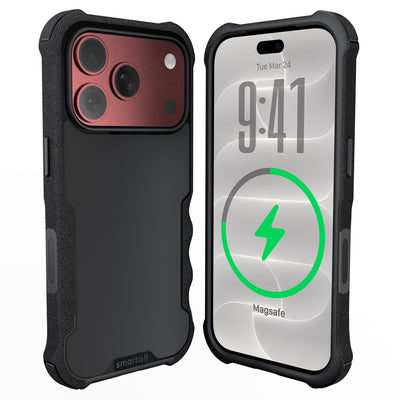
For confirmed iPhone 16 Pro owners, the Gripmunk with MagSafe® - Slim Case for iPhone 16 Pro is a slim case made specifically for iPhone 16 Pro. Built-in strong magnets support MagSafe accessories and high-speed wireless charging. Protective air-pocket corners cushion drops, while raised edges protect the screen and camera.
Textured sides reduce slipping without being sticky, the smooth back supports pocket use, and a soft microfiber interior helps prevent scratches and dings. It has been drop-tested 50 times from 6 feet with successful protection results, without promising protection from every accident. It retails for $19.99 to $24.99 and comes in Solid Black, Clearly Clear, So Jaded, and Wildflower Fields.
The Long Game: How Prevention Saves You Time, Money, and Hassle
Preventing a hard drop can protect the frame, camera lenses, buttons, sensors, charging port, and internal connections. It also avoids backup-phone arrangements, repair paperwork, software warnings, and waiting while a technician examines the device.
The Gripmunk with MagSafe® - Slim Case for iPhone 16 Pro cannot make an iPhone 18 Pro compatible and is not a substitute for model-specific protection. It does show the financial logic: a modest protective purchase for the correct device can be easier to justify than paying the iPhone 18 Pro screen repair cost.
Navigating the Repair Environment: Tips, Turnaround Times, and What to Watch Out For
Repair decisions get easier when you know what to ask before handing over a phone. The iPhone 18 Pro screen repair cost is only one factor. Part quality, technician experience, diagnostics, warranty coverage, turnaround time, and damage beyond the display can change the final bill. Request a written estimate and ask what happens if the technician finds additional damage.
Choosing Your Repair Service: What to Ask and What to Expect
Ask whether the replacement is a genuine service part, refurbished assembly, or aftermarket display. Confirm that labor, calibration, testing, adhesive, and applicable taxes are included. Ask how the shop will test Face ID, touch response, automatic brightness, True Tone, cameras, speakers, microphones, and wireless charging. Get the warranty in writing, including coverage for display defects, touch problems, and installation-related failures.
- Request a written estimate before work begins.
- Identify the display type and source.
- Ask whether calibration and sensor testing are included.
- Confirm the warranty period and exclusions.
- Back up your phone before service.
Turnaround Times: How Long Will You Be Without Your Phone?
Turnaround depends on parts availability, appointment volume, technician workflow, and damage extent. A stocked location may finish the replacement the same day, while mail-in service requires shipping in both directions. A bent frame, damaged connector, or liquid exposure may require extra diagnostics. Ask whether the timeframe is an estimate or promised completion window. Back up the phone, remove sensitive information when possible, and arrange a temporary device if work, travel, or two-factor authentication depends on it.
Hidden Costs: Back Glass Damage and Other Potential Fees
A drop can also damage back glass, camera rings, frame, buttons, charging port, internal brackets, or Face ID-related components. Liquid indicators and corrosion may affect service eligibility. Ask whether there is a diagnostic fee if you decline service and whether additional damage requires approval before work continues. A quote should separate screen, labor, parts, taxes, and optional work.
When Is It NOT Worth Repairing Your iPhone 18 Pro?
Repair may not make financial sense if the phone has several major problems, a badly bent frame, a failing battery, or a total estimate near the device’s current value. Compare the estimate with a replacement phone, remaining financing balance, trade-in eligibility, and the value of your data. A cracked screen alone does not automatically mean replacement, but several damaged systems can create expensive follow-up repairs.
Future-Proofing Your Device: Understanding Apple’s Repair Policies and Longevity
Apple’s service options, parts availability, software support, and repair policies can change as devices age. Keep purchase receipts, coverage details, repair invoices, and warranty documents together. Before non-Apple service, check how it may affect future support, display notifications, parts pairing, and eligibility for additional service. Ask whether the provider will return original damaged parts and whether your data remains on the phone during testing. Backups, protection, and early attention to small issues can extend useful life without making a phone indestructible.
Frequently Asked Questions
How much does it cost to replace an iPhone 18 Pro screen?
The iPhone 18 Pro screen repair cost is usually $329 to $379 through Apple without coverage. AppleCare+ can reduce the eligible screen-damage fee to $29, while independent shops commonly charge $199 to $279. DIY kits start around $140 to $180 before tools, calibration, and possible mistake-related repairs.
Is it worth fixing a broken iPhone 18 Pro screen?
Fixing a broken iPhone 18 Pro screen is often worth it if the phone works well and the repair costs less than replacing the device. Compare the iPhone 18 Pro screen repair cost with the phone’s current value, then ask about display quality, calibration, Face ID testing, and warranty coverage before approving service.
How much does Apple charge to replace an iPhone screen?
Apple screen replacement for an iPhone 18 Pro typically costs $329 to $379 without AppleCare+. The final price may increase if technicians find frame damage, rear-glass damage, or liquid exposure. AppleCare+ may lower an eligible screen repair to a $29 service fee under the plan’s terms.
Can an iPhone 18 Pro screen be repaired instead of replaced?
An iPhone 18 Pro screen can usually be repaired by replacing the complete display assembly rather than fixing only the cracked glass. OLED, touch, refresh-rate, sensor, and flex-cable parts make glass-only work specialized. A qualified technician should test brightness, touch response, Face ID, automatic brightness, and high-refresh scrolling afterward.
Is it cheaper to repair or replace an iPhone 18 Pro?
Repairing an iPhone 18 Pro is usually cheaper than replacing the phone when the damage is limited to the screen. Screen service ranges from about $29 with eligible AppleCare+ to $379 through Apple without coverage. Replacement may make more sense if the phone also has frame, rear-glass, liquid, or battery problems.
What should I ask before choosing an iPhone 18 Pro screen repair shop?
Ask an iPhone 18 Pro repair shop for the total price, display type, calibration steps, testing process, and written warranty. Confirm whether the part is a genuine service display, aftermarket OLED, or refurbished assembly. Smartish rule of thumb: the lowest quote is not always the lowest final cost if True Tone, touch response, or Face ID performance suffers.