








Key Takeaways
- The best protective iPhone case in 2026 offers strong drop protection without being bulky.
- Effective cases feature air-pocket corners to absorb impact.
- Raised edges on the case provide additional screen protection.
- Grippy sides help prevent accidental drops before they happen.
- Protection and everyday usability are both essential in a quality iPhone case.
Table of Contents
- Quick Answer – What "Best Protective iPhone Case" Really Means in 2026
- What Makes an iPhone Case Truly "Protective"?
- Rugged vs. Slim: Choosing the Right Protection Style for Your Life
- The Critical Features of the Best Protective iPhone Case
- MagSafe & Wireless Charging With Protective Cases
- Matching Protection Level to Your Lifestyle (Without Overdoing It)
Best Protective iPhone Case in 2026: The No-Nonsense Guide to Keeping Your Phone Alive
Your iPhone 17, 17 Pro, 17 Pro Max, or iPhone Air is built tough, but not "concrete-drop" tough. The best protective iPhone case in 2026 balances real-world drop protection with everyday usability, no brick-sized cases required. We're talking air-pocket corners, raised edges that actually work, and grippy sides that prevent drops in the first place.
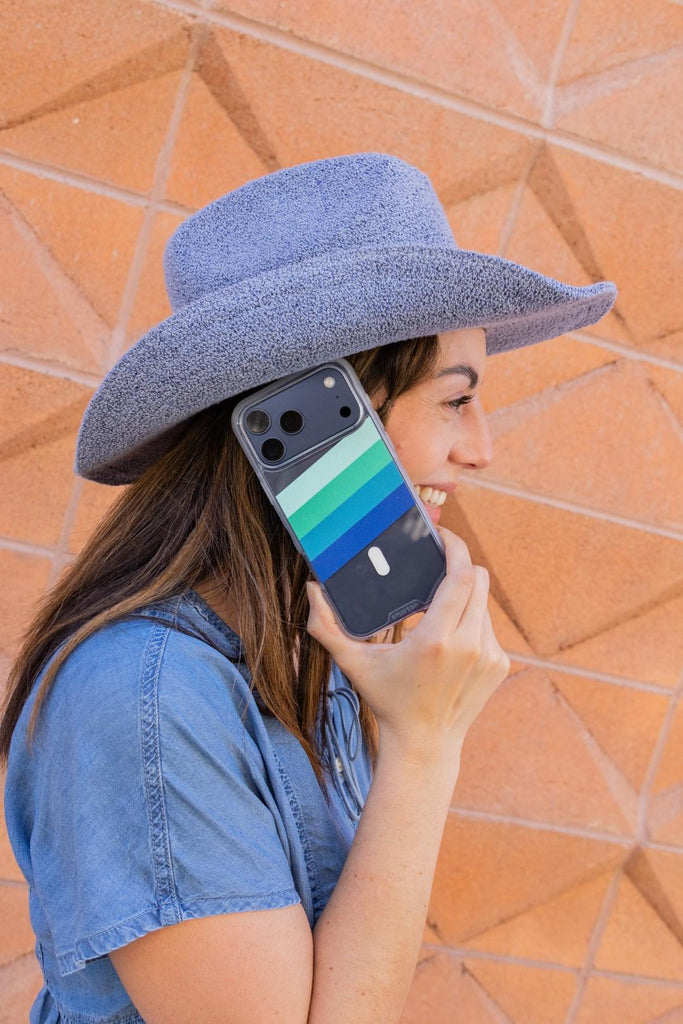
After testing dozens of cases across different protection levels, the standout winner combines drop-tested engineering with MagSafe compatibility and pocket-friendly design. Think protection that works without turning your sleek phone into a chunky mess. Gripmunk with MagSafe® for iPhone 17 is a prime example of this balance, offering slim yet robust protection for everyday use.
For those seeking even more ruggedness, Gripzilla delivers tank-like defense with reinforced corners and aggressive grip, making it ideal for harsher environments or users who demand maximum impact absorption.
The best protective iPhone case in 2026 delivers four non-negotiables: air-pocket corners for impact absorption, raised screen edges (about 1mm), a raised camera ring, and grippy-not-sticky side texture. This formula works across iPhone 17, 17 Pro, 17 Pro Max, and iPhone Air models.
"Best" doesn't mean "biggest brick." Today's top protective cases balance serious drop protection with MagSafe compatibility, comfortable daily carry, and precise button feel. The sweet spot? Cases that add meaningful protection without making your phone feel like a walkie-talkie from 1995.
Protection priorities have shifted. Instead of just surviving drops, the best cases prevent them through superior grip design while maintaining wireless charging and accessory compatibility. Your case should work with your life, not against it.
Core Must-Haves for Any Protective Case:
- Air-pocket corners – visible shock absorption where phones hit first
- Raised screen edge – keeps glass off surfaces when face-down
- Raised camera ring – protects lenses when phone sits on its back
- Grippy texture – prevents the drop from happening at all
Smartish cases nail these fundamentals across their entire lineup, every case is drop-tested with air-pocket corners and raised edges that actually measure up. For a deeper dive into top picks, check out this best iPhone 17 protective case guide.
What Makes an iPhone Case Truly "Protective"?

The 3 Main Ways Phones Actually Break
Real-world phone damage follows predictable patterns. Corner impacts from 3-6 feet onto concrete or tile cause most cracks, your phone tumbles, hits corner-first, and the impact radiates across the glass. Flat back impacts stress the camera bump area, especially on Pro models with larger camera systems. Face-down slides across rough surfaces like asphalt or concrete steps create the deep scratches that screen protectors can't fix.
These scenarios matter more than marketing drop heights. A case that survives a 10-foot drop onto grass might fail at 3 feet onto concrete if the corner design is weak. Focus on how cases handle the hits your phone will actually take. For more on what to look for, see this best case iPhone resource.
Impact Protection 101 – Shock Absorption vs. Shock Dispersion
Shock absorption uses softer materials like TPU that compress on impact, slowing the force transfer to your phone. Think of it like a mini airbag system. Shock dispersion uses rigid materials to spread impact across a wider area, preventing concentrated stress points that crack glass.
The best protective cases combine both approaches, soft inner layers for absorption, firmer outer shells for dispersion. Air-pocket corners are the visible proof this engineering is happening. Those little channels and thicker corner sections aren't just design flourishes; they're functional impact zones.
All Smartish cases use air-pocket corner design to help absorb those critical corner hits where most damage starts.
Raised Edges: Tiny Millimeters, Big Difference
A raised screen edge of about 1mm keeps your display off the table when your phone lands face-down. Seems tiny, but it's the difference between a working phone and a spider-webbed screen. The raised camera ring serves the same purpose when your phone sits on its back, protecting those expensive lenses from direct surface contact.
These raised edges work even if you use screen protectors and lens protectors. Think of them as your backup protection when adhesive protectors fail or get damaged.
Case Thickness vs. Real-World Protection
Added thickness along edges and corners directly improves drop performance by creating more material to absorb and disperse impact. But thickness in flat backplate areas often does nothing except add bulk. Smart case design puts material where physics demands it.
Rough thickness ranges: slim protective cases add about 1-1.5mm around edges, while rugged protective cases may add 2-3mm or more. Wallet cases like Wallet Slayer Vol. 1 and Vol. 2 are naturally thicker to house cards, and that extra depth actually boosts back and corner protection as a side benefit.
Rugged vs. Slim: Choosing the Right Protection Style for Your Life
Rugged Protective Cases – When You Need the "Tank"
Rugged cases feature thicker edges, reinforced corners, more impact-absorbing material, and aggressive textures designed for serious grip. They're built for construction sites, outdoor jobs, trail days, and travel where your phone lives near concrete and rocks. These cases prioritize maximum impact absorption over sleek aesthetics.
Gripzilla exemplifies the protection-first approach with its thick edges, reinforced backplate, and deep finger grooves that lock into your hand. The case features drop-tested construction with air-pocket corners and raised screen edges, plus aggressive texturing that maintains grip even with dirty or gloved hands.
Quick Check: Real rugged protection shows up in corner reinforcements and raised camera rings, not just angular styling. Look for visible extra material at impact zones.
Slim Protective Cases – Everyday Armor That Still Fits Your Pocket
Slim protective cases add minimal thickness while including essential protection features: air-pocket corners, raised edges, and grippy sides. They're designed for everyday commuters, office use, gym bags, and users who prioritize pocket-friendly profiles without sacrificing drop protection.
Gripmunk represents this balanced approach with drop-tested construction in a slim profile. The textured sides provide "grippy, not sticky" handling, while raised screen edges and camera rings protect against table drops and scratches. Despite the minimal bulk, it maintains full MagSafe compatibility for wireless charging and accessories.
The pocket test reveals the difference: a quality slim protective case should slide easily into jeans while feeling secure in your grip during one-handed use.
Direct Comparison: Rugged vs. Slim Protective Cases
| Feature | Rugged (Gripzilla-style) | Slim (Gripmunk-style) |
|---|---|---|
| Drop Protection | Maximum impact absorption, thick corners | Essential protection, air-pocket design |
| Bulk/Pocket Fit | Noticeable thickness, still pocketable | Minimal added bulk, easy pocket entry |
| Hand Comfort | Deep grooves, aggressive texture | Subtle texture, comfortable daily carry |
| Best Use Cases | Outdoor work, travel, high-risk environments | Office, commute, everyday protection |
| MagSafe Performance | Compatible, strong magnetic hold | Compatible, optimized for accessories |
Choose rugged when your phone faces concrete, tools, or outdoor elements regularly. Pick slim when you need reliable protection for typical drops from pocket height onto standard surfaces. Both styles should include drop-testing and raised edges – the difference lies in impact absorption capacity and daily carry comfort.
The Critical Features of the Best Protective iPhone Case
Materials That Take a Hit (Without Looking Beat Up)
TPU (thermoplastic polyurethane) leads protective case materials for its flexibility, shock absorption, and resistance to scuffs and abrasions. Unlike silicone that attracts lint or hard plastics that crack under stress, TPU compresses during impact then returns to shape.
Polycarbonate provides rigid dispersion when used in backplates, spreading impact force across wider areas. However, thin polycarbonate alone becomes brittle. Hybrid constructions combine TPU's absorption with polycarbonate's dispersion for comprehensive protection.
Silicone offers grip but tends toward tackiness and lint attraction. Leather provides premium aesthetics with moderate protection, developing patina over time. Most protective cases use TPU or TPU-polycarbonate hybrids for optimal impact performance.
Grip: The Feature That Quietly Prevents Most Drops
Texture and side design prevent more damage than any amount of padding by stopping drops before they happen. Quality protective cases feature textured sides, finger grooves, or ergonomic contours that lock the phone securely in your hand.
Look for "grippy, not sticky" finishes that provide traction without clinging to pockets or collecting debris. Smartish cases emphasize high-grip textured sides and ergonomic grooves across their lineup, recognizing that prevention beats protection.
Test grip with the one-handed reach: can you comfortably touch thumb to opposite corner without feeling insecure? Try the sweaty hands test by lightly dampening fingertips – quality texture maintains hold even when moisture interferes.
Button Feel, Ports, and Everyday Usability
Protected buttons must deliver clean clicks without mushy lag. Precise cutouts matter for daily function: camera control button access, easy mute switch operation, and port openings that accommodate different cable head sizes.
Smartish cases use covered buttons for protection while providing cutouts for the camera control button and precise port access. This approach balances protection with the tactile feedback users expect from their device.
Test button responsiveness immediately: press each button 10-15 times when your case arrives. Initial stiffness often improves within days, but persistent mushiness indicates poor design that will annoy you daily.
Screen and Camera Protection: Not Just "Nice to Have"
Raised edges are your phone's first line of defense against the two most expensive repairs: cracked screens and damaged camera lenses. A proper raised screen edge (typically around 1mm) creates a protective barrier when your phone lands face-down, while a raised camera ring keeps those delicate lenses off surfaces when placed back-down.
This protection works even if you're already using screen protectors and camera lens protectors. The case's raised edges prevent direct impact, while the protectors handle scratches and minor contact. It's layered defense that actually makes sense.
Quick Test: Place your phone face-down and back-down on a flat table. If you can see light under the screen or camera lenses, your case is doing its job.
All Smartish cases feature raised screen edges and camera rings as standard, not as premium add-ons. When you're investing in protection, these millimeters of elevation can save you hundreds in repair costs. For more on rugged standards, see MIL-STD-810 testing protocols.
MagSafe & Wireless Charging With Protective Cases

How MagSafe Works (Without the Tech Overload)
MagSafe uses an array of magnets to align your phone perfectly with chargers and accessories. When a case interferes with this magnetic connection, either through thickness or poor magnet placement, you get weak charging, dropped connections, or accessories that won't stay put.
The key is magnetic alignment strength. A truly MagSafe-compatible case maintains that satisfying "snap" when connecting to chargers and keeps accessories securely attached during normal use. For a curated selection, browse these MagSafe cases designed for optimal compatibility.
MagSafe-Compatible Protective Cases vs. "MagSafe-Interfering" Cases
MagSafe-compatible means reliable magnetic alignment and strong hold for mounts and chargers. Both Gripmunk and Gripzilla are designed specifically for MagSafe compatibility, maintaining full functionality while delivering drop-tested protection.
However, wallet cases like Wallet Slayer Vol. 1 and Vol. 2 are not MagSafe or wireless charging compatible. The card storage and additional thickness block the magnetic connection and wireless charging coils entirely.
Before buying, verify MagSafe compatibility in the product specs. If it's not explicitly mentioned, assume it won't work reliably with your MagSafe accessories.
Wireless Charging With Thicker Cases
Thickness kills wireless charging efficiency. Many rugged and wallet cases add enough material between your phone and the charging pad to weaken or completely block the connection.
Wallet Slayer Vol. 1 and Vol. 2 require cable charging, there's no workaround. If wireless charging convenience matters more than card storage, choose a MagSafe-compatible case like Gripmunk or Gripzilla and carry a separate wallet.
For reliable wireless charging, stick with cases that explicitly support it and test your setup immediately after installation. For more on MagSafe options, see this best iPhone 17 Pro MagSafe case review.
Matching Protection Level to Your Lifestyle (Without Overdoing It)
Everyday Commuters, Office Humans, and Coffee Shop Regulars
Your biggest risks are drops onto concrete sidewalks, slips from cafe tables, and fumbles getting in and out of cars. A slim protective case like Gripmunk with MagSafe® for iPhone 17 Pro handles these scenarios while staying pocket-friendly and MagSafe-compatible for desk chargers and car mounts.
Add an optional screen protector if you're particularly cautious, but the raised edges provide solid everyday protection without the bulk.
Parents, Caregivers, and Multi-Taskers
When you're juggling kids, bags, snacks, and a phone, drops happen from weird angles and onto unforgiving surfaces. A rugged protective case like Gripmunk with MagSafe® for iPhone 17 Pro Max offers more forgiveness when life gets chaotic, with deeper grooves for secure grip even with wet or distracted hands.
Alternatively, Wallet Slayer Vol. 1 or Vol. 2 works for quick trips when carrying just cards and phone matters more than MagSafe compatibility. The added thickness naturally boosts protection.
Outdoor Work, Construction, and Heavy-Duty Use
Concrete floors, tool belts, and dirty or gloved hands demand maximum protection. Gripzilla-style rugged cases provide the shock absorption and aggressive texturing needed for harsh environments, while air-pocket corners handle the inevitable corner impacts.
Pair with screen and camera lens protectors for complete coverage. Ultra-thin "minimal" cases simply aren't enough when your work environment includes power tools and hard surfaces. For research on device durability, see this external study on drop protection.
Travelers, Creators, and On-the-Go Athletes
You need MagSafe mounts for cars, wireless charging in airports, and reliable protection during active use. MagSafe-compatible cases like Gripmunk with MagSafe® for iPhone Air deliver this flexibility while maintaining drop protection for travel mishaps.
Consider Wallet Slayer for specific trips where having cards attached to your phone matters more than wireless charging convenience.
5-Question Protection Checklist:
1. What surfaces do you typically drop things on?
2. How do you usually carry your phone?
3. Do you use wireless charging or MagSafe accessories?
4. Do you need card storage or prefer a slimmer profile?
5. How often are you in environments with concrete, tools, or unpredictable hazards?
Frequently Asked Questions
What key features should I look for in the best protective iPhone case in 2026?
Look for air-pocket corners to absorb impact, raised edges to protect the screen and camera, and a grippy texture to prevent drops before they happen. The best cases balance strong protection with everyday usability, including precise button coverage and compatibility with wireless charging.
How do air-pocket corners and raised edges contribute to protecting my iPhone from drops and scratches?
Air-pocket corners act like tiny shock absorbers where your phone is most likely to hit first, reducing damage from drops. Raised edges keep the screen and camera lenses elevated off flat surfaces, preventing scratches when your phone is face-down or resting on its back.
Can I use MagSafe and wireless charging with a highly protective iPhone case?
Yes. Many protective cases, like Gripmunk and Gripzilla, are designed to be MagSafe compatible and support wireless charging without compromising protection or adding unnecessary bulk.
How do I choose between a rugged versus a slim protective case based on my lifestyle?
If you’re often outdoors or in rough environments, a rugged case like Gripzilla offers reinforced corners and extra grip for maximum impact absorption. For everyday use and pocket-friendly carry, a slim case like Gripmunk provides solid protection without bulk, balancing defense with sleekness.