




Best cases with MagSafe charging compatibility
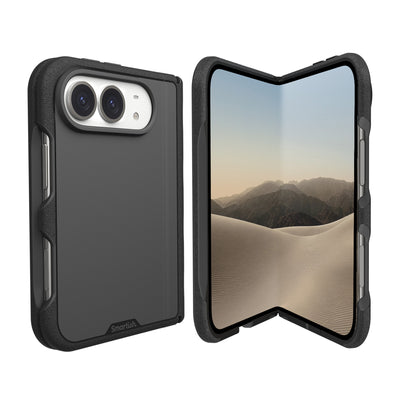
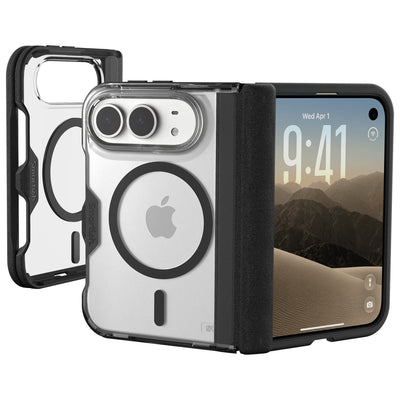
The Best cases with MagSafe charging compatibility keep your charger, car mount, and wallet attached without turning your iPhone into a slippery brick. For a practical balance of grip, everyday protection, and magnetic charging support, Smartish Gripmunk is our standout value pick.
Key Takeaways
- Smartish Gripmunk offers strong value because it pairs a secure grip with reliable magnetic charging support.
- A well-built MagSafe case keeps accessories like wallets and car mounts firmly attached while still protecting your phone.
- Good magnetic cases combine everyday drop protection with enough grip to prevent slips from your hand.
- Compatibility with chargers and mounts matters just as much as raw durability when choosing a MagSafe case.
Below, we compare the Smartish options named in this guide and explain what each one does best. Smartish Cases are made for real-life drops and daily carry, not just careful handling at a desk.
The Best MagSafe Cases for iPhone: Our Top Picks
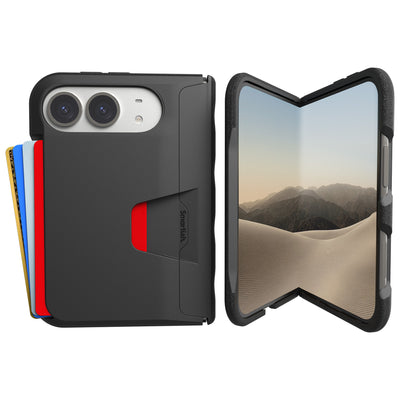
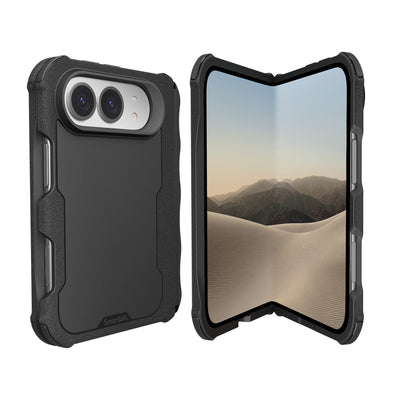
Choose Gripmunk if you want a slim, grippy case with MagSafe support for everyday charging and accessories. Pick Gripzilla if added protection matters more than keeping your case as slim as possible. Wallet Slayer Vol. 2 carries cards and has a kickstand, but it is not MagSafe, so it is not the pick for magnetic charging or snap-on accessories.
How We Evaluated Magnet Strength, Charging Speed, and Protection
A useful comparison considers more than whether a case has a magnetic ring. We look at how securely a charger or mount attaches, whether the case allows the charger to align properly, and whether its shape gives you a comfortable grip. Drop protection, raised screen and camera edges, and pocket-friendly bulk also matter.
Apple specifies MagSafe charging up to 15W, compared with up to 7.5W for standard Qi charging. Actual speed depends on the iPhone, charger, power adapter, temperature, and case, so a MagSafe label alone does not guarantee identical charging performance across cases.
Comparison Table: Specs at a Glance
| Pick | MagSafe | Best fit | What to know |
|---|---|---|---|
| Best overall: Smartish Gripmunk | Yes | Everyday grip and charging | Slim, grippy design |
| Protection: Smartish Gripzilla | Yes | More substantial case feel | Thicker build |
| Everyday carry: Smartish Wallet Slayer Vol. 2 | No | Cards and hands-free viewing | Built-in card storage and kickstand |
Top Picks by Need

The right case depends on what spends more time in your hand: a charger, a car mount, or a handful of cards. These picks cover distinct everyday needs, with magnetic charging clearly separated from the wallet-style option.
Best Value: Smartish Gripmunk, Slim, Grippy, and MagSafe-Ready
Best for: People who want magnetic charging and a dependable everyday grip without a bulky case. Gripmunk earns the best overall value spot because it brings together the features most people use daily: MagSafe compatibility, grippy sides, and a slim profile. It is an easy choice for anyone who wants to keep using a charger or mount without adding extra fuss.
Best for Protection: Smartish Gripzilla, Thicker Build, Same MagSafe Performance
Best for: Anyone who wants a more substantial case while keeping MagSafe in the mix. Gripzilla has a thicker build than Gripmunk, making it the more protective-feeling option of the two. Its MagSafe support suits people who want to keep using compatible chargers and accessories while choosing a case built for a more drop-prone routine.
Best for Everyday Carry: Smartish Wallet Slayer Vol. 2, Cards and a Kickstand
Best for: People who prefer carrying cards on their phone and want a built-in kickstand for hands-free viewing. Wallet Slayer Vol. 2 is not MagSafe, so choose it for its card-carrying design, not magnetic charging, wallets, or mounts. If MagSafe is nonnegotiable, select a different case.
Pros and Cons Summary for Each Pick
Gripmunk is the straightforward choice for everyday magnetic charging and grip. Gripzilla suits buyers who want a thicker case with MagSafe support. Wallet Slayer Vol. 2 keeps cards and a kickstand close at hand, but its non-MagSafe design rules it out for magnetic charging and snap-on accessories.
Smartish Cases focus on practical features that help with daily handling. Before buying, confirm your iPhone model and the case’s listed compatibility; a good fit beats a hopeful guess every time.
True MagSafe vs. Magnetic Ring Cases: What 'Compatible' Actually Means
“MagSafe compatible” should mean more than a decorative ring printed on a case. A properly designed magnetic case aligns an iPhone with a MagSafe charger and helps compatible accessories attach securely. That alignment matters for charging, but also for keeping a wallet on the back of your phone instead of somewhere under the car seat.
How MagSafe Works: The Magnet Array Behind the Charger
MagSafe uses a ring of magnets around the iPhone’s wireless charging area. A compatible case includes magnets positioned to match that arrangement, helping the charger sit in the right spot. Apple lists MagSafe charging up to 15W on supported iPhone and charger combinations; actual performance depends on the device, charger, power adapter, temperature, and case.
That’s why magnetic attachment and wireless charging belong in the same conversation. A case can allow charging through its back while still positioning a charger poorly. For the Best cases with MagSafe charging compatibility, look for clear model-specific support, a well-aligned magnet array, and a connection that feels secure in ordinary use.
The Weak-Magnet Problem: Why Some 'MagSafe' Cases Fall Off Mounts
A weak or misaligned magnetic ring may hold a charger on a desk but struggle with a wallet, car mount, or bumpy commute. Case material and thickness can also affect the connection. A case that adds too much distance between the iPhone’s magnets and an accessory may reduce attachment strength or interfere with charging alignment.
Don’t treat the word “magnetic” as proof of reliable MagSafe performance. Check the manufacturer’s compatibility details and return policy, then test the connection with your own accessories. Smartish Cases are designed for everyday handling, and the exact iPhone model listed for each case is the fit that counts.
A 30-Second Test to Spot Fake MagSafe Compatibility
Place a MagSafe charger on the case and check whether it snaps into a centered position. Lift the phone by the case and gently tilt it: the charger should stay attached without sliding around. Then try a wallet or mount you already own. If the accessory shifts with light movement, the connection may not suit daily use.
Charge briefly and check that the phone reports charging and that the charger remains aligned. This quick check can’t certify a case’s full performance, but it catches obvious problems before a wallet makes a bid for freedom at a crosswalk.
| Check | What to look for | Why it matters |
|---|---|---|
| Magnet alignment | Charger settles into a centered position | Supports reliable charging placement |
| Attachment | Wallet or mount stays put during gentle movement | Helps prevent slips during everyday use |
| Model fit | Case listing names your exact iPhone | Magnet placement and dimensions vary by model |
Charging Speed and Accessory Performance Through a Case
A case shouldn’t make wireless charging a guessing game. Fit, thickness, material, and magnet placement can all affect how well a charger connects, while the phone and power adapter also shape charging speed. Compare cases using the same iPhone, charger, adapter, and starting battery level for a fair test, then watch for inconsistent connection or unusual warmth.
Does Case Thickness Slow Down MagSafe Charging?
It can. A thicker case may create more distance between the charger and the iPhone, making alignment and energy transfer less efficient. Cases thicker than 3mm may weaken the magnetic connection and reduce charging efficiency, so a bulky build deserves a closer test rather than an automatic pass.
Apple’s MagSafe specification allows up to 15W on supported combinations, while standard Qi charging can reach up to 7.5W on iPhone. Those are maximums, not promises for every setup. If charging feels inconsistent, remove the case once and compare the connection; also check the adapter, charger placement, and phone temperature before blaming the case alone.
Wallets, Car Mounts, and Stands: What Stays Attached (and What Doesn't)
Chargers, magnetic wallets, stands, and car mounts place different demands on a case. A wallet may stay attached at rest yet slide when pulled from a tight pocket. A mount has to hold through turns and road vibration, while a stand needs a stable connection as you tap the screen. Test the accessory you actually use, not just the charger included in a product photo.
For the Best cases with MagSafe charging compatibility, secure attachment and comfortable handling should go together. If a case feels awkwardly thick or its sides are slippery, magnetic convenience won’t fix the everyday grip problem. Check that accessories attach squarely and that the phone remains easy to pick up and use.
Compatibility: iPhone 12 Through iPhone 18 Pro, Pro Max, and Duo
MagSafe debuted with the iPhone 12 generation, but case compatibility is not universal across every iPhone released since then. Camera openings, button placement, dimensions, and magnet positioning can vary. Choose a case listing that names your exact model, rather than assuming that a case for another generation will fit because both phones support magnetic charging.
Apple announced iPhone 18 Pro, iPhone 18 Pro Max, and iPhone Duo on September 9, 2026. For those models, confirm that the case maker specifically lists the exact device and its accessories before ordering. That check matters especially for iPhone Duo: do not assume a standard iPhone case or accessory fits a foldable design. Compatibility needs a model-specific confirmation, not optimistic guesswork.
How to Choose: A Quick Decision Framework

The Best cases with MagSafe charging compatibility should fit your daily routine, not just your charger. Start with three questions: Do you want a slim feel, more coverage for drops, or room for cards? Then check the exact iPhone model, accessory support, and return policy before you buy. Smartish Cases are a practical place to start if you want everyday grip and protection without turning your phone into a pocket brick.
Pick by Priority: Slim, Protective, or Wallet-Style
Choose a slim case if comfort, easy pocket access, and regular wireless charging come first. If your phone meets hard floors more often than you’d like, consider a more substantial design with protective edges. Prefer fewer things to carry? A wallet-style case can keep cards close, but check whether it supports MagSafe before expecting magnetic charging or snap-on accessories.
Next, match the case to how you use your phone: test the grip in one hand, check that buttons remain easy to press, and confirm that your charger and mount attach securely. Cases thicker than 3mm may weaken magnetic connection and reduce charging efficiency, so look beyond appearance alone. Smartish Cases offer options for different carry preferences; verify the listing for your model before ordering.
FAQs About MagSafe Cases
What is the best MagSafe case for iPhone? The right choice depends on your priorities. For a slim everyday case with grip and MagSafe support, Gripmunk is the value pick in this comparison.
How much does a MagSafe case cost? Prices vary by brand, model, and features. Check current listings for the exact case and iPhone rather than relying on a general price range.
How do I choose the right MagSafe case? Confirm exact-model fit, magnetic accessory support, comfort, and the level of drop protection you need. Review the return policy in case the fit or connection falls short.
Is a MagSafe case worth it for iPhone? It can be useful if you regularly use magnetic charging, a wallet, or a car mount. If you do not use those accessories, prioritize grip and protection instead.
What should I avoid when comparing MagSafe cases? Avoid vague compatibility claims, unclear model listings, and assuming every magnetic ring holds accessories equally well. Check the connection with your own charger or mount when possible.
The Bottom Line
For a balanced mix of daily grip, a slim feel, and magnetic convenience, Gripmunk is the standout value recommendation. The Best cases with MagSafe charging compatibility are the ones that fit your exact iPhone and keep your accessories useful without making everyday carry a chore.
Frequently Asked Questions
What does MagSafe compatible mean for a phone case?
A MagSafe compatible case has magnets positioned to match the ring of magnets around your iPhone's wireless charging area. That alignment lets a MagSafe charger sit in the right spot for charging up to 15W and helps accessories like wallets and car mounts attach securely instead of sliding off.
Do all MagSafe cases charge at the same speed?
No, a MagSafe label alone does not guarantee identical charging performance across cases. Apple specifies MagSafe charging up to 15W versus up to 7.5W for standard Qi, but actual speed depends on your iPhone, charger, power adapter, temperature, and the case itself.
How can I tell if a case is truly MagSafe compatible?
Look for clear model-specific support, a well-aligned magnet array, and a connection that feels secure in everyday use. A weak or misaligned ring may hold a charger on a desk but fail with a wallet or car mount, so check the manufacturer's compatibility details and return policy, then test with your own accessories.
Will a MagSafe case work with my MagSafe wallet and car mount?
A properly designed MagSafe case will work with a MagSafe wallet and car mount, but strength varies between cases. Case material and thickness matter: too much distance between the iPhone's magnets and an accessory can reduce attachment strength or interfere with charging alignment, which is why accessories can end up under the car seat with cheap cases.
What is the best MagSafe case for drop protection?
The Smartish Gripzilla is the best pick for drop protection while keeping MagSafe support. Its thicker build feels more substantial than the slim Gripmunk, making it a better fit for a more drop-prone routine, and it still works with compatible MagSafe chargers and accessories.
Is the Smartish Wallet Slayer Vol. 2 MagSafe compatible?
No, the Smartish Wallet Slayer Vol. 2 is not MagSafe compatible. It is designed for carrying cards and includes a built-in kickstand for hands-free viewing, so choose it for everyday carry convenience rather than magnetic charging or snap-on accessories.
Do I need to check my iPhone model before buying a MagSafe case?
Yes, always check the exact iPhone model listed on the product page before ordering, since case fit is model-specific. This applies whether you are buying for an iPhone 18 lineup device, an iPhone Duo, or an older iPhone 17 or 16, because a good fit beats a hopeful guess every time.