




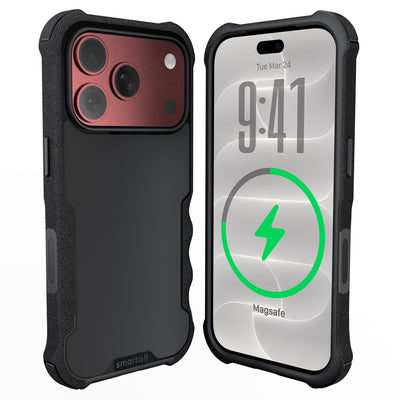




Slim protective phone case
A slim protective phone case should guard against everyday bumps without turning your phone into a pocket brick. Look for grippy sides, air-pocket corners, impact-absorbing edges, a raised screen edge, a raised camera ring, and buttons that still feel good to press.
Key Takeaways
- You can get serious drop protection without adding bulk when a case uses smart design features like air-pocket corners and impact-absorbing edges.
- Textured sides give you the grip you need so your phone stays in your hand instead of hitting the pavement.
- A well-designed case keeps both your screen and camera lens lifted off flat surfaces with raised edges to prevent scratches.
- Do not settle for mushy buttons, because a quality case should still give you that satisfying click every time you press them.
This guide covers what slim protection can and can’t do, which features matter, and how to compare a case with your daily routine.
What is a slim protective phone case?
A slim protective phone case is a low-profile cover that helps guard against scratches, scuffs, bumps, and everyday drops while adding less bulk than a heavily built case. The design still needs a snug fit, air-pocket corners, impact-absorbing edges, a raised screen edge, and a raised camera ring.
Thickness is only one part of the equation. An ultra thin phone case may handle surface scratches but leave little room for corner structure or lifted edges. A well-designed slim case puts material around the frame, corners, display, and cameras. The areas most likely to meet a table, car console, or sidewalk.
For a low-profile case with MagSafe compatibility, see the Gripmunk slim case for iPhone 16 Pro. It has air-pocket corners, raised screen and camera edges, textured sides, and a soft microfiber interior lining. It provides access to the iPhone 16 Pro Camera Control button and has been tested for drop protection; this does not guarantee protection from every drop. The same basic checklist applies when choosing a case for iPhone 17.
What are the benefits of a slim protective phone case?
A low-profile case takes up less room in a pocket or small bag and feels easier to hold during one-handed scrolling, commuting, or taking photos. That matters if your phone spends the day in your hand instead of parked safely on a desk.
Good slim cases keep the controls practical, too. Covered buttons should click clearly, while precise speaker, microphone, Camera Control, and charging-port cutouts should remain easy to use. Textured sides add grip without feeling sticky.
Protection comes from construction, not a thickness contest. Air-pocket corners and flexible impact-absorbing edges can help manage everyday impacts, while raised edges keep the screen and camera from resting directly on a flat surface. No case makes a phone drop-proof.
MagSafe compatibility is a separate feature. For background on the technology, read how MagSafe works, then check the case’s magnetic support, fit, and accessory compatibility.
How do you choose a slim protective phone case?
Choose a case that fits your exact phone model and covers the areas most likely to meet hard surfaces. Compare protection, handling, and charging support before you buy. Especially if you’re looking for a thin phone case for iPhone 16 or a case for iPhone 17.
1. Check the protection details
Look for air-pocket corners, impact-absorbing edges, a raised screen edge, and a raised camera ring. The raised screen edge helps keep the display off a flat surface. The camera ring creates separation for the lenses when the phone rests on its back.
2. Pay attention to handling
Side texture, button response, and fit affect every pickup. Covered buttons should click without a fingernail workout. Port cutouts should leave room for the charging cable, and the Camera Control button should have the correct cutout where the model requires it.
3. Confirm charging compatibility
If you’re shopping for an ultra thin phone case or an ultra thin iPhone case, confirm charging and accessory support before buying. With MagSafe, check magnetic hold, charging alignment, and mount stability separately.
Wallet cases solve a different problem by carrying cards inside the case. Wallet Slayer Vol. 1 and Wallet Slayer Vol. 2 offer card storage, but they’re thicker than a slim case. Wallet Slayer Vol. 2 also includes a kickstand. Neither wallet case should be treated as MagSafe compatible.
4. Match the case to your priorities
Pick based on the jobs your phone does all day. Gripmunk is the slim choice for a lighter feel and MagSafe compatibility. Gripzilla adds a more protective build with a rigid backplate while keeping the same MagSafe support.
References
- https://pubmed.ncbi.nlm.nih.gov/27454312/
- https://www.ncbi.nlm.nih.gov/pmc/articles/PMC6217968/
- https://en.wikipedia.org/wiki/Mobile_phone_accessories
Frequently Asked Questions
Will a super thin case still protect my phone from drops?
It may help with impacts if the design includes reinforced corners, flexible impact-absorbing edges, a snug fit, and a raised lip around the screen and camera. No case can promise an accident-proof phone.
How thin is too thin for reliable protection?
There is no single cutoff because material, construction, fit, and phone model all matter. Choose a profile that gives you the handling and edge coverage you need.
Can MagSafe work through some ultra-thin cases?
Compatibility depends on magnetic alignment, case material, and the distance between the phone and accessory. Check exact support for your phone model, charger, wallet, or mount.
What is the thinnest iPhone case with MagSafe?
There is no universal winner because published thickness measurements and protection features vary by model and measurement method. Decide which jobs. Grip, corner coverage, and magnetic alignment. Matter most before choosing. For an overview of related accessory compatibility, compare the accessory type with your case’s stated support.