








Key Takeaways
- Custom design phone cases allow you to personalize your device with unique artwork and style.
- These cases provide essential protection tailored to your phone's needs.
- Unlike generic mass-produced cases, custom cases make a personal statement.
- You can customize both the aesthetic and the level of protection for your phone.
- Custom cases maintain daily functionality while offering personalized design.
Table of Contents
- What Is a Custom Design Phone Case, Really? (And Why It's Worth Caring About)
- Types of Custom Phone Cases and What They're Best For
- How to Design Your Own Custom Phone Case from Scratch (Step-by-Step)
- Final Pre-Order Checklist
- Choosing the Right Materials and Finish for Your Custom Case
- Creative Ideas for Custom Design Phone Cases (That Aren't Boring)
Custom Design Phone Cases: The Complete Guide to Making One That's So You
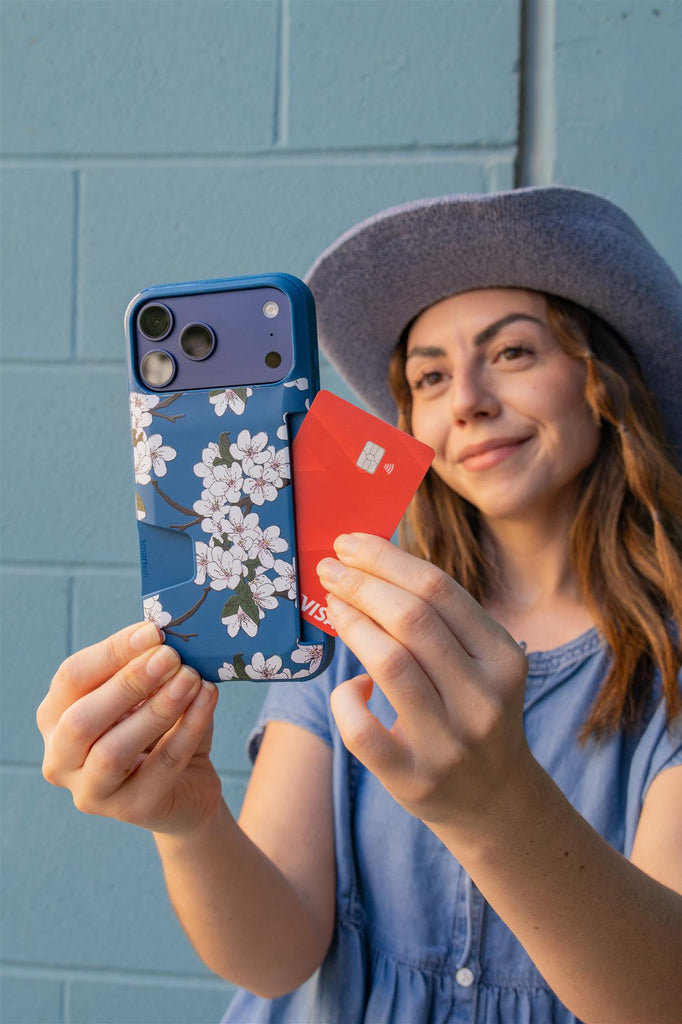
Custom design phone cases transform your most-used device into a personal statement while delivering the protection your phone actually needs. Unlike mass-produced cases that scream "generic," custom cases let you control everything from the artwork to the protection level, creating something that's uniquely yours without sacrificing drop protection or daily functionality.
The best custom cases combine personal expression with real-world durability, think air-pocket corners, raised screen edges, and MagSafe compatibility wrapped in your favorite photo, logo, or design. Whether you're designing one case for yourself or planning bulk orders for an event, understanding the process upfront saves time, money, and disappointment. For more inspiration on how to create a custom iPhone case that stands out, check out this helpful guide.
What Is a Custom Design Phone Case, Really? (And Why It's Worth Caring About)
Custom Phone Case, Defined in Plain English
A custom design phone case puts you in control of the artwork, colors, text, and sometimes even materials that make up your case. This goes beyond picking from pre-made designs, you're uploading your own photos, creating graphics, or working with templates to build something from scratch.
Customization comes in three main flavors: print-only (your art on a standard shell), hybrid (design plus choosing colors, finishes, and text), and fully tailored (controlling material, style, print, and sometimes grip features). Most people start with print-only since it's straightforward and accessible.
Why People Love Custom Cases: The Big Three Benefits
Personal expression turns your phone into a mini billboard for your personality. Instead of carrying the same black rectangle as everyone else, your case becomes a conversation starter, memory keeper, or brand ambassador that reflects who you are.
Function plus style means you don't sacrifice protection for looks. Modern custom cases include air-pocket corners, ~1mm raised screen edges, raised camera rings, and MagSafe compatibility while showcasing your design. The protection features work behind the scenes while your artwork takes center stage.
Memorable gifting makes custom cases go-to presents for birthdays, graduations, weddings, and holidays. A case featuring someone's pet, favorite quote, or shared memory hits different than generic accessories, it shows thought and effort while being practical enough to use daily.
Personalization vs Protection – You Don't Have to Pick One
The myth that "custom equals flimsy" comes from early print-on-demand cases that prioritized fast production over durability. Today's quality custom cases start with proven protective builds, then add your design on top.
A well-designed custom case includes impact-absorbing corners, ~1mm raised screen edge for face-down protection, raised camera ring for lens safety, and comfortable grip textures. These features work whether you're commuting daily like On-the-go Owen, upgrading annually to the latest tech like Tech Enthusiast Ted (including the iPhone 17), or juggling kids and content creation like busy parents.
Types of Custom Phone Cases and What They're Best For

Core Case Styles (And When to Use Each)
Slim cases deliver everyday protection without bulk, featuring low-profile edges and lightweight builds. They work perfectly for office environments, casual daily use, and anyone who prioritizes MagSafe compatibility without extra thickness.
Protective cases step up the defense with thicker edges, rigid backplates, and extra impact absorption. Choose these for active lifestyles, frequent travelers, or anyone who needs confidence during outdoor adventures and busy commutes.
Wallet cases combine protection with storage, holding 1-3 cards plus folded cash while protecting your phone. Some include kickstand functionality for hands-free video calls and content viewing. Perfect for minimalists who want to travel light.
Popular Materials: Feel, Durability, and Print Quality
TPU (thermoplastic polyurethane) offers flexibility and impact absorption with excellent grip and vibrant print reproduction. It's the go-to choice for most custom cases because it balances protection, comfort, and visual quality.
Polycarbonate provides a rigid, hard back that delivers crisp print quality and excellent photo clarity. When combined with TPU edges in hybrid construction, you get the best of both worlds, soft, grippy edges with a hard, protective backplate.
Silicone delivers maximum grip and soft touch but attracts dust and lint more than other materials. Premium materials like leather, wood, and metal offer unique textures but work better with engraving than full-color printing.
Specialty Types: When You Want Something Extra
MagSafe-compatible cases include built-in magnets that work seamlessly with wireless chargers, car mounts, and magnetic wallets. Both slim and protective styles can include MagSafe without compromising drop protection.
Clear custom cases feature anti-yellowing technology and work best with logo overlays, text designs, or subtle photo elements that let your phone's original color show through.
Eco-friendly options use plant-based or recycled materials but may involve trade-offs in durability or print vibrancy compared to traditional plastics.
Comparison Table – Which Case Type Fits Your Life?
| Case Type | Bulk Level | Protection Level | Best For | Typical Custom Options |
|---|---|---|---|---|
| Slim (Gripmunk-style) | Low | Everyday | Office use, MagSafe accessories | Full-color prints, text, logos |
| Protective (Gripzilla-style) | Medium | High-impact | Active lifestyles, frequent travel | Photos, graphics, business branding |
| Wallet (Vol. 1/Vol. 2 style) | Medium-High | All-around | Minimalist carry, travel | Monograms, leather textures, embossing |
| Clear | Low | Basic | Showing device color, subtle designs | Transparent overlays, edge accents |
| Bumper/Frame | Minimal | Edge-focused | Wireless charging priority | Side patterns, grip textures |
| Flip/Folio | High | Full coverage | Screen protection, card storage | Cover art, interior personalization |
How to Design Your Own Custom Phone Case from Scratch (Step-by-Step)
Step 1 – Pick the Right Phone Model (Don't Skip This)
Tiny differences between phone generations, camera layouts, new buttons like Camera Control, port changes, can make your custom design phone cases fit poorly or cover important features. The iPhone 15 Pro's camera island differs from the iPhone 14 Pro, and the iPhone 17 will likely introduce new considerations.
Double-check your exact model name and year before clicking "Add to Cart." Most phones display this information in Settings > General > About, taking under 30 seconds to confirm.
Step 2 – Choose Your Case Style and Protection Level
If you toss your phone in bags, backpacks, or gym lockers, choose protective cases with thicker edges and rigid backplates. For slim profile lovers, prioritize drop-tested cases that maintain low bulk. Wallet cases work best if you hate carrying separate wallets and only need 1-3 cards plus folded cash.
Look for air-pocket corners, raised edges around the screen, raised camera rings, and comfortable grip textures. These features protect your phone regardless of which design you print on top.
Step 3 – Prepare Your Artwork the Right Way
Aim for 150-300 DPI at final print size to avoid pixelated results. For a typical 6" × 3" case area, upload images at least 1800 × 900 pixels. Use JPEG or PNG for photos, PNG for graphics with transparent backgrounds.
Leave 3-5mm around all edges for trimming and keep important text or faces inside the safe zone, away from camera cutouts and corners where printing can be inconsistent.
Step 4 – Upload, Position, and Align Your Design
Use grid guides to center key elements and avoid cropping faces or logos at edges. Pay special attention to camera cutouts, ports, and the camera control button, these areas won't print and can interrupt your design if not planned for.
Spend 2-3 minutes zooming and rotating previews before ordering. What looks centered on your computer screen might appear off-balance on the actual case.
Step 5 – Add Text Without Making It Look Chaotic
Use minimum 8-10 point equivalent for small captions, 16-24 point equivalent for names or quotes that should be readable at arm's length. Dark text works on light photo areas; add outlines or shadows when placing text over busy backgrounds.
Three placement approaches that usually work: bottom third of the case, vertical text along one edge, or centered horizontal band across the middle.
Step 6 – Finishing Touches: Filters, Collages, and Layouts
Use filters sparingly, they can muddy colors when printed on cases. For photo collages, stick to 2-4 images per case for clarity; more than 6 photos typically results in faces too small to recognize.
Three reliable layout archetypes: grid arrangement for multiple photos, single hero image centered with text, or full-bleed artwork that extends to all edges.
Final Pre-Order Checklist
□ Phone model and generation confirmed
□ Design orientation matches phone position
□ Text spelling and grammar checked
□ Important elements 5mm from edges
□ Camera cutout doesn't interrupt key design elements
□ MagSafe compatibility confirmed if needed
□ Image resolution 150+ DPI at print size
□ Preview checked at 100% zoom
Print a mental screenshot of your design preview and imagine using it daily. Does the text remain readable when your phone sits on a table? Will the main image still look good after six months of handling? These final checks prevent disappointment when your custom design phone cases arrive.
Choosing the Right Materials and Finish for Your Custom Case

How Material Changes Protection, Grip, and Weight
Softer materials like TPU absorb impact better through flex and compression, while rigid backplates distribute force across a wider area. Cases with rigid backplates feel more solid in hand but add 10-15 grams compared to fully soft builds.
Prioritize lightweight builds (30-40g) for all-day comfort during calls and texting. Choose heavier-duty construction when your phone regularly faces drops from pocket height or higher during outdoor activities. For more on the science behind case materials and their properties, see this engineering activity on designing cellphone cases.
TPU vs Silicone vs Polycarbonate – A Simple Breakdown
TPU offers the best balance: flexible enough for easy installation, rigid enough for sharp print quality, and naturally grippy without collecting lint. Silicone provides superior grip but attracts dust and can feel sticky rather than grippy over time.
Polycarbonate delivers the sharpest print quality for photo-heavy designs but requires TPU edges for proper shock absorption. Hybrid constructions combine polycarbonate backs with TPU edges for both crisp printing and reliable protection.
Finish Options: Glossy, Matte, Textured, and Clear
Glossy finishes make colors more vibrant but show fingerprints and minor scratches easily. Matte finishes reduce glare and hide daily wear while giving photos a softer, more artistic appearance.
Textured sides create grippy surfaces that improve one-handed use without feeling sticky. Anti-yellowing clear finishes work best when you want subtle design overlays or to showcase your phone's original color alongside custom elements.
| Material | Best Finish | Pros | Watch Outs | Best Use Case |
|---|---|---|---|---|
| TPU | Matte or Textured | Flexible, good grip, sharp prints | Can yellow over 12+ months | Daily protection with custom art |
| Silicone | Matte | Superior grip, soft feel | Attracts lint and dust | Workout and outdoor use |
| Polycarbonate | Glossy | Crisp photo quality, rigid | Slippery alone, brittle without TPU edges | Photo-focused custom designs |
| Hybrid | Glossy back, textured edges | Print quality + protection | Slightly more expensive | Premium custom cases |
Creative Ideas for Custom Design Phone Cases (That Aren't Boring)
For Everyday You: Personal Expression Ideas
Minimalist monograms with clean sans-serif fonts work across any case color and remain readable at arm's length. Color-block patterns using 2-3 signature colors create visual interest without overwhelming the design or competing with app icons.
Choose favorite quotes under 6-8 words and use high-contrast backgrounds, white text on dark photos or dark text on light areas. Avoid script fonts smaller than 18-point equivalent; they become illegible when printed on textured surfaces.
Photo & Collage Cases That Don't Turn Muddy
Select 1-3 high-resolution hero photos instead of cramming 10 tiny images that become unrecognizable. Use background blur to focus attention on faces while softening busy backgrounds that compete for visual space.
Three reliable formulas: family portrait centered with names below, close-up pet photo filling 80% of the case, or travel landmark as background with date overlay. Keep faces at least 15mm wide when printed for clear recognition. For more ideas on the latest trends, check out these cute iPhone 17 cases for inspiration.
Matching Sets for Couples, Friends, and Teams
Create split illustrations that connect when phones sit side by side, puzzle pieces, shared landscapes, or complementary color gradients. Use shared color palettes with different names or roles to maintain visual cohesion across multiple custom design phone cases.
Seasonal sets work well for gifts: holiday themes, wedding party coordination, or game day team colors. Order all cases simultaneously to ensure color consistency across the batch.
AI-Generated and Digital Art Designs
When prompting AI tools, you can experiment with unique digital artwork that truly sets your phone case apart. For a deeper dive into the history and evolution of phone cases, see the Wikipedia article on phone cases.
Frequently Asked Questions
What are the different types of custom design phone cases and how do I choose the best one for my needs?
Custom design phone cases come in three main types: print-only, where your artwork is printed on a standard case; hybrid, which lets you customize colors, finishes, and add text; and fully tailored, offering control over materials, style, and grip features. Choose based on how much control you want over design and protection, print-only is great for quick personalization, while fully tailored suits those who want a unique look and feel.
How can I design a custom phone case from scratch, and what steps should I follow to ensure a great result?
Start by selecting your case model and size to match your phone. Next, upload your artwork or create a design using templates, paying attention to placement and resolution. Choose colors, finishes, and any text or effects you want. Finally, review your design carefully before ordering to ensure it looks just right and fits your style and protection needs.
What materials and finishes are available for custom phone cases, and how do they affect protection and style?
Common materials include flexible TPU, hard polycarbonate, and hybrid blends, each offering different levels of durability and grip. Finishes range from matte and glossy to anti-yellowing clear options. Your choice impacts both protection, like shock absorption and scratch resistance, and the look, so pick what matches your lifestyle and personal style best.
Can custom phone cases provide the same level of protection as mass-produced cases without sacrificing personal expression?
Yes, custom phone cases can offer solid protection with features like air-pocket corners, raised screen edges, and precise cutouts while letting you express your unique style. The key is choosing a custom case design that balances durability with your personal artwork or colors, so you don’t have to compromise on protection or personality.