






best wireless charging phone
Wireless charging turns your phone into a drop-and-go device. No cables, no worn-out ports. The best wireless charging phone in 2026 combines fast Qi2 or MagSafe speeds with solid battery life. This guide cuts through the noise with phones that actually deliver--and case options that keep charging at full speed.
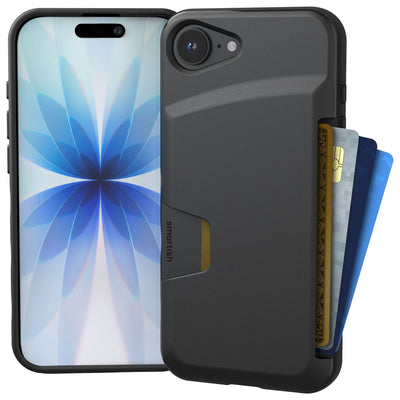
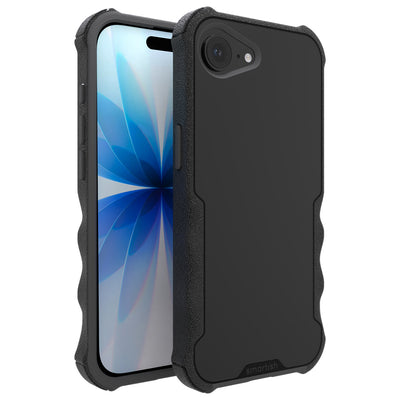
iPhone 17 Pro and Samsung Galaxy S25 Ultra lead for speed and reliability at 15W. Google Pixel 10 Pro offers excellent value with reverse charging, while Samsung Galaxy A56 and Motorola Edge 2026 bring wireless power under $200. All work with MagSafe-ready cases like Gripmunk (slim) or Gripzilla (protective)--no speed throttling, just protection that works.
Top Wireless Charging Phones for 2026
Flagship Picks: Samsung Galaxy S25 Series and iPhone 17 Pro
iPhone 17 Pro delivers 15W MagSafe charging and reverse power sharing for AirPods. Samsung Galaxy S25 Ultra matches that with Qi2 support, plus faster wired speeds. Both handle cases with air-pocket corners without throttling.
Google Pixel 10 Lineup and Foldables
Google Pixel 10 and 10 Pro support Qi2 at 12W, with reverse charging for earbuds. Pixel Fold 2 adds wireless power to a foldable form--check case compatibility due to its thicker profile. All three integrate with Android's adaptive charging to preserve battery health.
OnePlus 15 and Motorola Edge Options
OnePlus 15 brings Qi2 with 10W wireless and 80W wired for hybrid users. Motorola Edge 2026 sticks to standard Qi at 7.5W but keeps pricing reasonable. Both work with raised-camera-ring cases.
| Phone | Wireless Standard | Max Speed | Reverse Charging |
|---|---|---|---|
| iPhone 17 Pro | MagSafe | 15W | Yes |
| Samsung Galaxy S25 Ultra | Qi2 | 15W | Yes |
| Google Pixel 10 Pro | Qi2 | 12W | Yes |
| OnePlus 15 | Qi2 | 10W | No |
Wireless Charging Standards Explained
Qi vs Qi2 vs MagSafe Breakdown
Qi is the universal baseline at around 7.5W for most Android phones. Qi2 adds magnetic alignment and pushes speeds to 15W--it's basically MagSafe's snap-in design going universal. MagSafe stays exclusive to iPhones at the same 15W with a tighter accessory ecosystem. Learn more about the Qi standard here.
Charging Speeds and Reverse Power Sharing
15W fills your battery in under two hours. Heat management matters more than raw watts, though--throttling kills speed faster than a lower-watt charger. Reverse charging lets you power earbuds or a friend's device by placing it on your phone's back. Handy for emergencies without extra cables.
Android vs iOS: Key Differences
iPhones lock to MagSafe for peak speeds; third-party Qi chargers max out at 7.5W. Android phones with Qi2 hit 15W on any certified pad. More charger choices, less vendor lock-in.
Case Compatibility and Charging Tips
How Cases Affect Wireless Charging
Thick cases or metal plates block the magnetic field, cutting speeds or stopping charging. Stick to cases under 3 mm with no metal inserts. Air-pocket corners and raised edges add drop protection without interference.
MagSafe-Ready Cases That Don't Kill Speed
MagSafe cases snap chargers into perfect alignment. Look for built-in magnets rated for 15W to avoid weak holds. Gripmunk keeps things slim with finger grooves, while Gripzilla adds a rigid backplate. Both pass the same drop tests and charge at full 15W.
Gear Up Smart(ish): All Smartish cases feature air-pocket corners and raised edges for face-down protection. Gripmunk and Gripzilla are MagSafe compatible--your charger clicks on without fuss. Customize any case to match your style.
Budget Phones with Wireless Charging Under $200
Affordable Samsung and Google Picks
Samsung Galaxy A56 brings Qi charging at 7.5W for around $180, with a 5,000 mAh battery that lasts all day. Google Pixel 9a drops to $150 on carrier deals, supporting Qi at 7.5W with adaptive charging to extend battery lifespan. Both protect lenses with raised camera rings.
Realme, Motorola, and OnePlus Deals
Realme GT Neo 7 hits $190 with Qi support and 65W wired for fast top-ups. Motorola Edge 2026 stays under $200 with 7.5W wireless. OnePlus Nord 5 offers Qi at 10W for $185--speed and affordability without cutting corners.
Value Comparison for Everyday Users
Budget phones sacrifice speed, not functionality. Expect 7.5W to 10W wireless--enough for overnight charging or desk use. For commuters, pair with car mounts that charge while navigating.
| Phone | Price | Wireless Speed | Battery |
|---|---|---|---|
| Samsung Galaxy A56 | $180 | 7.5W Qi | 5,000 mAh |
| Google Pixel 9a | $150 | 7.5W Qi | 4,500 mAh |
| Realme GT Neo 7 | $190 | 7.5W Qi | 5,200 mAh |
| OnePlus Nord 5 | $185 | 10W Qi | 4,800 mAh |
Maximize Your Wireless Phone Setup
Accessory Pairings for On-the-Go Charging
Car mounts with built-in Qi keep your phone charged during commutes. Desk stands angle your screen for notifications while powering up--perfect for video calls. Portable battery packs with wireless output let you charge on hikes or flights without hunting for outlets. Learn more about wireless charging technology at the Energy Saver website.
Reverse Charging Use Cases and Troubleshooting
Place earbuds or a smartwatch on your phone's back to share power. Reverse charging drains your battery faster, so use it sparingly. If charging stops mid-cycle, remove your case and check for metal objects or thick wallet inserts blocking the coils.
Quick Test: Does Your Phone Work with Cases?
Drop your cased phone on a charger. Powers up within two seconds? You're set. Slow or intermittent charging means the case is too thick or misaligned. Gripmunk and Gripzilla both pass this test--raised edges for face-down protection, finger grooves for grip, full charging speed.
Pro Tip: Test charging with your case before a trip. Smartish cases with air-pocket corners won't block signals or slow speeds. Pair with a Qi2 or MagSafe pad for reliable power at home, work, or anywhere you set your phone down.
Final Recommendations: Which Wireless Charging Phone Fits Your Life?
Flagship Users: Speed and Ecosystem Matter
iPhone 17 Pro and Samsung Galaxy S25 Ultra dominate with 15W speeds and reverse charging. If you're deep in the ecosystem with AirPods or Galaxy Buds, the magnetic alignment of MagSafe or Qi2 makes daily charging effortless. Both work flawlessly with Gripzilla's rigid backplate and raised camera ring. For top MagSafe experience, see details on MagSafe.
Budget Shoppers: Prioritize Battery Over Speed
Samsung Galaxy A56 and Google Pixel 9a prove wireless charging doesn't require flagship prices. At 7.5W, overnight charging fills the tank without overheating. Pair with Gripmunk for slim protection and finger grooves that make one-handed use feel natural.
Android Flexibility vs iOS Simplicity
Android users gain charger freedom with Qi2, hitting peak speeds on any certified pad. iOS locks to MagSafe for 15W, but third-party Qi chargers still work at reduced rates. Choose based on your existing accessories and app preferences, not charging specs alone.
Smartish Take: The best wireless charging phone balances speed with real-world durability. Gripmunk and Gripzilla both pass drop tests and charge at full speed--air-pocket corners absorb impact, raised edges protect your screen face-down. Customize any case because function shouldn't look boring.
Future-Proofing Your Wireless Charging Setup
Qi2 Adoption Means More Accessory Choices
As Qi2 becomes standard across Android flagships, expect car mounts, desk stands, and portable chargers to follow. Magnetic alignment eliminates the guesswork of older Qi pads. Invest in Qi2-certified accessories now to avoid replacing gear when you upgrade phones in 2027.
Reverse Charging Expands Beyond Earbuds
Future devices like smart rings and AR glasses will rely on reverse charging for quick top-ups. Phones with 5,000 mAh batteries can spare power without dying mid-day. Test this feature with your current earbuds or smartwatch to see if it fits your workflow.
Case Design Evolves with Charging Tech
Thinner magnets and better heat dissipation mean future cases will charge faster without adding bulk. Smartish already builds MagSafe compatibility into Gripmunk and Gripzilla without sacrificing drop protection. You don't need to choose between safety and speed.
Make Wireless Charging Work for You
Match Your Phone to Your Daily Routine
Desk workers benefit from stands that angle screens for notifications while charging. Commuters need car mounts that power phones during navigation. Parents juggling kids want reverse charging to top off earbuds without digging for cables. Pick based on where you actually use it, not just specs on paper.
Test Your Case Before Buying Chargers
Drop your cased phone on a friend's charger or in-store demo before investing in pads. Gripmunk and Gripzilla work with Qi2 and MagSafe out of the box, with precise cutouts for buttons and ports. If your current case blocks charging, swap it for one with air-pocket corners that protect without interference.
Start with One Charger, Expand Later
Buy a single Qi2 or MagSafe pad for your nightstand, then add car mounts or desk stands as needs arise. Portable battery packs with wireless output cover travel without extra cables. Smartish mounts and chargers integrate with Gripmunk and Gripzilla, so your setup grows with your lifestyle instead of collecting dust.
Bottom Line: Wireless charging turns your phone into a drop-and-go tool. Flagship speeds hit 15W, budget options deliver 7.5W. Pair with a MagSafe-ready case like Gripmunk or Gripzilla, and you'll never fumble with cables again.