





iPhone 18 Pro magsafe stand
Your phone can run your calendar, guide you through a recipe, and wake you for work, yet it can still slide off a nightstand at 2 a.m. An iPhone 18 Pro magsafe stand gives it a stable home for charging, video calls, notifications, and iOS StandBy mode.
Key Takeaways
- A dedicated MagSafe stand gives your iPhone 18 Pro a secure spot for charging, video calls, and glancing at notifications without picking it up.
- iOS StandBy mode works best when your phone sits at a steady angle, which makes a reliable stand the difference between a feature you use and one you forget.
- Magnet strength and alignment are the real test, since a weak connection leads to slipped phones and interrupted charging overnight.
- If you prefer to travel light, a case with a built-in kickstand can handle most propping needs without an extra accessory on your desk.
- The best setup matches your routine, whether that is a nightstand clock, a kitchen companion for recipes, or a hands-free desk station.
The right setup depends on more than magnet strength. The case must allow a clean connection, the stand needs a steady base, and the charging hardware must maintain contact overnight. Desk duty, bedside charging, and the built-in kickstand route each have different strengths.
iPhone 18 Pro MagSafe Stands: Desk Duty vs. Nightstand Necessity
The Core Problem: Why Your Phone Needs a Stand (Beyond Just Looking Cool)
A flat charging pad can fail when the phone shifts, the cable gets nudged, or the camera bump leaves the device at an awkward angle. A vertical magnetic stand keeps the screen visible for timers, calls, calendar checks, and Zoom meetings. Portrait orientation suits notifications and calls; horizontal viewing works well for clock display, streaming, or recipes. The stand also keeps the phone away from crumbs, puddles, and dust beneath a monitor.
MagSafe Magnets: The Foundation of Rock-Solid Stability
Magnetic attachment helps only when it stays put. Research around reliable vertical mounting uses 18 Newtons (N) as a benchmark for dependable, slip-free holding force. Performance varies, so attach the phone, rotate it, shake the stand carefully, and watch for sagging or creeping. A thick case, weak magnetic ring, misaligned accessory, or camera bump that prevents flush contact can turn a confident snap into a falling phone.
Charging Reliability: No More Waking Up to a Dead Phone
Overnight failures usually come from interrupted alignment, movement, case interference, or an adapter that cannot supply the stand’s requirements. A bedside setup should stay aligned when you grab the phone for a midnight time check. Qi2 magnetic profiles can improve alignment, while newer Qi2.2 systems support charging capability up to 25 watts when the phone, charger, adapter, and compatibility details all line up. Wattage cannot fix a loose connection.
Before choosing an iPhone 18 Pro magsafe stand, check the charging standard, adapter requirements, hinge range, base weight, and exact case fit. A 0 to 150-degree adjustment range supports desk viewing and bedside StandBy mode.
Kickstand Cases: The All-in-One Convenience Play
Built-In Advantage: Always There When You Need It
An integrated kickstand puts hands-free viewing in your pocket. Prop the phone up for a recipe, workout timer, flight video, or call, then fold the support away. This suits people who change locations often. The tradeoff is mechanical wear: a ring or hinge can loosen after repeated opening, closing, and one-handed adjustments. Look for a support that opens predictably, holds its angle, and folds flat without snagging in a pocket.
Smartish Grip & Stand Cases: Grippy, Not Sticky, and Always Ready
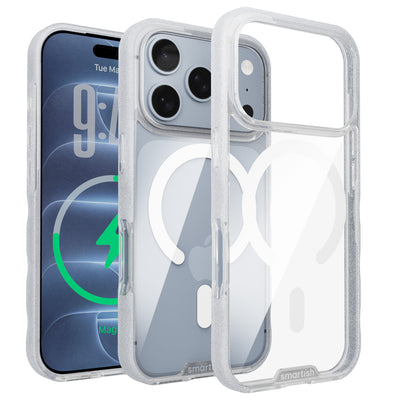
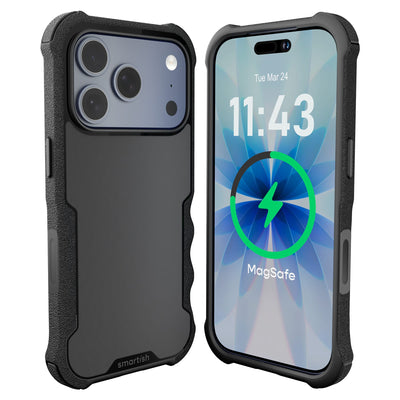
Gripmunk with MagSafe® - Slim Case for iPhone 16 Pro focuses on everyday handling. Textured sides help prevent slips without feeling sticky, while the smooth back slides into a pocket. Air-pocket corners help during drops, raised edges keep the screen and camera away from tables, and a soft microfiber interior helps prevent scratches and dings. It has been drop-tested 50 times from 6 feet with successful protection results, though no case can promise immunity from every drop.
The Gripmunk with MagSafe® - Slim Case for iPhone 16 Pro includes strong built-in magnets for MagSafe accessories and high-speed wireless charging. It provides complete access to iPhone 16’s Camera Control button through precise cutouts and reinforced edges. Colors and patterns include Solid Black, Black Tie Affair, Clearly Clear, Clearly Black, Blues on the Green, So Jaded, Moving Mountains, Striped Up, and Wildflower Fields. The price ranges from $19.99 to $24.99. It is designed specifically for iPhone 16 Pro, not confirmed protection or fit for an iPhone 18 Pro.
MagSafe Compatibility Check: Does Your Case Play Nice?
Check for a properly positioned magnetic ring, a slim charging area, and enough camera clearance. The case should sit flush against the charging surface rather than rest on the camera bump. Test portrait and horizontal positions, then tap near the top edge. If the phone shifts, the magnet or alignment is not sufficient for a wall-mounted or bedside setup.
Pros and Cons of Integrated Kickstand Cases
Pros
- Hands-free support travels with the phone.
- One purchase can cover grip, drop defense, viewing, and magnetic attachment.
- A grippy side texture helps with slips on desks, couches, and kitchen counters.
- Folded support stays compact for pockets and bags.
Cons
- A loose hinge or ring can sag after repeated daily use.
- The case must match the phone model and charging alignment precisely.
- Built-in supports may not offer the height or angle range of a dedicated desktop stand.
- Wireless charging depends on the charger, adapter, case, and contact remaining aligned.
Dedicated MagSafe Stands: Precision Power and Display
Desk Displays: Optimizing Your Workspace for Productivity
A dedicated stand earns desk space by keeping the screen visible, stable, and correctly angled. Use portrait for messages, calendars, and calls; turn the phone sideways for timers, media, or recipes. A weighted base matters as much as the magnetic mount. If tapping a notification makes the stand move, stronger magnets alone will not solve the problem.
A hinge adjusting from 0 to 150 degrees supports upright Zoom calls, lower keyboard-work viewing, and iOS StandBy mode. Before buying an iPhone 18 Pro magsafe stand, check camera clearance and security in both orientations. Attach the phone, rotate it, tap the screen, and shake the stand carefully to test for sagging.
Nightstand Champions: Tackling Overnight Charging Challenges
Bedside charging must connect easily in low light, stay aligned during sleep, and remain accessible for an alarm or time check. A broad base resists cable tension, while an angled charging puck can show notifications without lighting the room.
Disconnects can come from a shifted phone, poor case fit, camera bump interference, or an underpowered adapter. A thick case may weaken the hold if its ring is misaligned or creates too much distance. The Gripmunk with MagSafe® - Slim Case for iPhone 16 Pro uses strong built-in magnets for MagSafe accessories, but its confirmed fit is for iPhone 16 Pro, not iPhone 18 Pro.
Understanding Charging Standards: MagSafe, Qi2, and Getting Full Speed
MagSafe uses magnetic alignment for compatible Apple hardware and accessories. Qi2 adds a magnetic attachment profile to the broader wireless charging standard. Qi2.2 magnetic power profiles support charging capability up to 25 watts, according to the research cited for this guide, but reaching that ceiling requires compatible phone, stand, adapter, and software. A higher rating cannot force a device to accept more power.
Check stated output, USB-C adapter requirements, and AVS compatibility details before expecting full-speed charging. Confirm that the stand supports charging through your case. Attachment strength and electrical performance require separate checks. For an iPhone 18 Pro magsafe stand, steady overnight contact matters more than the largest number on the box.
Key Features to Look For: Beyond Just a Magnet
Prioritize a weighted or non-slip base, firm hinge, clean charging face, and camera clearance. The mount should remain steady while you type, swipe, or reach for the phone. A smooth adjustment mechanism helps, but a hinge that loosens and sags undermines the setup.
| Feature | Why it matters | What to check |
|---|---|---|
| Magnetic holding force | Keeps the phone attached in portrait and horizontal positions | 18 N is a research benchmark for reliable vertical holding |
| Hinge adjustment | Supports desk viewing and bedside StandBy mode | Look for a useful 0 to 150-degree range |
| Base stability | Prevents movement when cables or fingers apply pressure | Choose a broad, weighted, non-slip footprint |
| Charging standard | Determines alignment, speed, and adapter needs | Confirm MagSafe or Qi2 support, output, and Qi2.2 or AVS details |
| Case clearance | Maintains contact despite protection and camera hardware | Check ring alignment and flush contact with the charging surface |
Attach the phone, rotate it, connect the correct adapter, and leave it charging long enough to confirm stable contact. This test can reveal loose hinges, slipping bases, misaligned rings, and overnight charging failures.
Choosing Your Perfect iPhone 18 Pro MagSafe Stand Solution
The “Ish” Test: Making the Smart Choice for Your Needs and Budget
The best iPhone 18 Pro magsafe stand solves the actual annoyance without creating new ones. A desk setup needs a stable viewing angle; a nightstand setup needs dependable contact in the dark and a base that will not shift. Check case fit, magnetic alignment, charger output, adapter requirements, and hinge tension before judging price. If the phone slides, hinge sags, or charging drops after a gentle bump, the setup fails the ish test.
Case vs. Stand: Which Wins for Your Lifestyle?
Choose an integrated kickstand case if the phone moves from the kitchen to the couch to the airport. It keeps hands-free support close without another item in your bag. Choose a dedicated stand if the phone has a permanent desk or bedside location. A separate stand can offer a heavier base, broader angle adjustment, and better height for calls or StandBy mode. In either setup, weak magnetic rings, poor camera clearance, or incorrect model fit can spoil charging and viewing.
Troubleshooting Common MagSafe Stand Issues: Slipping and Charging Drops
When the phone slips, clean dust and oils from the case and charging surface. Inspect the ring for misalignment or damage, remove accessories between the phone and mount, and check whether the camera housing prevents flat contact. Test both orientations with light taps near the top edge. If the stand moves, cable tension or a narrow base may be responsible. For charging drops, check the adapter, cable, charging standard, and case clearance. Test the phone without its case to identify whether the case is causing the problem.
Smartish Value: Premium Functionality Without the Sticker Shock
Gripmunk with MagSafe® - Slim Case for iPhone 16 Pro provides grippy sides, a smooth pocket-friendly back, air-pocket corners, raised screen and camera edges, and a soft microfiber interior. Its strong built-in magnets support MagSafe accessories and high-speed wireless charging. It has been drop-tested 50 times from 6 feet with successful protection results, though no case promises protection from every drop. The confirmed fit is iPhone 16 Pro, not iPhone 18 Pro.
The Gripmunk with MagSafe® - Slim Case for iPhone 16 Pro retails for $19.99 to $24.99 and comes in multiple colors and patterns. For any purchase, check exact model fit, ring alignment, camera clearance, grip, charging compatibility, and support-mechanism firmness.
Frequently Asked Questions
Will the iPhone 18 still have MagSafe?
The iPhone 18’s MagSafe support is not confirmed by the information available here. An iPhone 18 Pro MagSafe stand should be chosen only after checking official charging and magnetic compatibility details, since phone, case, charger, and adapter support all affect performance.
What is the best MagSafe stand for iPhone?
The best iPhone 18 Pro MagSafe stand is one with a stable weighted base, dependable magnetic alignment, suitable charging support, and an adjustable viewing angle. A good stand should hold the phone in portrait and horizontal positions without sagging, sliding, or moving when you tap the screen.
What is the point of MagSafe on iPhone?
MagSafe lets an iPhone attach magnetically to compatible accessories such as charging stands and mounts. An iPhone 18 Pro MagSafe stand can keep the screen visible for calls, timers, recipes, notifications, and StandBy mode while helping maintain charging alignment.
Is there an iPhone 17 Pro Max case with a kickstand?
iPhone 17 Pro Max cases with built-in kickstands are available from some accessory makers, but each case should be checked for exact model fit and magnetic alignment. A kickstand case offers portable hands-free viewing, while a dedicated MagSafe stand may provide a steadier fixed setup for overnight charging.
What is the best iPhone case with a kickstand?
The best iPhone case with a kickstand depends on whether portability or fixed-position viewing matters more. Look for a support that opens predictably, holds its angle, folds flat, and matches your phone model, while checking that the case sits flush on the chosen MagSafe charger or stand.
How do I know if a case works with an iPhone 18 Pro MagSafe stand?
An iPhone 18 Pro case works with a MagSafe stand when its magnetic ring is properly positioned, its charging area is slim, and the camera bump does not prevent flush contact. Test the phone in portrait and horizontal positions, then tap the screen to check for shifting or loss of contact.
Can an iPhone 18 Pro MagSafe stand charge overnight?
An iPhone 18 Pro MagSafe stand can charge overnight when the phone, case, charger, adapter, and magnetic alignment remain compatible and stable. Qi2 magnetic profiles may help maintain alignment, but higher wattage cannot correct a loose connection or a stand that moves when the phone is handled.