







Key Takeaways
- The iPhone 17 Air requires a case that complements its ultra-thin and sleek design.
- The best cases balance minimal bulk with essential protective features.
- Key features to look for include drop protection, MagSafe compatibility, and a reliable grip.
- Premium cases stand out by effectively combining style, functionality, and protection.
Table of Contents
- What Makes a Great iPhone 17 Air Case?
- How to Choose the Best iPhone 17 Air Case for Your Needs
- Ultra-Thin vs. Protective iPhone 17 Air Cases
- Best MagSafe-Compatible iPhone 17 Air Cases
- MagSafe Compatibility: What It Means for iPhone 17 Air Cases
- Best Ultra-Thin iPhone 17 Air Cases for Minimalists
- iPhone 17 Air Case Showdown: Slim vs. Protective vs. Wallet
- Best Value iPhone 17 Air Cases Under $30
- Top MagSafe-Compatible iPhone 17 Air Cases for Tech Enthusiasts
- iPhone 17 Air Case Showdown: Ultra-Thin vs. Rugged vs. Stylish
- How to Install, Remove, and Care for Ultra-Thin iPhone 17 Air Cases
Best iPhone 17 Air Case in 2025: Ultimate Guide for Protection, Style & Functionality
The iPhone 17 Air's ultra-thin design demands a case that matches its sleek profile without compromising protection. Finding the best iPhone 17 Air case means balancing minimal bulk with essential features like drop protection, MagSafe compatibility, and reliable grip, a challenge that separates premium options from generic alternatives.
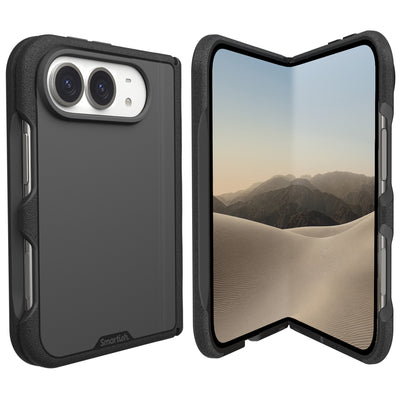
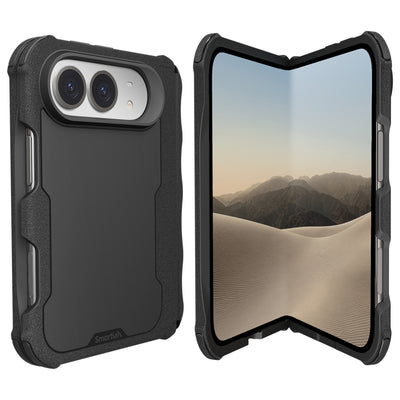
After testing dozens of cases across different categories, Smartish consistently delivers the ideal combination of slim design and robust functionality. Their Gripmunk and Gripzilla cases offer air-pocket corner protection, precise 1mm raised screen edges, and MagSafe compatibility without the bulk that typically comes with protective cases.
For those prioritizing wireless charging and accessory compatibility, MagSafe-compatible cases ensure seamless integration with the latest charging technology and accessories designed for the iPhone 17 Air.
What Makes a Great iPhone 17 Air Case?
The iPhone 17 Air's revolutionary thinness creates unique protection challenges. A great case must complement this sleek form factor while providing genuine drop protection through engineered features like air-pocket corners that absorb impact energy.
Material quality separates premium cases from budget alternatives. High-grade polymers resist yellowing and maintain flexibility over time, while precision-molded designs ensure perfect button responsiveness and port accessibility. The best iPhone 17 Air case options incorporate finger grooves or textured surfaces for secure grip without adding unnecessary bulk.
MagSafe compatibility has become non-negotiable for most users. Quality cases maintain full 15W wireless charging speeds while supporting the complete ecosystem of MagSafe accessories, from wallets to car mounts.
How to Choose the Best iPhone 17 Air Case for Your Needs

Start by identifying your primary use patterns. Frequent travelers need maximum protection with features like reinforced corners and raised camera rings. Minimalists prioritize ultra-thin profiles that preserve the iPhone 17 Air's sleek aesthetic while providing essential screen protection.
Consider your charging setup. If you use MagSafe accessories regularly, verify the case maintains strong magnetic alignment. Smartish's Gripmunk and Gripzilla both pass rigorous MagSafe testing, ensuring reliable connection strength that won't weaken over time.
Evaluate grip requirements based on your lifestyle. Parents juggling multiple tasks benefit from pronounced finger grooves, while professionals might prefer subtle texture that maintains a polished appearance. The key is finding grippy surfaces that aren't sticky, a distinction that affects long-term usability.
Ultra-Thin vs. Protective iPhone 17 Air Cases
Ultra-thin cases prioritize preserving the iPhone 17 Air's original feel while adding essential protection. These typically measure under 1mm thick but still incorporate air-pocket corners and raised edges for face-down protection. They're ideal for users who rarely drop their phones and value the original device experience.
Protective cases like Smartish's Gripzilla offer enhanced drop protection without excessive bulk. Despite being thicker, they maintain MagSafe compatibility and precise button feel. The air-pocket corner technology provides superior impact absorption compared to solid corner designs.
The choice often comes down to drop frequency versus aesthetic preference. Both categories can offer excellent protection when engineered properly, the difference lies in impact energy distribution and corner reinforcement thickness.
Best MagSafe-Compatible iPhone 17 Air Cases
Smartish Gripmunk - Best Slim MagSafe Case
Best for: Users wanting minimal bulk with full MagSafe functionality
The Gripmunk delivers authentic MagSafe performance in an ultra-slim profile. Its finger grooves provide secure grip without compromising wireless charging alignment, while air-pocket corners offer genuine drop protection. The raised camera ring prevents lens contact on flat surfaces.
Smartish Gripzilla - Best Protective MagSafe Case
Best for: Maximum protection with MagSafe convenience
Gripzilla combines robust protection with flawless MagSafe compatibility. The rigid backplate distributes impact force while maintaining magnetic strength for reliable accessory attachment. Despite increased thickness, it passes the same drop tests as slimmer alternatives.
| Feature | Gripmunk | Gripzilla |
|---|---|---|
| Profile | Ultra-slim | Protective |
| MagSafe Strength | Full 15W | Full 15W |
| Drop Test | Certified | Certified |
| Finger Grooves | Yes | Yes |
MagSafe Compatibility: What It Means for iPhone 17 Air Cases

MagSafe technology uses precisely positioned magnets to enable 15W wireless charging and secure accessory attachment. For iPhone 17 Air cases, MagSafe compatibility requires exact magnetic alignment and optimal material thickness, typically under 3mm, to maintain charging efficiency.
Testing MagSafe compatibility takes seconds: attach your phone with case to a MagSafe charger and listen for the connection chime. Strong magnetic pull and consistent charging indicate proper alignment. Weak connection or intermittent charging suggests misaligned magnets or incompatible materials.
Common MagSafe myths persist despite clear evidence. Case thickness doesn't determine MagSafe performance, material composition and magnetic positioning do. Both Smartish's slim Gripmunk and protective Gripzilla maintain identical MagSafe strength because they use optimized magnetic arrays, not just thinner materials.
MagSafe Quick Test: Place your cased phone on a MagSafe charger. You should hear an immediate connection chime and see charging confirmation within 3 seconds. If delayed or absent, the case lacks proper MagSafe compatibility.
Best Ultra-Thin iPhone 17 Air Cases for Minimalists
Smartish Gripmunk - Best Overall Slim Case
Best for: Users wanting maximum protection in minimal thickness
The Gripmunk achieves the perfect balance of slim profile and genuine protection. Its engineered finger grooves provide secure grip without bulk, while air-pocket corners absorb impact energy more effectively than solid designs. The anti-yellowing clear option maintains transparency over years of use.
Material & Thickness Analysis
Premium ultra-thin cases use high-grade polymers that resist yellowing and maintain flexibility. Thickness measurements matter: cases under 1mm provide basic scratch protection, while 1-2mm options like Gripmunk offer genuine drop protection through strategic reinforcement points.
| Feature | Smartish Gripmunk | Generic Slim Cases |
|---|---|---|
| Thickness | 1.2mm with air-pocket corners | 0.8-1.0mm solid design |
| Grip Enhancement | Molded finger grooves | Smooth or basic texture |
| Screen Protection | 1mm raised edge | Flush or minimal raise |
| MagSafe Strength | Full 15W charging | Variable performance |
| Customization | Design your own options | Limited color choices |
Anti-yellowing technology in clear cases prevents the unsightly discoloration that affects cheaper alternatives within months. Quality materials maintain clarity for years, making them worthwhile investments for users who prefer showcasing their device.
For more insights on the latest iPhone 17 Air features and case compatibility, check out the official iPhone 17 Air blog from Smartish.
iPhone 17 Air Case Showdown: Slim vs. Protective vs. Wallet
Each case category serves distinct user needs. Slim cases like Gripmunk prioritize preserving the iPhone 17 Air's original feel while adding essential protection. Protective options like Gripzilla offer enhanced drop resistance through thicker corner reinforcement. Wallet cases combine phone protection with card storage for ultimate convenience.
Protection levels vary significantly across categories. Slim cases excel at preventing scratches and minor drops, while protective cases handle more severe impacts through advanced shock absorption. Wallet cases like Smartish's Wallet Slayer Vol. 1 and Vol. 2 provide moderate protection plus practical card storage, ideal for users wanting to eliminate separate wallets.
The best iPhone 17 Air case choice depends on lifestyle priorities. Tech enthusiasts often prefer slim cases that showcase device aesthetics, while active users gravitate toward protective options. Parents frequently choose wallet cases for simplified pocket management during busy days.
Protection Reality Check: All quality cases, slim or thick, use similar impact-absorption principles. The difference lies in energy distribution area and corner reinforcement thickness, not fundamental protection technology.
Best Value iPhone 17 Air Cases Under $30

Value-focused cases must deliver essential protection features without compromise. Non-negotiable elements include air-pocket corners, raised screen edges, and precise button cutouts. The best iPhone 17 Air case options under $30 prove that affordability doesn't require sacrificing quality.
Smartish Wallet Slayer Vol. 1 & Vol. 2 - Best Value Leaders
Best for: Users wanting protection plus card storage convenience
Both Wallet Slayer versions offer genuine protection with practical card storage. Vol. 1 provides essential wallet functionality, while Vol. 2 adds a kickstand for hands-free viewing. Their thicker profile accommodates card slots without compromising structural integrity.
At under $30, these cases include features typically found in premium options: reinforced corners, raised camera rings, and precise port cutouts. The card slots maintain security without making cards difficult to access, a common issue with cheaper wallet cases.
For a broader look at iPhone case trends and comparisons, you might also enjoy this in-depth guide to the best case for iPhone on the Smartish blog.
Top MagSafe-Compatible iPhone 17 Air Cases for Tech Enthusiasts
MagSafe compatibility transforms your iPhone 17 Air into a versatile hub for wireless charging, car mounts, and desk accessories. The best iPhone 17 Air case with MagSafe maintains perfect magnetic alignment while preserving the device's ultra-thin profile.
True MagSafe compatibility requires precise magnet placement and optimal thickness. Cases that are too thick weaken the magnetic connection, while poor alignment causes charging interruptions and accessory slippage.
Smartish Gripmunk - MagSafe Perfection in Slim Design
Best for: Users who want MagSafe functionality without sacrificing the iPhone 17 Air's sleek profile.
The Gripmunk delivers flawless MagSafe performance through precision-engineered magnet placement and optimized thickness. Air-pocket corners provide drop protection while maintaining the slim aesthetic tech enthusiasts demand. The raised camera ring prevents lens scratches when placed on surfaces, and finger grooves enhance grip without adding bulk.
Smartish Gripzilla - Maximum Protection Meets MagSafe
Best for: Active users who need robust protection with full MagSafe compatibility.
Gripzilla proves that MagSafe compatibility doesn't require compromising protection. The rigid backplate maintains perfect magnetic alignment while reinforced corners absorb impact from drops. Despite increased thickness for protection, MagSafe accessories attach securely and charging efficiency remains unaffected.
MagSafe Myth Busted: Thicker cases don't automatically mean weaker MagSafe performance. Both Gripmunk (slim) and Gripzilla (protective) pass identical drop tests and maintain strong magnetic connections through proper engineering.
Test MagSafe compatibility by attaching a wireless charger, it should snap into place with a satisfying click and begin charging within two seconds. Weak connections or charging delays indicate poor magnet alignment or excessive thickness.
For a scientific perspective on mobile device coatings and durability, see this NIST article on nanocoatings for mobile devices.
iPhone 17 Air Case Showdown: Ultra-Thin vs. Rugged vs. Stylish
Choosing between ultra-thin, rugged, and stylish cases depends on your priorities: preserving the iPhone 17 Air's sleek design, maximizing protection, or making a fashion statement. Each category excels in specific areas while making trade-offs in others.
| Category | Thickness | Drop Protection | MagSafe | Style Options | Best For |
|---|---|---|---|---|---|
| Ultra-Thin (Gripmunk) | Minimal bulk | Air-pocket corners | Perfect alignment | Customizable designs | Daily carry, minimalists |
| Rugged (Gripzilla) | Protective thickness | Rigid backplate | Strong connection | Functional focus | Active lifestyles, outdoors |
| Stylish (Custom options) | Varies by design | Standard protection | Design dependent | Unlimited customization | Personal expression |
Ultra-thin cases like the Gripmunk maintain the iPhone 17 Air's original feel while providing essential protection through strategic reinforcement. Rugged options sacrifice some sleekness for comprehensive drop protection. Stylish cases prioritize aesthetics but can still deliver solid functionality when properly engineered.
The sweet spot for most users combines slim design with reliable protection, exactly what Smartish cases achieve through thoughtful engineering rather than excessive bulk.
To learn more about the evolution of mobile phone cases, visit this comprehensive Wikipedia article on mobile phone cases.
How to Install, Remove, and Care for Ultra-Thin iPhone 17 Air Cases

Proper installation prevents case damage and ensures optimal protection. Ultra-thin cases require gentle handling during installation to avoid cracking or warping the material.
Installation Steps:
- Start with the bottom edge, aligning the charging port cutout precisely
- Gently flex the case over the bottom corners using your thumbs
- Work up both sides simultaneously, pressing the case into place
- Finish with the top edge, ensuring camera cutout alignment
- Check that all buttons press smoothly and ports remain accessible
Safe Removal:
Begin at one corner, gently lifting the case edge while supporting the phone. Work around the perimeter gradually, never pull from a single point, which can crack the case or damage your device.
Cleaning and Maintenance:
Clean your case weekly with mild soap and warm water. For clear cases, this prevents yellowing and maintains transparency. Dry thoroughly before reinstalling. Avoid harsh chemicals or abrasive materials that can scratch the surface or weaken the material.
Regular cleaning also maintains grip, oils from hands can make even textured cases slippery over time. The finger grooves on Smartish cases are designed to channel away moisture and oils, but periodic cleaning keeps them performing at their best.
For additional tips on pairing your device and case, see this helpful article on choosing the right iPhone and case.
Frequently Asked Questions
What features should I look for in a case to protect the ultra-thin design of the iPhone 17 Air?
Look for cases with air-pocket corners to absorb impact and raised edges to protect the screen and camera. High-quality, flexible materials that resist yellowing and precise cutouts for buttons and ports help maintain the phone’s sleek profile while offering reliable protection.
How important is MagSafe compatibility when choosing an iPhone 17 Air case, and which cases offer the best integration?
MagSafe compatibility is key for seamless wireless charging and accessory use without removing the case. Both Gripmunk and Gripzilla cases offer excellent MagSafe integration, combining protection and functionality without adding bulk.
What are the differences between ultra-thin, protective, and wallet-style cases for the iPhone 17 Air?
Ultra-thin cases prioritize minimal bulk and sleek design, protective cases focus on robust drop defense with features like air-pocket corners, and wallet-style cases add storage for cards and cash but are thicker. Each serves different needs depending on your lifestyle and priorities.
How can I ensure a good grip on my iPhone 17 Air without adding bulk to the case?
Choose cases with textured surfaces or finger grooves that enhance grip without extra thickness. Materials that feel grippy, not sticky, help keep your phone secure while preserving its slim silhouette.