




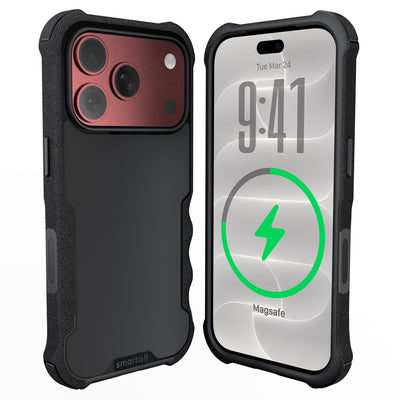




What to buy with a new iPhone
Upgrading is fun right up until you realize the box contains a beautiful new phone, a cable, and approximately zero help with keeping it alive or off the sidewalk. Knowing What to buy with a new iPhone starts with four basics: protection, grip, charging, and a way to carry the thing without turning your pockets into a junk drawer.
Key Takeaways
- Protect your new iPhone with a durable case that absorbs drops and prevents scratches.
- Improve grip with a textured case or pop socket to avoid accidental slips.
- Invest in a fast charger and extra cable so you never run out of battery during the day.
- Choose a slim wallet case or phone grip to carry your phone without adding bulk to your pocket.
You don't need a cart full of shiny accessories. A few well-chosen pieces solve everyday annoyances, from slippery edges to scratched screens and the classic “where did I put my phone?” routine. Here's the practical starting point.
What to Buy With a New iPhone: The Unboxing Day Checklist
Start with the pieces that protect the phone and keep it powered: a case, screen protection, and a compatible wall adapter. Add a spare cable, camera lens protector, mount, or carry accessory only if your routine calls for it. That keeps your setup useful instead of turning it into an accessory graveyard.
Why the Box Is Lighter (and What's Missing)
New iPhones, including the iPhone 17, don't include a charging adapter or wired headphones. You get the phone and a charging cable, so the wall brick is your responsibility. If your existing adapter has a USB-C connection and delivers suitable power, it may still do the job. If it's ancient, temperamental, or shared with three roommates and a small household pet, add a compatible adapter.
The Everyday Starter Kit
A case manages impact around the phone's body. A screen protector adds a replaceable barrier against scratches. A USB-C charging setup keeps the battery moving at home, at work, or in the car. The right combination depends on how you carry and use your phone.
- Case: Look for grippy sides, air-pocket corners, a raised screen edge, and a raised camera ring.
- Screen protector: Choose one that covers the active screen without interfering with the case.
- Charging adapter: Match the connector and power needs of your cable and phone.
- Spare cable: Keep one near your bed, desk, or travel bag so charging isn't a scavenger hunt.
Essential Protection for Your New iPhone 17
Choose a case by routine, not by drama. Gripmunk is the slim option for daily carry, while Gripzilla has a rigid backplate and more protective coverage for active schedules. Both have air-pocket corners, raised screen edges, raised camera rings, covered buttons, precise cutouts, and pass the same drop test. Both are compatible with MagSafe.
Finding the Right Case: Slim vs. Protective
A slim case makes sense if you want lower bulk for pockets, commuting, and casual use. Look for textured sides, impact-absorbing edges, and enough lip around the screen to keep glass away from tables. Slim should mean less bulk, not a decorative skin that gives up at the first encounter with concrete.
For active schedules, crowded bags, or outdoor adventures, Gripzilla's additional coverage may suit your routine. If you want a slim magnetic option, consider the Gripmunk Clear with MagSafe slim case for iPhone 17 Pro. Clear cases are made to resist yellowing, so you can show off the phone without making peace with a banana tint.
| Case style | Best fit | Features to seek | Trade-off |
|---|---|---|---|
| Gripmunk | Daily carry, commuting, casual use | Textured grip, air-pocket corners, raised screen edge, raised camera ring, MagSafe compatibility | Less surrounding bulk than Gripzilla |
| Gripzilla | Active routines and outdoor use | Rigid backplate, air-pocket corners, raised screen edge, raised camera ring, MagSafe compatibility | More coverage means a thicker pocket fit |
If pocket space isn't your priority, a carry-focused design solves a different problem. The Dancing Queen - Crossbody Wallet Case for iPhone 11 Pro Max holds 5 cards plus cash, includes lipgloss loops, and has an adjustable crossbody strap for hands-free carrying. A removable wristlet is included, too. It's designed for the iPhone 11 Pro Max, not the iPhone 17, so check compatibility before purchasing. The case isn't compatible with wireless chargers or MagSafe accessories.
Screen and Camera Lens Protectors: Do You Need Them?
A case and screen protector solve different problems. The case helps manage impact around the phone's body, while the protector takes the scratches and scuffs that come from pockets, bags, and shared surfaces. For a phone used heavily for navigation, messaging, or content creation, that extra barrier can make sense. Out-of-warranty cracked-screen repairs can cost upwards of $300 to $400 depending on the model, according to WIRED.
Camera lens protection is most useful for people who place their phone on rough surfaces or carry it with hard objects. A camera protector adds another replaceable layer. Check that it doesn't cover flash areas, introduce glare, or interfere with your case. The raised camera ring on a case helps protect the lenses when the phone rests on its back.
For What to buy with a new iPhone, protection comes before decorative extras. Pick the case by your routine, add screen coverage if scratches would bother you, and use camera protection if your carry habits are rough on gear.
Chargers, Cables, and Mounts for a New iPhone
After protection, charging is the next practical purchase. New iPhones use USB-C, and the cable in the box may need a wall adapter. Check the connector on your phone and cable, then choose an adapter with suitable output. A spare USB-C cable is useful at a desk, bedside table, office drawer, or in a travel bag. One cable at home is less a charging plan and more a tiny battery lottery.
USB-C, Fast Charging, and Tangle-Free Setups
Fast charging depends on the phone, adapter, cable, and power source working together. A quality USB-C cable should fit securely, bend without feeling flimsy, and reach your usual charging spot without stretching across the room. For a shared desk or nightstand, a multi-port adapter such as the 2-Port USB and USB-C wall charger can reduce outlet wrestling. Keep cables in a small organizer and use hook-and-loop ties instead of tight knots.
Car charging deserves its own setup. A USB-C car charger keeps navigation, music, and calls from draining the battery during a commute or road trip. Pair it with a short cable so excess cord doesn't collect around the gear shifter. A charging stand can keep the screen visible at home for timers, recipes, or a long couch session.
Charging Setup: Pros and Cons
Pros
- A spare cable prevents daily charging scavenger hunts.
- Fast charging gets useful battery power back during shorter breaks.
- Cable ties and organizers keep desks, bags, and cars under control.
Cons
- Low-quality cables can fray, disconnect, or charge inconsistently.
- Extra adapters and cords add clutter without a storage plan.
- Wireless charging can be slower than a wired connection.
MagSafe Explained: What Actually Sticks
MagSafe uses a ring of magnets inside compatible iPhones and accessories to help a charger or mount line up with the phone's charging coil. That alignment helps the charger stay in place after a tiny nudge. Read our guide to how MagSafe works before choosing magnetic accessories.
MagSafe accessories include charging pucks, desktop stands, car mounts, battery packs, and magnetic wallets. A mount needs a firm base and a strong hold, especially on rough roads. Wireless charging works best when the phone and charger make proper contact, with no thick, non-compatible case between them. Magnets are clever, not psychic.
Wallet Cases, Grips, and Trackers
Choose carry accessories based on the nuisance you want to solve. Wallet Slayer Vol. 1 and Vol. 2 combine a phone case with card storage. A grip supports one-handed use. A strap keeps both hands free. An AirTag case or strap helps you keep tabs on a bag, key ring, or luggage handle.
Wallet Slayer Vol. 1 and Vol. 2: The Pocket Test
Wallet Slayer Vol. 1 and Vol. 2 are built for people who want payment cards close to the phone instead of split between two objects. Carry only the cards and cash used during a normal day, then leave membership cards and old receipts at home. Both wallet cases are thicker than a slim case, so compare capacity and pocket comfort before choosing. Wallet Slayer Vol. 2 includes a kickstand.
Keeping Tabs on Your Gear with AirTag Cases and Straps
An AirTag case or strap helps attach a tracker to a bag, luggage handle, key ring, or other item that likes to wander. Look for a snug holder, a secure attachment point, and an opening that allows the tracker's sound to remain audible. A tracker can't prevent loss, but it can make the search less like an archaeological dig through every sofa cushion in the apartment.
Phone grips solve a different carry problem. A textured grip gives fingers a steadier purchase for photos, scrolling, and one-handed use. A crossbody strap keeps both hands available for groceries, transit cards, toddlers, or the important work of holding a sandwich. Match the attachment method to your case, and check that the strap hardware doesn't press against buttons or block charging access.
Quick Purchase Guide
- Carry a few cards: Choose Wallet Slayer Vol. 1 or Vol. 2.
- Need free hands: Choose a crossbody strap or wristlet.
- Drop your phone while filming: Add a grip with a secure, comfortable texture.
- Misplace bags or keys: Add an AirTag case or strap.
- Use magnetic charging: Choose Gripmunk or Gripzilla and confirm accessory compatibility.
References
- https://www.ncbi.nlm.nih.gov/pmc/articles/PMC6375397/
- https://en.wikipedia.org/wiki/IPhone
New iPhone Accessory FAQ
Knowing What to buy with a new iPhone gets easier when each accessory has a job. Protection handles drops and scratches, charging gear keeps the battery ready, and carry options solve pocket clutter. The best setup depends on your routine, case compatibility, charging habits, and how often your phone encounters sidewalks with suspicious enthusiasm.
Do I really need a case and screen protector for a new iPhone?
A case is a practical choice for nearly anyone who carries a phone outside a padded drawer. It adds grip to slippery edges, helps shield corners from impact, and creates a raised lip that keeps the display and camera area away from some flat surfaces. A screen protector is optional, but useful if your phone shares a pocket or bag with keys, coins, or other hard objects.
What is MagSafe and what accessories work with it?
MagSafe uses a ring of magnets inside compatible iPhones and accessories to help align charging coils and hold attachments in place. Compatible accessories include wireless charging pucks, desktop stands, car mounts, battery packs, and magnetic wallets. Confirm the phone, charger, and power adapter specifications before expecting a particular speed.
Are wallet cases better than carrying a traditional wallet?
A wallet case can be better if you usually carry a small number of cards and want one item instead of two. The trade-off is capacity. If you carry loyalty cards, identification, receipts, or several payment cards, a traditional wallet may remain more comfortable.
What charger do I need for the newest iPhone?
Start with a compatible USB-C charging cable and a USB-C wall adapter. New iPhones no longer include a charging adapter or wired headphones in the box, so the adapter may need to be purchased separately. For What to buy with a new iPhone, the sensible order is clear: protect the phone, power it reliably, then add carry features that fit your actual day. Learn more about the iPhone and its generations before choosing model-specific accessories.