








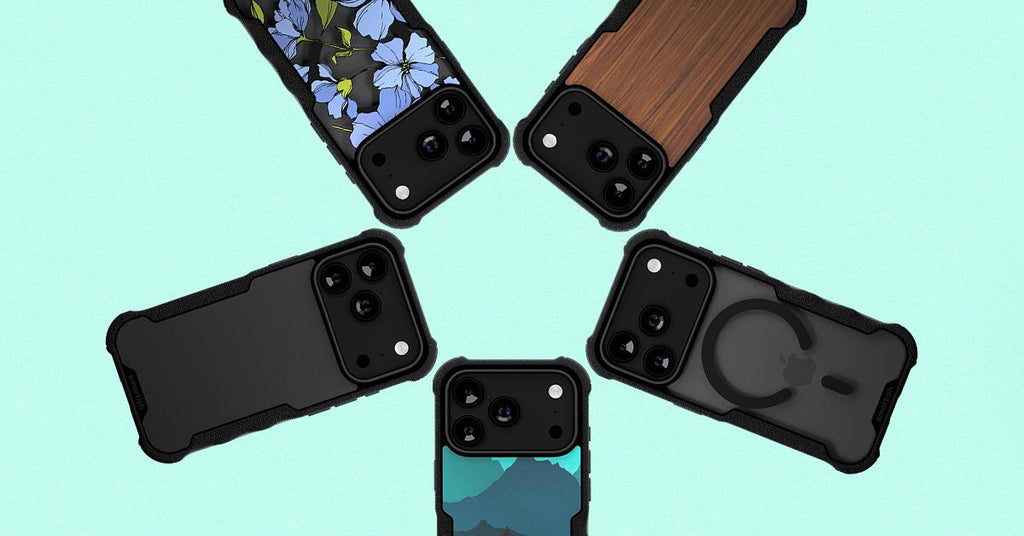
Top protective cases with wireless charging support
Why Protective Cases with Wireless Charging Matter
Top protective cases with wireless charging support solve a real problem: keeping your phone safe without yanking off the case every time you charge. MagSafe designs snap to chargers, stands, and mounts. Air-pocket corners and raised edges guard against drops. Function that keeps up with your day.
What Actually Matters
Air-pocket corners absorb impact. Raised screen edges protect glass when you set your phone face-down. Camera rings do the same for the back. Precise cutouts keep ports and buttons accessible.
MagSafe magnets need to hold your phone on a car mount without slipping. Look for cases tested with actual chargers and accessories—not just ones that claim compatibility. The Gripmunk with MagSafe® Slim Case for iPhone 15 locks on tight and charges fast.
Slim vs. Protective
Both work with wireless charging. Gripmunk keeps things trim. Gripzilla adds dual-layer toughness. Both are drop-tested, both charge wirelessly. Thickness doesn't kill MagSafe—weak magnets do.
Pros
- Drop protection without removing the case to charge
- MagSafe magnets work with stands, mounts, and wallets
- Raised edges shield the screen and camera
Cons
- Non-MagSafe cases require manual alignment on charging pads
- Wallet cases add bulk if you want ultra-slim
Built for Real Life
Commutes, outdoor adventures, juggling coffee—your gear gets tested. Cases with grippy (not sticky) edges and corner cushioning handle the bumps without turning your phone into a brick.
Need hands-free? The Dancing Queen Crossbody Wallet Case for iPhone 14 works with MagSafe charging and doubles as a purse.
Top Picks for Everyday Protection and Charging

Slim, rugged, and clear options for the iPhone 17. All drop-tested and MagSafe-compatible.
Gripmunk: Slim Without Compromise
Finger grooves make one-handed texting easier. MagSafe magnets lock onto chargers and mounts. The slim build fits in tight pockets, and you can customize colors or patterns to match your style.
Gripzilla: Tougher When You Need It
Dual-layer design with a soft interior and tough exterior handles harder drops. It's thicker than Gripmunk but still charges wirelessly. Grippy edges keep your phone secure during hikes or bike rides.
Clear Case Options
Show off your phone's design with anti-yellowing materials that stay transparent. Both Gripmunk and Gripzilla come in clear. Same drop protection, same MagSafe compatibility. Customize with stickers or keep it minimal.
| Feature | Gripmunk | Gripzilla |
|---|---|---|
| Profile | Slim | Dual-layer protective |
| MagSafe | Yes | Yes |
| Drop-Tested | Yes | Yes |
| Finger Grooves | Yes | Yes |
| Clear Option | Yes | Yes |
How MagSafe Actually Works
MagSafe cases snap to chargers, stands, and car mounts without slipping. Magnets inside align with charging coils for consistent power transfer. Both Gripmunk and Gripzilla work with standard Qi wireless pads too.
Magnet Strength Matters
Strong magnets hold your phone on a car mount during sharp turns or bumpy roads. Weak magnets? Your phone slides off mid-navigation. Gripmunk and Gripzilla use tested magnet arrays that lock on with a satisfying click.
Charging Speed Reality Check
Wireless charging speed depends on the charger, not the case. A 15W MagSafe puck can push full power through Gripmunk or Gripzilla when you've got a compatible power adapter. Thicker cases don't slow charging because magnets keep coils aligned.
If charging feels slow, check your adapter wattage first.
Beyond Just Charging
MagSafe stands prop your phone at a comfortable angle for video calls. Car mounts keep navigation visible without clips. Gripmunk and Gripzilla work with both, plus MagSafe wallets if you want to ditch extra bulk.
The Side Hustle MagSafe Compatible Wallet gives you card storage without sacrificing wireless charging. Snap, charge, go.
Match a Case to Your Lifestyle
Your daily routine matters more than specs. Are you commuting between meetings? Juggling kids and gear? Showing off your new iPhone 17?
Commutes and Adventures
Gripzilla handles bike rides, hiking trails, and crowded subway platforms. Grippy edges help you keep hold when you're moving fast. Toss it on a MagSafe car mount for directions, then snap it onto a charging stand when you get home.
Busy Parents
Gripmunk fits in pockets and diaper bags without adding weight. MagSafe charging means you can power up while prepping dinner or folding laundry. No cable hunting required.
Tech Enthusiasts
Clear versions of Gripmunk and Gripzilla let the iPhone 17 shine through with anti-yellowing materials. Both support MagSafe accessories and wireless charging, so your setup stays intact when you upgrade every year.
| Case | Best For | Key Features |
|---|---|---|
| Gripmunk | Everyday carry, slim pockets | Finger grooves, MagSafe, drop-tested |
| Gripzilla | Outdoor adventures, rugged use | Dual-layer design, MagSafe, extra grip |
Get the Most from Your Case

Setup and Testing
Snap your case onto the phone. All corners should click into place. Test MagSafe by holding your phone near a charger—it should pull toward the magnets. Place it on a wireless pad. Charging should start within two seconds.
Keep It Clean
Wipe down your case with a damp cloth every few weeks to remove dust and oils. Grippy edges stay grippy when clean. If lint builds up in port cutouts, use a soft brush or compressed air.
Mix and Match Accessories
Gripmunk and Gripzilla work with MagSafe wallets, stands, and mounts. Need card storage? The Side Hustle wallet includes a kickstand and holds up to three cards. It's thicker than a standard case, so swap based on what your day demands.
Which Case Is Right for You?
Top protective cases with wireless charging support don't make you choose between drop protection and MagSafe convenience. Gripmunk and Gripzilla are both drop-tested and work with stands, mounts, and wallets.
The choice comes down to your routine. Slim for easy pockets or rugged for tougher conditions?
If you're upgrading from an older iPhone, MagSafe compatibility opens up a whole ecosystem. Wireless charging pads, magnetic wallets, and adjustable stands all work together. You can swap between a slim case during the week and a rugged option for weekend adventures.
Quick Recommendation: Gripmunk fits tight pockets and lighter use. Gripzilla is better for outdoor adventures and busy parents. Both support wireless charging and MagSafe accessories.
What's Next for Case Design
As wireless charging speeds increase, cases will need stronger magnets to maintain alignment at higher wattages. Expect thinner materials that still absorb drops and more sustainable options that don't sacrifice protection.
Anti-yellowing formulas for clear cases keep improving, so your phone stays visible longer.
MagSafe accessories are expanding beyond chargers and wallets. Battery packs, tripod mounts, even gaming controllers now use magnetic connections. Gripmunk and Gripzilla already support these add-ons, so you're ready when new gear launches.
Making Your Decision

Where does your phone spend most of its time? Desks and countertops need less protection than hiking trails or playgrounds. If you use a car mount daily, strong MagSafe magnets matter more than shaving off a millimeter of thickness.
Test wireless charging with your current setup before buying. A 15W MagSafe charger can push full speed through a compatible case with the right power adapter. If you're using an older Qi pad, charging should still work but might take longer.
Customization options let you match your case to your style. Gripmunk and Gripzilla both come in patterns, solid colors, and clear finishes. All versions include the same drop-tested protection and MagSafe compatibility.
Top protective cases with wireless charging support handle daily wear without forcing you to choose between safety and convenience. Snap your phone onto a charger, toss it in your bag, and trust the corners and edges to do their job.