






how easy does iPhone 17 screen scratch
So, How Easy Does That iPhone 17 Screen Scratch, Anyway?
The iPhone 17's Ceramic Shield 2 technology makes it tougher than previous models, but it's not invincible. Keys and coins typically won't cause damage, but sand, concrete, and unexpected drops can still leave marks. Real-world testing shows improved resistance, though daily protection remains smart.
The Promise of New Tech vs. Everyday Reality
Apple's marketing team loves throwing around terms like "strongest glass ever," but let's talk about what that means when your phone meets your actual life. The iPhone 17 does pack better scratch resistance than its predecessors, but "better" doesn't mean bulletproof. Your morning coffee run, gym session, or beach day still poses risks that no amount of engineering can completely eliminate.
What's Under the Hood: Ceramic Shield 2 (and What It Actually Means)
Ceramic Shield 2 isn't just marketing fluff. It's a genuine step up in durability. The technology embeds ceramic crystals into the glass matrix, creating a surface that's roughly 25% more scratch-resistant than standard smartphone glass. Think of it like adding tiny armor pieces to your screen. This doesn't make it scratch-proof, but common pocket items like keys and coins are much less likely to leave permanent marks.
The 'Butterfingers' Factor: Common Culprits for Scratches
Sand remains public enemy number one for any phone screen. Those tiny quartz particles clock in at 7 on the hardness scale while phone glass typically hits around 6. Meaning sand wins every time. Concrete surfaces, rough fabrics, and even protective cases with trapped debris can cause scratches. While the Gripmunk Clear with MagSafe for iPhone 17 Pro keeps newer models safe from these hazards, proper protection strategies work across iPhone generations.
Reality Check: Even with improved durability, microscopic scratches from everyday use are normal. The iPhone 17's screen handles routine contact better, but intentional protection still beats hoping for the best.
Beyond the Hype: Real-World Scratch Tests and What They Tell Us
Simulating the Pocket Gauntlet: Keys, Coins, and Grit
Independent testing labs put the iPhone 17 through controlled scratch tests using common pocket items. Keys and coins barely register on the new Ceramic Shield 2 surface, which is a clear win over older models. The real test? Accumulated pocket lint mixed with microscopic debris. This gritty combination acts like fine sandpaper over time, creating hairline scratches that catch light at certain angles.
The Sand Trap: Why Beach Days Can Be a Screen's Worst Nightmare
Beach photography sessions require extra caution, regardless of your iPhone model. Testing shows the iPhone 17 handles brief sand exposure better than previous generations, but extended contact still causes visible scratching. Even quick pocket grabs after building sandcastles can introduce abrasive particles that spell trouble for any screen.
Dropped? Oops! Does a Fall Mean a Scratched Screen?
Drop tests reveal an interesting pattern: the iPhone 17's improved durability means fewer catastrophic cracks, but concrete and asphalt surfaces still leave their mark. A single drop onto rough pavement can create multiple micro-scratches that accumulate over time. The phone might survive the impact structurally while picking up cosmetic damage that affects resale value. For maximum protection against drops and scratches, consider armor cases designed for heavy-duty protection.
| Test Scenario | iPhone 16 | iPhone 17 | Improvement |
|---|---|---|---|
| Key/Coin Contact | Minor scratches | No visible damage | Significant |
| Sand Exposure (30 seconds) | Multiple scratches | Light surface marks | Moderate |
| Concrete Drop | Deep scratches | Surface scuffing | Noticeable |
What the Pros (and We) Say About Durability
Industry testing suggests the iPhone 17 represents real progress in scratch resistance. But here's the thing. Pairing improved hardware durability with practical protection habits is still the best approach, especially if you care about long-term appearance and resale value.
The Smartish Solution: How to Keep Your iPhone 17 Looking Fresh (Without the Fuss)
Your First Line of Defense: The Mighty Screen Protector
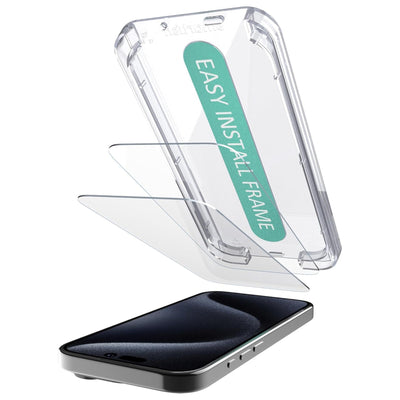
Screen protectors remain the most cost-effective insurance policy for any phone, including the iPhone 17. Tempered glass protectors absorb impact and take scratches so your actual screen doesn't have to. They're replaceable, affordable, and nearly invisible when properly applied. Think of them as disposable armor that sacrifices itself for the greater good of your device's longevity.
Beyond the Screen: How a Smartish Case Offers Holistic Protection
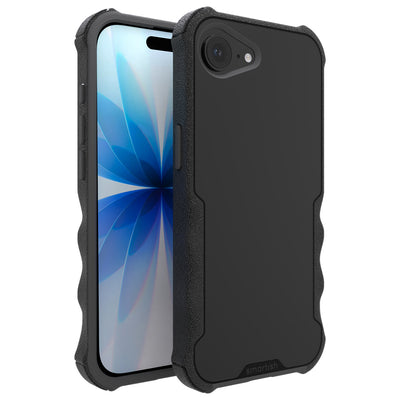
Cases protect more than just screens. They create barriers between your phone and the chaos of daily life. Raised edges around cameras and screens prevent direct surface contact when you place the phone face-down. A well-designed case also limits the grit that builds up over time and causes gradual wear. For comprehensive protection, slim cases with MagSafe compatibility offer the perfect balance of protection and functionality.
The 'Oops' Moment Strategy: What to Do If a Scratch Happens
Light scratches on the iPhone 17 often look worse than they are. Clean the screen thoroughly with a microfiber cloth first. Many apparent scratches are just accumulated oils and debris. If you do have true surface damage, professional repair services can replace screens, though costs typically exceed preventive protection by a significant margin.
Smart Economics: A quality case and screen protector can cost roughly $50 combined, while professional screen replacement starts around $200. The math speaks for itself.
The Science Behind the Scratches: Why Some Things Leave Marks and Others Don't
The Mohs Scale: Your Pocket's Report Card
The Mohs scale ranks material hardness from 1 (talc) to 10 (diamond). Understanding where common materials fall explains why certain items scratch phones while others don't. Copper coins rate around 3, steel keys hit 5 to 6, and quartz sand reaches 7. The iPhone 17's improved glass lands around the mid-6 range, making it resistant to most pocket contents but still vulnerable to harder minerals.
Why Your Pocket Is a Micro-Terrain of Tiny Terrors
Pockets accumulate microscopic debris from concrete dust, fabric fibers, and environmental particles. This invisible grit creates an abrasive environment that gradually wears screen surfaces. Often, it's not one big scratch, but hundreds of tiny ones that add up over months. For those interested in the latest iPhone developments, check out our iPhone 16 rumors and updates to see how Apple continues improving durability.
The Illusion of 'Scratch-Proof': What Brands Don't Always Tell You
No consumer device is truly scratch-proof under all conditions. Marketing terms like "scratch-resistant" describe improvements over previous generations, not absolute immunity. The iPhone 17's durability gains are real but relative. That's why smart protection habits still matter if you want a screen that stays clean-looking.
Smart protection starts with understanding these limitations. Whether you're securing an iPhone 11 Pro Max or planning for the iPhone 17, combining improved hardware with practical protection habits is a reliable way to reduce daily wear and unexpected accidents.
Frequently Asked Questions
How hard is it to scratch an iPhone 17 screen?
The iPhone 17 screen is tougher than previous models, thanks to its Ceramic Shield 2 technology. This makes it roughly 25% more scratch-resistant than standard smartphone glass. While keys and coins usually won't leave a mark, abrasive materials like sand and concrete can still cause scratches.
How durable is the iPhone 17 screen?
The iPhone 17 screen is quite durable, representing a genuine step up with Ceramic Shield 2. It's designed for improved resistance against everyday wear and tear. While it's tougher and less prone to catastrophic cracks, it's not completely invincible against all impacts or harsh surfaces.
Does the white iPhone 17 scratch easily?
The screen's scratch resistance comes from its Ceramic Shield 2 technology, which is consistent across all iPhone 17 models. This means the color of your iPhone 17, whether white or any other shade, does not impact how easily the screen itself scratches. The screen tech is universal.
Does an iPhone screen get scratched easily?
For the iPhone 17, the screen is designed with better scratch resistance than its predecessors. It handles routine contact well, but 'better' doesn't mean scratch-proof. Microscopic scratches from daily use, especially from tiny grit like sand, are still a possibility over time.
Is the iPhone 17 screen fragile?
Fragile isn't the right word for the iPhone 17 screen. Its Ceramic Shield 2 technology makes it significantly tougher than older models, reducing the likelihood of major cracks from drops. However, it's still glass, so rough surfaces like concrete can still leave cosmetic marks.