








Key Takeaways
- Clear cases are available as fully transparent, frosted/transparent hybrids, or clear backs with colored bumpers.
- Choosing the right case requires precise matching to your specific iPhone 16 model.
- The iPhone 16, 16 Plus, 16 Pro, and 16 Pro Max vary slightly in camera placement and dimensions.
- Using a case that fits exactly ensures proper protection and functionality.
Table of Contents
- Quick Take – What "iPhone 16 Cases Clear" Really Means (and What You Actually Need)
- Clear vs. Opaque Cases on iPhone 16: What You Lose, What You Gain
- Materials 101 – What Your iPhone 16 Clear Case Is Actually Made Of (and Why It Matters)
- MagSafe vs Non-MagSafe iPhone 16 Clear Cases – How to Choose the Right Setup
- Protection Blueprint – How Clear iPhone 16 Cases Keep Screens and Cameras Safe
- Clear Case Care: Cleaning, De-Yellowing, and Keeping It Looking New
- Installation, Fit, and Screen Protector Compatibility
- Common Clear Case Problems on iPhone 16 (And Easy Fixes)
iPhone 16 Clear Cases: How to Pick, Protect, and Keep That Crystal-Clear Look
Quick Take – What "iPhone 16 Cases Clear" Really Means (and What You Actually Need)
What Counts as a "Clear iPhone 16 Case" in 2025
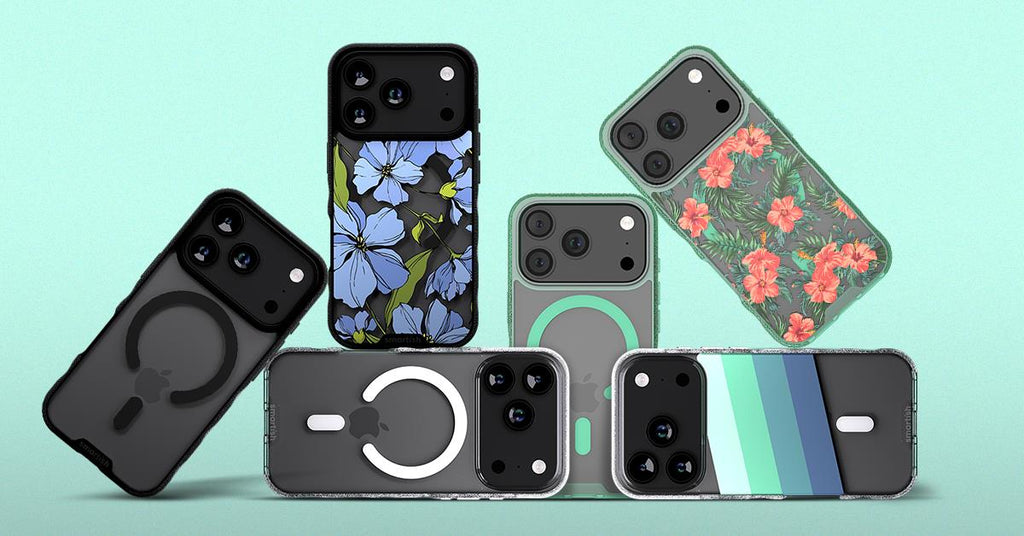
Clear cases come in three flavors: fully transparent, frosted/transparent hybrids, and clear backs with colored bumpers. The key is iPhone 16 model precision, your case must match exactly since the iPhone 16, 16 Plus, 16 Pro, and 16 Pro Max differ by millimeters in camera placement and dimensions.
Don't confuse clear with flimsy. Quality iphone 16 cases clear typically measure 1.5–2.5 mm for slim builds or 2.5–3.5+ mm for protective designs. Both can deliver solid drop protection through smart engineering.
If you just upgraded and want something clear, start with: MagSafe-compatible, raised screen edge (~1 mm), raised camera ring, air-pocket corners, and anti-yellowing materials. For a full selection, check out these cases designed for the latest iPhone models.
Quick Answer: If you just upgraded and want something clear, start with: MagSafe-compatible, raised screen edge (~1 mm), raised camera ring, air-pocket corners, and anti-yellowing materials.
The 10-Second Checklist for iPhone 16 Clear Cases
- Raised screen edge (~1 mm) for face-down protection
- Raised camera ring so lenses don't touch surfaces
- Air-pocket corners for better impact absorption
- Textured sides for grip (grippy, not sticky)
- MagSafe-compatible magnets for chargers and mounts
- Anti-yellowing materials and coatings
- Precise cutouts for ports and Camera Control button
- Drop-tested design for active commutes and adventures
Who a Clear iPhone 16 Case Is Perfect For
Color-showoff minimalists who spent extra on that new iPhone 16 shade and want everyone to see it. Tech enthusiasts pairing sleek aesthetics with MagSafe chargers, mounts, and wireless accessories. Parents who need protection but want to spot their phone when it "mysteriously disappears" into couch cushions. Everyday users seeking protection without hiding their device's design.
Clear vs. Opaque Cases on iPhone 16: What You Lose, What You Gain

Transparency vs. Personality – Design Tradeoffs
Clear cases range from crystal transparent to frosted/matte finishes that reduce glare. Solid opaque cases offer custom prints, bold colors, and personality expression but hide your device completely.
| Feature | Clear | Frosted Clear | Solid/Opaque |
|---|---|---|---|
| Shows device color | Fully | Partially | Not at all |
| Fingerprint visibility | High | Low | Varies |
| Scratch visibility | High | Medium | Low |
| Custom art potential | Limited | Some | Unlimited |
Protection & Grip: It's Not About Being Clear, It's About the Build
Protection comes from engineering, air-pocket corners, raised edges, quality materials, not transparency. Both slim designs (like Gripmunk style) and protective builds (like Gripzilla style) deliver the same core protection features when properly designed.
Look for drop-tested construction, 1 mm raised screen edges, raised camera rings, textured sides, and finger grooves. These features matter infinitely more than whether the case is clear or colored.
When it comes to finding the best option for your device, you might want to explore this best iphone 16 clear case guide for additional insights and recommendations.
When a Clear Case Is the Better Call (and When It Isn't)
Clear wins when showing off new device colors, maintaining resale value, or creating clean content for social media. Opaque makes sense for heavy-use environments, users wanting bold personal expression, or anyone working with materials that stain (dyes, inks, makeup).
Worried about scratches showing? Choose frosted or hybrid clear designs, clear backs with textured sides split the difference beautifully.
Materials 101 – What Your iPhone 16 Clear Case Is Actually Made Of (and Why It Matters)
TPU, Polycarbonate, and Hybrids – The Big Three
TPU (thermoplastic polyurethane) offers flexibility and impact absorption, perfect for bumpers and corners. Polycarbonate provides rigid, scratch-resistant backplates that stay crystal clear longer. Hybrid designs combine both – hard backs with flexible bumpers – giving you durability where you need it and flexibility where it matters.
| Material | Flexibility | Impact Absorption | Scratch Visibility | Weight | Best Use |
|---|---|---|---|---|---|
| TPU | High | Excellent | Shows easily | Light | Slim everyday cases |
| Polycarbonate | Low | Good | Less visible | Medium | Clear backplates |
| Hybrid | Balanced | Superior | Minimal on back | Medium | Protective cases |
How Anti-Yellowing Really Works (and What's Just Marketing)
UV exposure, skin oils, and heat break down plastic polymers, causing that dreaded yellow tint. Real anti-yellowing protection comes from UV inhibitors mixed into the material itself – not just surface coatings that wear off in weeks.
Quality cases use stabilized materials that resist oxidation for 6-12+ months with regular use. Cheaper alternatives may yellow within 1-3 months despite bold marketing claims. Look for hybrid designs that keep the clear area on rigid polycarbonate backs rather than flexible TPU, which yellows faster.
Spot better anti-yellowing cases by checking for specific UV-resistant additives in product descriptions, real user reviews mentioning clarity over time, and brands that back their claims with material science rather than vague promises.
Thickness, Weight, and Feel – Finding Your Sweet Spot
Ultra-slim clear shells measure 1.5-2mm thick, everyday protective cases run 2-3mm, and heavy-duty builds reach 3.5mm+. That extra 0.5mm dramatically improves drop protection and grip without turning your phone into a brick.
For commuters and parents juggling daily chaos, prioritize air-pocket corners and textured grip over shaving millimeters. Pocket minimalists should still demand ~1mm raised edges – protection shouldn't disappear just because you want sleek lines.
MagSafe vs Non-MagSafe iPhone 16 Clear Cases – How to Choose the Right Setup
How to Tell if a Clear Case Is Truly MagSafe-Compatible
MagSafe-compatible cases embed a precise magnet array aligned with your iPhone's charging coil. Look for explicit "MagSafe compatible" language in product descriptions, not just "works with wireless charging."
Verify compatibility by confirming it works with MagSafe chargers, magnetic grips, car mounts, and stands. Both slim designs like Gripmunk and protective builds like Gripzilla can maintain full MagSafe functionality while passing identical drop tests – thickness doesn't kill magnets when engineered properly.
Note that wallet cases like Wallet Slayer Vol. 1 and Vol. 2 aren't MagSafe-compatible, prioritizing card storage and kickstand functionality over magnetic mounting.
How MagSafe Affects Everyday Use (Without Affecting Protection)
MagSafe magnets don't improve or reduce drop protection – they're purely about convenience. The real-world difference shows up in hands-free car mounting, effortless bedside charging that snaps instead of fumbling with cables, and swappable accessories.
Keep case thickness reasonable around the coil area (2-3mm works perfectly) and avoid stacking multiple MagSafe accessories simultaneously. A charger plus wallet plus ring creates weak connections and frustrated users.
When a Non-MagSafe Clear Case Still Makes Sense
Cable-only users, wallet case devotees, and budget-conscious buyers often skip MagSafe without missing anything. Wallet cases need full back real estate for cards and springs, making magnetic compatibility impossible.
If you never use magnetic accessories, focus on grip quality, raised edges, and precise Camera Control button cutouts instead of magnet strength. The best protection comes from thoughtful design, not magnetic marketing.
Protection Blueprint – How Clear iPhone 16 Cases Keep Screens and Cameras Safe

The Protection Trifecta – Screen, Corners, Camera
Effective protection starts with three non-negotiables: ~1mm raised screen edges for face-down protection, air-pocket corners that absorb impact like mini airbags, and raised camera rings protecting lenses when placed on surfaces.
These features work together – raised edges prevent direct contact, air pockets distribute force away from vulnerable corners, and camera rings create clearance for your lenses. Quality iPhone 16 cases clear designs integrate all three without compromising transparency.
For more details on the science behind clear case protection, check out this iphone 16 clear case article that dives deeper into the topic.
Clear Case Care: Cleaning, De-Yellowing, and Keeping It Looking New
Even the best iPhone 16 cases clear designs need regular maintenance to stay crystal-clear. The good news? A 5-minute weekly routine prevents most yellowing and cloudiness before they become permanent.
How to Clean Your Clear iPhone 16 Case in Under 5 Minutes
Remove your case completely and rinse with lukewarm water. Apply a pea-sized drop of mild soap to a soft cloth, never directly on the case. Gently scrub inside and outside surfaces for 30-60 seconds, paying extra attention to corners where grime accumulates.
Rinse thoroughly and pat dry with a microfiber cloth. Let the case air-dry for 10-15 minutes before reinstalling. Skip harsh cleaners, alcohol baths, or abrasive pads, they'll create micro-scratches that trap more dirt over time. For more information on why keeping your phone clean matters, see this Harvard Health article.
Yellowing, Cloudiness, and Stains – What You Can Fix vs What You Can't
Surface grime comes off easily, but deep material discoloration is permanent. Dye transfer from dark jeans or bags can be caught early with spot cleaning, but once the plastic itself has yellowed from UV exposure and heat, replacement is your only option.
For minor cloudiness, try a baking soda paste (water + baking soda) applied gently for 1-2 minutes, then rinsed completely. Light isopropyl alcohol on a cotton swab can tackle isolated stains, but test in an inconspicuous area first.
Preventive Maintenance – Keeping It Clear Longer
Prevention beats restoration every time. Wipe your case weekly with a damp microfiber cloth and avoid leaving your phone on hot dashboards or in direct sunlight for hours. Store your phone in dedicated pockets or compartments to prevent contact with pens, keys, and makeup bottles.
Pair your clear case with quality screen and lens protectors, this reduces how often you'll remove and reinstall the case, minimizing wear on both the case and your phone's finish. For more general tips on keeping your tech hygienic, you may find this CDC hand hygiene resource helpful.
Installation, Fit, and Screen Protector Compatibility
Perfect installation takes 30 seconds when done right, but rushing leads to trapped dust, misaligned buttons, and compatibility issues with screen protectors.
How to Install a Clear Case Without Trapping Dust or Bubbles
Clean your phone thoroughly with a microfiber cloth, checking for any lint or particles. Start installation at the camera end, seat the top edge first, ensuring the camera cutout aligns perfectly. Press along the sides with your thumbs, then snap the bottom corners into place with gentle pressure.
After installation, run your finger around all edges to confirm a secure fit. Wipe the case exterior once more to remove any fingerprints from handling.
Making Sure Your Screen Protector and Case Don't Fight Each Other
Case-friendly screen protectors leave a small gap around edges, this prevents lifting when your case's raised edge presses against the glass. The ideal setup pairs a case with ~1mm raised screen edge and properly sized tempered glass.
Install your screen protector first, then test-fit the case. If you notice lifting at corners or edges, you need either a smaller screen protector or a different case design. Don't compromise, poor compatibility leads to dust infiltration and reduced protection.
Signs of a Bad Fit (and When to Return It, Fast)
Check these within your first 10 minutes: gaps at corners where the case doesn't sit flush, case movement when you press the sides, misaligned or unresponsive buttons, and camera ring interference with photo edges.
Return immediately rather than "getting used to it." A properly designed case should feel secure and natural from day one, compromising on fit compromises protection. For more on the evolution of clear cases and their fit, you might enjoy this clear iphone case article.
Common Clear Case Problems on iPhone 16 (And Easy Fixes)

Most clear case frustrations stem from predictable issues with straightforward solutions. Knowing what to look for saves time and money.
My Clear Case Turned Yellow
Yellowing comes from UV exposure, heat, skin oils, and cheap materials breaking down over time. Try gentle cleaning methods once, if the discoloration doesn't budge, the material itself has degraded and needs replacement.
For your next case, prioritize anti-yellowing materials and avoid leaving your phone in hot cars or direct sunlight for extended periods.
MagSafe Feels Weak or Won't Connect Reliably
Test your MagSafe charger directly on your phone first, if that works perfectly, the issue is case-related. Non-aligned magnets, excessive thickness around the coil area, or non-MagSafe cases masquerading as compatible are common culprits.
Try a certified MagSafe accessory to confirm compatibility. If alignment feels off or connection strength varies, replace the case, magnets don't have a "break-in" period.
Buttons Are Hard to Press & Case Feels Slippery
Poor molding creates stiff button covers that require excessive pressure. Quality cases feature dedicated button covers with tactile feedback and clear labeling for volume and power controls.
Frequently Asked Questions
How do I ensure I pick the right clear case for my specific iPhone 16 model?
Match your case precisely to your iPhone 16 model, 16, 16 Plus, 16 Pro, or 16 Pro Max, as each differs slightly in size and camera placement. Double-check model compatibility before buying to ensure proper fit and full functionality.
What are the key protective features to look for in a clear iPhone 16 case?
Look for a raised screen edge (~1 mm) to protect the display, a raised camera ring to shield lenses, air-pocket corners for impact absorption, and textured sides for a grippy hold. MagSafe compatibility and precise cutouts add convenience without sacrificing protection.
How can I prevent my clear iPhone 16 case from yellowing over time?
Clean your case regularly with mild soap and water, avoid prolonged UV exposure, and use alcohol wipes to keep it fresh. Choosing cases made with anti-yellowing materials also helps maintain that crystal-clear look longer.
What are the advantages and disadvantages of clear versus opaque cases for the iPhone 16?
Clear cases let your iPhone’s color shine through and offer a minimalist look, but they may show scratches or yellow over time. Opaque cases hide wear better and offer more color options but cover your phone’s original design. Both can provide solid protection when well made.