








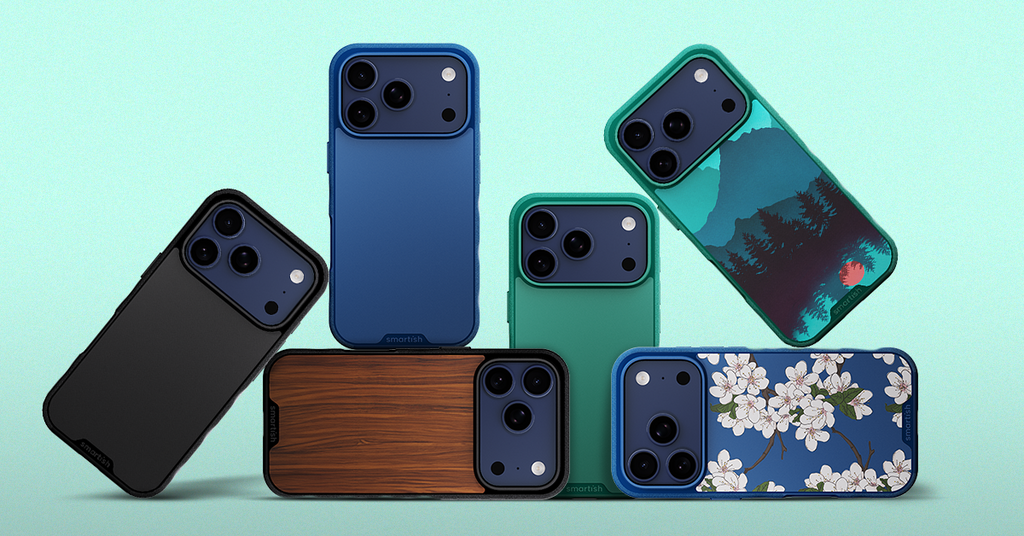
How much do slim MagSafe phone cases cost?
What's the Real Price Range for Slim MagSafe Cases?
Most slim MagSafe cases land between $25 and $80, depending on materials, drop protection, and brand. Knowing where each tier starts and stops saves you from overpaying for features you don't need.
Budget Picks Under $40
Entry-level slim MagSafe cases typically run $25 to $39. Expect basic MagSafe alignment, minimal raised edges, and lighter materials. Protection exists, but corner reinforcement and grip quality vary widely. Fine for light use; less ideal for active commutes.
Mid-Range Options ($40-60)
This is where most buyers land, and for good reason. Cases in this range tend to include air-pocket corners, a raised camera ring, grippy side texture, and reliable MagSafe alignment. The Smartish Gripmunk with MagSafe sits right here: slim, drop-tested, MagSafe compatible, and built for iPhone 16 Pro and newer models including iPhone 17.
Premium Slim Cases Over $60
Above $60, you're mostly paying for materials--aramid fiber, leather--or brand prestige. Protection and MagSafe performance don't automatically scale with price. If a mid-range case passes a drop test, the premium tier rarely adds meaningful function for everyday use.
Sales and Discounts to Watch
New iPhone releases often trigger discounts on previous-generation cases. Signing up for brand emails usually unlocks a first-order deal. Smartish runs seasonal promos worth bookmarking if you're not in a rush.
| Price Tier | Typical Features | Best For |
|---|---|---|
| Under $40 | Basic MagSafe, minimal edge protection | Light, low-risk daily use |
| $40-60 | Air-pocket corners, raised camera ring, grippy texture, drop-tested | Active commuters, everyday carry |
| Over $60 | Premium materials, brand-forward design | Aesthetic-priority buyers |
How Thin Can Slim MagSafe Cases Get Without Sacrificing Function?
Where Thickness Trade-Offs Actually Show Up
True slim cases add minimal depth--but go too thin and the trade-offs get real fast: corner cushioning shrinks, grip texture flattens, and structural rigidity drops. Most well-reviewed slim cases hit a sweet spot that keeps them pocketable without gutting the protection. That's the range where Smartish plays.
Does Thinner Mean Weaker MagSafe Hold?
Not necessarily. MagSafe performance depends more on magnet array placement than case thickness. A well-engineered slim case maintains full MagSafe alignment. The Gripmunk with MagSafe is slim and fully MagSafe compatible without compromising hold or charging speed.
MagSafe Charging Speed in Ultra-Slim Cases
Cases engineered with proper magnet alignment consistently support full MagSafe charging speeds. Go too thin without that alignment dialed in, though, and heat dissipation during wireless charging can trigger speed throttling. Design matters more than raw thinness.
Bottom line on thickness: The optimal slim MagSafe case balances pocketability with real-world protection. That balance typically puts you in the $35 to $55 range--enough room for smart engineering without padding the price tag.
Protection Levels in Slim MagSafe Cases: What You Actually Get
Drop Protection and Air Pockets Explained
Air-pocket corners absorb impact by compressing on contact, distributing force away from your phone's frame. This design works in slim profiles without adding bulk. The Gripmunk with MagSafe uses air-pocket corners and has been drop-tested 50 times from 6 feet. Slim doesn't mean fragile.
Raised Edges for Screen and Camera Safety
A raised screen edge keeps the display off flat surfaces when you set it face-down. A raised camera ring does the same job for your lenses when the phone rests on its back. Both are standard on quality slim cases--and non-negotiable for anyone with an active day.
Pros of Slim MagSafe Cases
- Pocketable without bulk
- Full MagSafe wallet and charger compatibility
- Air-pocket corners absorb real impact
- Raised edges protect screen and camera lenses
Cons of Slim MagSafe Cases
- Less corner cushion than rugged cases
- Ultra-thin options may sacrifice grip texture
- Not ideal for high-impact outdoor activities
Slim vs. Other MagSafe Cases: Quick Comparison Guide
Slim vs. Rugged: Bulk and Price Trade-Offs
Rugged MagSafe cases like the Gripzilla offer more corner and back protection with a rigid backplate--at the cost of added depth. If your day involves outdoor adventures or job-site exposure, that extra coverage earns its keep. For commuters and everyday carry, slim wins on comfort and pocketability.
Slim vs. Wallet Cases: Convenience Factors
Wallet cases like the Wallet Slayer Vol. 1 and Vol. 2 carry cards and cash but add thickness--and they're not MagSafe compatible. Slim MagSafe cases pair with MagSafe wallet accessories instead, keeping the profile lean while still covering the essentials.
Best Value for Everyday Use
Prioritizing value? Aim for the $40 to $55 range. That tier consistently delivers air-pocket corners, raised edges, grip texture, and drop-test credibility without tipping into premium-pricing territory.
| Case Type | MagSafe | Bulk Level | Best Use |
|---|---|---|---|
| Slim (Gripmunk with MagSafe) | Yes | Low | Daily commute, travel |
| Rugged (Gripzilla) | Yes | Medium | Outdoor, high-impact days |
| Wallet (Wallet Slayer) | No | Medium-High | Card carry, minimalist wallet |
Find Your Perfect Slim MagSafe Case Without Sticker Shock
Features Worth Paying For
Not every spec on a product page earns its keep. Focus on air-pocket corners, a raised camera ring, grippy side texture, and verified drop-test credibility. MagSafe alignment quality matters more than marketing language. Check those boxes in the $40 to $55 range, and the case is doing its job.
Compatibility Check for iPhone 17 and Beyond
Always confirm compatibility before buying. Camera layouts and button placement shift with each new iPhone generation. The Gripmunk with MagSafe is built for specific iPhone models with precise cutouts--including the camera control button, covered volume and power buttons, and accessible port openings.
Smartish Gripmunk with MagSafe: Slim, Grippy, Fairly Priced
The Gripmunk with MagSafe hits the sweet spot: slim profile, air-pocket corners, raised screen edge, raised camera ring, grippy sides (not sticky), MagSafe compatible, and drop-tested 50 times from 6 feet. Wirecutter has recognized it as the best case for most people--eight years running. That combination is harder to find than the spec sheets suggest.
The Bottom Line on Slim MagSafe Case Value
So, how much do slim MagSafe phone cases cost when you factor in everything that matters? Honest answer: $40 to $55 covers the features worth paying for. Air-pocket corners, a raised camera ring, grippy texture, and drop-test credibility are the benchmarks. Below that tier, protection often gets trimmed. Above it, you're usually paying for materials over function.
The Gripmunk with MagSafe checks every box on that list--and carries Wirecutter recognition to back it up. Slim, MagSafe compatible, and fairly priced. Know what you need, and you don't have to overpay to get it right.