








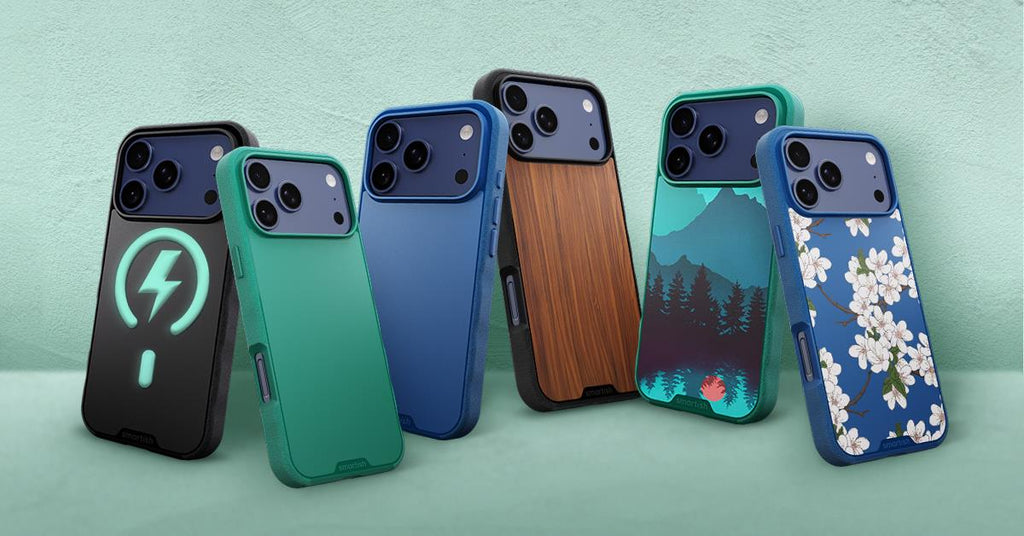
best phone grips
Why Phone Grips Make a Real Difference
The best phone grips combine secure hold, ergonomic comfort, and real drop protection. For most people, a case with grip built right in--like the Smartish Gripzilla or Gripmunk--delivers all three without a separate accessory to juggle.
Common Drop Risks in Daily Life
Commutes, coffee runs, chasing kids around the park--phones get fumbled constantly. A single-handed scroll while holding a bag is all it takes. The best phone grips give your fingers something to actually hold onto, cutting that risk down before it becomes a cracked-screen situation.
Hand Strain Fixes for Busy Days
Holding a large phone flat against your palm for hours puts real stress on your fingers and wrist. A good cell phone grip shifts that tension, letting your hand relax into a natural position. For anyone managing carpal tunnel or arthritis, that difference is felt by lunchtime.
Quick Wins for Selfies and Streaming
A grip that doubles as a stand turns any flat surface into a viewing setup. Selfies get steadier. One-handed video calls stop feeling like a circus act. Small upgrade, outsized payoff.
Types of Phone Grips That Actually Stick Around
PopSocket-Style Collapsible Grips
These accordion-style discs attach to the back of your case or phone. They pop out for grip or propping, then collapse flat for pockets. Widely available and affordable--though they add a noticeable bump and can block wireless charging depending on placement.
MagSafe Magnetic Options
Magnetic grips snap onto MagSafe-compatible cases and detach cleanly when you need to charge. No adhesive, no residue. The best MagSafe phone grip options work with Smartish Gripmunk and Gripzilla cases, both of which support MagSafe across iPhone 15, 16, and 17 model lines.
Strap and Loop Designs
Finger loops and wrist straps thread through or attach to a case, keeping the phone tethered to your hand. Great for active use. The Dancing Queen - Crossbody Wallet Case for iPhone 11 Pro Max takes this further with a removable wristlet and a fully adjustable crossbody strap, so your hands stay free entirely. Note: not compatible with wireless charging.
Integrated Case Grips with Built-In Protection
The smartest setup skips the add-on entirely. Finger grooves built into the case itself give you grip without the extra layer--protection and hold in one piece, with nothing to lose and nothing to reattach after charging.
| Grip Type | Wireless Charging | Drop Protection | Pocket Friendly |
|---|---|---|---|
| PopSocket-Style | Often blocked | None added | Moderate |
| MagSafe Magnetic | Yes (with MagSafe cases) | None added | Good |
| Strap and Loop | Depends on the case | Minimal | Good |
| Integrated Case Grip | Yes (with a MagSafe case) | Full case protection | Best |
Top Phone Grips for 2026: Real-World Picks
Best Overall Grip for Everyday Use
Smartish Gripzilla earns the top spot among the best phone grips for most people. Finger grooves are built right into the case, air-pocket corners absorb impact at the edges most likely to hit the ground, and the raised camera ring keeps your lens off flat surfaces. Drop tested, MagSafe compatible, and available for iPhone 17. See the Gripzilla with MagSafe Armor Case for iPhone 17 for the full picture.
Pros
- Integrated finger grooves, no add-ons needed
- Air-pocket corners and a raised screen edge
- MagSafe compatible, with no charging interference
- Drop tested for active lifestyles
Cons
- Thicker profile than slim cases
- No built-in kickstand
Slimmest MagSafe Grip for Pocket Pros
Smartish Gripmunk is the slim pick. Drop-tested, MagSafe compatible, and built with the same finger grooves--just in a slimmer package. It's the best MagSafe phone grip for anyone who wants to skip the bulk without giving up hold or protection. Available for iPhone 15, 16, and 17. Browse the full Gripmunk slim case range.
Toughest Grip for Active Days
Gripzilla is the right call for hikes, workouts, and anything else that puts your phone at risk. The rigid backplate paired with grippy (not sticky) edges and air-pocket corners handles the rough stuff. Precise cutouts keep every button and port accessible--no fumbling required.
Stand and Grip Combos That Hold Steady
For the best phone grip and stand combination, look at cases paired with a MagSafe magnetic stand accessory. Both Gripmunk and Gripzilla support MagSafe accessories, so your options stay wide open without committing to a built-in kickstand.
Phone Grips for Hand Health: Easing Carpal Tunnel and Arthritis
How Grips Cut Down on Strain
Gripping a flat phone slab tightens the tendons running through the wrist. A finger groove or loop lets those tendons relax, spreading the phone's weight more evenly across your hand. That ergonomic shift is exactly what makes a grip worthwhile for anyone dealing with carpal tunnel or arthritis.
Ergonomic Features Worth Looking For
Look for finger grooves sized for a natural curl, grippy edges that don't require a tight squeeze, and a case light enough not to add fatigue. Anything that makes you pinch or reposition just to feel secure is already working against you.
Gripmunk and Gripzilla: Built for Comfortable Holds
Both cases feature finger grooves and grippy side edges. Gripmunk keeps things slim for smaller hands or lighter carries. Gripzilla adds more coverage--firmer, more padded feel during long holds. Neither one needs a death grip to feel confident. That's kind of the point.
MagSafe Grips That Won't Skip a Charge
How MagSafe Works with a Grip Case
MagSafe uses a ring of magnets built into compatible iPhones to align chargers and accessories precisely. A MagSafe-compatible case keeps that magnet ring intact so everything snaps on correctly, every time. The best MagSafe phone grip works with the case, not against it. Learn more about how MagSafe works and why it matters for grips.
Wireless Charging: No Guesswork
Gripmunk and Gripzilla are both MagSafe compatible and drop tested--and MagSafe compatibility doesn't affect protection level or add bulk. Gripmunk stays slim; Gripzilla stays protective. Set either one down on a MagSafe charger and it just works. No repositioning, no slow charging.
Grip + Case Combos: Protection Meets Hold
Why Standalone Grips Fall Short
A PopSocket on a bare phone gives you grip with zero drop protection. A strap on a thin case helps with hold but won't save your screen. Standalone grips solve one problem while leaving the bigger one open. Integrated designs cover both ends at once.
Air-Pocket Corners and Finger Grooves: What They Actually Do
Air-pocket corners compress on impact, absorbing the shock that would otherwise transfer straight to your phone. Finger grooves give your hand a natural resting position, reducing the odds of a drop in the first place. Think of it as covering the before and the after.
Drop-Tested for Real Life
Both Gripmunk and Gripzilla are drop tested. The raised screen edge keeps the display off flat surfaces when face-down. The raised camera ring does the same for your lens when the phone rests on its back. Two features, one case--and neither one needs much thought once it's on your phone.
How to Pick and Install Your Perfect Grip
Match the Grip to Your Life
Slim profile with MagSafe priority: go Gripmunk. Maximum protection with grip: go Gripzilla. Need your hands completely free with cards and cash along for the ride: the Dancing Queen - Crossbody Wallet Case for iPhone 11 Pro Max carries up to five cards plus cash, includes a removable wristlet, and converts to a crossbody with an adjustable strap. Worth noting: it's not compatible with wireless charging or MagSafe.
Install and Removal in Four Steps
- Secure your phone before installing any case.
- Start at one corner, pressing the case edges in sequence around the phone.
- Confirm the camera cutout, screen edge, and all ports align correctly.
- To remove, start at a corner and work it off gently without bending the frame.
Keeping Your Grip in Shape
Wipe case edges with a dry cloth regularly to keep the grip texture working. Skip silicone sprays or conditioners on grippy surfaces--they'll dull what you're trying to preserve. For crossbody straps, check the attachment points periodically and adjust the length as your carry setup changes.
The Bottom Line on Best Phone Grips
The best phone grips do more than prevent drops--they change how your phone feels in your hand all day. Whether you need slim MagSafe compatibility, serious drop protection, or a hands-free carry option, there's a setup built for your life. Gripmunk and Gripzilla cover the full range of everyday needs, from commutes to outdoor adventures, with finger grooves, air-pocket corners, and drop-tested builds that earn their keep. iPhone 11 Pro Max users who want grip, carry, and protection in one package should check out the Dancing Queen - Crossbody Wallet Case for iPhone 11 Pro Max--five-card storage, removable wristlet, and an adjustable crossbody strap. No juggling required.
Frequently Asked Questions
How do phone grips help prevent accidental drops?
Phone grips give your fingers a secure anchor, making it much harder for your device to slip from your grasp. Think of it as a little insurance policy against those everyday fumbles, whether you're juggling coffee or chasing after tiny humans. It helps prevent that cracked-screen situation before it even starts.
Can a phone grip really ease hand strain from holding a large phone?
You bet! Holding a big phone flat against your palm for hours can really stress your fingers and wrist. A good phone grip shifts that tension, letting your hand settle into a more natural, relaxed position. It's a small ergonomic shift that makes a big difference by lunchtime.
What makes an integrated phone grip case a smart choice?
An integrated phone grip case is the smartest setup because it skips the add-on entirely. You get finger grooves built right into the case itself, giving you a secure hold without any extra layers to juggle. It's protection and grip, all in one seamless piece, so there's nothing to lose or reattach.
Are there phone grips that also work as a kickstand for viewing?
Absolutely! Many phone grips double as a stand, transforming any flat surface into a perfect viewing setup. This means steadier selfies and hands-free video calls, so you can stream your favorite shows without feeling like you're performing a circus act. It's a small upgrade with an outsized payoff.
What's a good phone grip option for an iPhone 11 Pro Max?
For your iPhone 11 Pro Max, the Smartish Dancing Queen, Crossbody Wallet Case is a solid pick. It secures 5 cards plus cash, has handy lipgloss loops, and includes an adjustable crossbody strap to keep your hands completely free. Plus, it comes with a removable wristlet for quick grabs.
What are the main types of phone grips available?
We've seen a few types that actually stick around. There are PopSocket-style collapsible grips that pop out for use, MagSafe magnetic options that snap on clean, and strap or loop designs that tether your phone. Then there are integrated case grips, like our Smartish Gripzilla, which build the grip right into the case for a seamless experience.
Which Smartish phone grip is best for everyday use and protection?
For most people, the Smartish Gripzilla earns the top spot among phone grips for everyday use. It features finger grooves built right into the case, air-pocket corners to absorb impact, and a raised camera ring to keep your lens safe. It's drop tested and designed for active lifestyles, giving you peace of mind.