








Best MagSafe accessories
Your phone already handles directions, payments, photos, work messages, and the occasional research spiral. The best MagSafe accessories make those jobs easier with magnetic chargers, wallets, stands, mounts, and grips that attach when needed and stay out of the way the rest of the day.
Key Takeaways
- Magnetic accessories should solve real daily friction without adding clutter to your pocket or bag.
- The best MagSafe gear covers everyday needs like charging, mounting, and carrying cards while staying out of sight when not in use.
- Your phone already works hard enough, so the right magnetic add-ons should reduce hassle instead of creating new steps.
- Smart magnetic accessories click into place instantly and release just as quickly when you are done with them.
The best pick solves a specific nuisance without adding pocket bulk or blocking wireless charging. Start with your phone model, case, and routine. Then check the magnet, charging standard, fit, and trade-offs. Not just the product photo doing its best superhero pose.
What are the best MagSafe accessories?
The best MagSafe accessories are magnetic add-ons that connect to a compatible phone or case. Chargers, wallets, grips, stands, car mounts, and battery packs are the most useful options. The magnet helps each accessory land in the right spot, so you spend less time nudging a charger around like a sleepy Roomba.
MagSafe works alongside wireless charging, while Qi2 is the newer universal standard that brings magnetic alignment to supported Android phones. Charging speed depends on the phone, case, charger, wall adapter, and software. Maximum wattage on the box isn't a promise that every setup will reach it.
That makes the case part of the system. Thick materials, metal plates, or poorly positioned magnets can weaken the connection or interrupt charging. A compatible case should keep the phone comfortable, protect its corners and screen, leave the camera clear, and let accessories attach without a wrestling match. For more detail, read our guide to how MagSafe works.
What can MagSafe accessories do?
Magnetic accessories earn their keep by changing jobs quickly. A wallet can handle a coffee run, a stand can hold a recipe on the counter, and a car mount can keep directions visible without clamping onto the phone. A grip can help with one-handed scrolling, then come off before the phone heads into a pocket.
Alignment is the other practical win. A magnetic charger centers more consistently than a loose charging pad, while a mount or stand stays in its intended position. The connection still needs balance: a heavy accessory, slick case, or bulky stack can make a useful setup awkward.
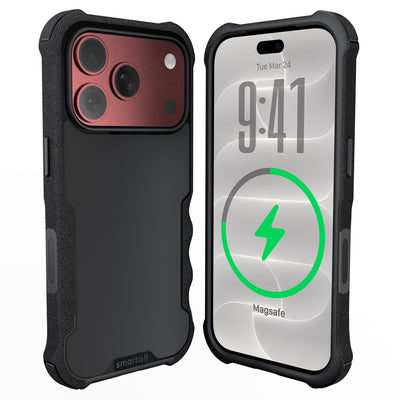
Smartish pick: Gripmunk and Side Hustle with MagSafe® Bundle for iPhone 15 Pro Max pairs a grippy case with a side-loading wallet component. It offers payment access without removing the Side Hustle wallet, plus air-pocket corners, raised edges, and wireless charging support inside the case.
The bundle is sized for the iPhone 15 Pro Max and works with MagSafe chargers and accessories. It suits anyone who wants protection and payment access without carrying a separate wallet. Free US shipping applies to orders over $35, and the bundle includes warranty coverage and free 30-day returns.
Shopping for the iPhone 17? Match every case and accessory to the exact phone model before ordering. Android phones with Qi2 support can use compatible magnetic accessories directly; other models may need a case with a magnetic ring or an adhesive ring. Check placement first so the ring doesn't interfere with charging, camera clearance, or grip.
How should you choose MagSafe accessories?
Choose based on your phone, case, and daily routine. Confirm whether the phone has built-in MagSafe, Qi2 support, or neither. Then check the accessory's weight, ring placement, charging requirements, and fit with your case. A desk charger and a car mount face very different tests.
Look for clear compatibility details and a return policy that lets you test the setup in a pocket, car, and workspace. Magnet strength matters, but so do comfort, surface texture, attachment points, and the space between the phone and accessory. A strong magnet can't rescue a design that catches on every jacket.
| Accessory type | Best use | What to check | Common tradeoff |
|---|---|---|---|
| Magnetic charger | Nightstands, desks, and travel | Qi2 or MagSafe support, charging wattage, cable length | Alignment depends on case compatibility |
| Magnetic wallet | Carrying payment essentials | Attachment strength, pocket clearance | Added bulk can affect pocket comfort |
| Grip or stand | One-handed scrolling and video viewing | Hand comfort, hinge construction, easy removal | Some designs add thickness to the phone |
| Car mount | Hands-free navigation | Vent, dash, or windshield mounting method | Heat and road vibration can test the connection |
| Battery pack | Charging away from an outlet | Battery capacity, alignment, cable access, weight | Convenience comes with extra weight |
Charging speed deserves a closer look. Standard wireless charging can deliver up to 7.5W on iPhones, while magnetic Qi2 or MagSafe chargers can deliver up to 15W, according to WIRED’s MagSafe accessory research. Confirm the charger's power requirements and pair it with a wall adapter that can supply them. Otherwise, your fast charger may take a personal day.
For a case and wallet combination, the Gripmunk and Side Hustle with MagSafe® Bundle for iPhone 15 Pro Max combines a grippy case, air-pocket corners, raised camera and screen edges, payment access, and MagSafe compatibility. The bundle supports wireless charging inside the case and is specifically sized for the iPhone 15 Pro Max. Match the model before ordering. Free US shipping applies to orders over $35, with warranty coverage and free 30-day returns included.
Test the accessory where it will live: charge overnight, place it in a tight pocket, attach it to a mount, and remove the wallet repeatedly. Watch for slipping, charging interruptions, blocked camera lenses, or edges that catch on fabric. Community recommendations can reveal clever ideas such as folding stands and compact grips, but verify the materials, phone support, alignment, and warranty terms yourself. For desk or wall use, the MagSafe Mountaineer Wall Mount keeps a compatible phone visible and accessible.
References
Frequently Asked Questions
What are the best MagSafe accessories overall?
The right setup depends on your routine, but a useful combination usually includes a charger, a wallet or grip, and a case that keeps the magnetic connection reliable. For iPhone 15 Pro Max owners who want protection and payment access together, the Gripmunk and Side Hustle with MagSafe® Bundle for iPhone 15 Pro Max is a practical place to start. The bundle includes two components, Gripmunk and Side Hustle, with MagSafe® compatibility, a grippy texture, air-pocket corners, raised camera and screen protection, and wireless charging support inside the case. It is a solid pick for errands, commuting, travel, and anyone tired of carrying a phone and wallet as separate little employees.
What are some unique magnetic accessories people recommend?
Community discussions often surface ideas beyond the usual charger and card holder. Reddit users mention compact phone grips, foldable kickstands, magnetic ring holders, gaming attachments, desk mounts, tripod adapters, and small travel stands. The appeal is simple: the same magnetic connection can support different jobs throughout the day. A grip can help during one-handed scrolling, then come off before the phone slips into a pocket. A folding stand can hold a recipe on the kitchen counter or a video on an airplane tray. Check the accessory’s weight, hinge quality, pocket profile, and phone clearance before buying. Clever is good. Clever that snags on every jacket is less good.
Can I use these accessories with Android or Samsung phones?
Yes, though compatibility depends on the phone model and case. Qi2 is a universal wireless charging standard that adds magnetic alignment to supported Android devices, including future Samsung and Google phones. Some current Android phones can use magnetic accessories through a case with a built-in ring. Another option is an adhesive magnetic ring, but placement deserves care. A poorly positioned ring may interfere with wireless charging, sit off-center, cover a camera area, or make the phone uncomfortable to hold.
Searches for the best MagSafe accessories for Android or Samsung often lead to products that work through magnetic cases rather than native Apple hardware. Read the case specifications, confirm wireless charging support, and check whether the accessory manufacturer names your exact phone model. A magnetic connection may physically attach while still delivering an imperfect charging experience. The magnet is only one piece of the puzzle.
What is Qi2, and does it work exactly like Apple MagSafe?
Qi2 is a newer wireless charging standard built around magnetic alignment. It follows the same broad idea as MagSafe: magnets help center the phone and charger, while the charging system transfers power wirelessly. It does not mean every Qi2 phone and every MagSafe accessory will offer identical speed, strength, or device features. The phone, case, charger, wall adapter, and software can all affect performance.
For everyday use, the practical test is straightforward. The phone should attach in the intended position, remain connected during normal handling, and charge without repeated repositioning. Look for certification or clear compatibility information instead of relying on a product title that tosses around the word “magnetic” like confetti.
Do magnetic wallets fall off easily?
A well-designed wallet should stay attached during ordinary use, but no magnetic wallet is permanently glued to the phone. Weak magnets, excessive thickness, slick case materials, and repeated stress can all affect the hold. Wallets with flexible attachment points may stretch over time, especially if they are pulled away from the phone by a pocket or bag. Inspect the connection if the wallet begins shifting.
The Gripmunk and Side Hustle with MagSafe® Bundle for iPhone 15 Pro Max takes a different practical route by including a side-loading wallet component that allows easy payment without removing the Side Hustle wallet. Its case texture is designed to help prevent slipping, while the magnetic system remains compatible with MagSafe chargers and accessories. The bundle is specifically sized for the iPhone 15 Pro Max, and Smartish warranty coverage plus free 30-day returns give shoppers a reasonable way to test the fit in real life.
Can a magnetic ring block wireless charging?
It can. Metal plates, misplaced adhesive rings, and thick layers between the phone and charger may interrupt charging or weaken alignment. Before installing a ring, confirm that it is designed for wireless charging and follow the placement guide carefully. Test the phone with your charger before committing the adhesive. If wireless charging is part of your daily routine, a compatible case is usually less fiddly than adding a ring and hoping it lands in the right spot.