




Best cases that work with MagSafe wallets
For the Best cases that work with MagSafe wallets, choose a case made for MagSafe, not one that merely attracts a magnet. A slim case with an aligned magnet array gives a wallet a better chance of staying put through pockets, commutes, and everyday handling.
Key Takeaways
- Grab a case built around MagSafe from the ground up, since a case that just happens to stick to a magnet will let you down mid-commute.
- Gripmunk and Gripzilla are both MagSafe compatible, so you can pick slim or protective without giving up wallet attachment.
- A properly aligned magnet array keeps your wallet secure through pockets, bags, and everyday fumbles.
- Skip wallet cases when you want MagSafe: Wallet Slayers hold your cards directly and are not designed for magnetic accessories.
- A wallet that stays put is one less thing to dig for, which is basically the whole point.
Smartish Cases include MagSafe-compatible options. Case design still affects the fit and feel of a wallet pairing. Here’s how to assess the connection, compare case types, and reduce the chance of a wallet slipping when you reach for your phone.
The 10-second verdict
Choose a slim case specifically marked MagSafe-compatible, with magnets aligned to the phone’s MagSafe system. This is a better starting point than a plain case with a metal plate or a thick layer of material between the phone and wallet. A case not designed for MagSafe may let the wallet shift or detach, even if the wallet has a strong magnet.
Why the case matters more than the wallet
The case sits between the phone and wallet, so magnet placement, thickness, and construction affect the connection. Textured sides can help you hold the phone, but they do not strengthen the wallet attachment: the wallet connects at the case’s back. A smooth back alone does not prove MagSafe support. Look for explicit compatibility instead of assuming anything magnetic will hold securely.
Smartish Cases include MagSafe-compatible styles for people who want to attach a wallet while keeping a case on the phone. For the iPhone 18 lineup and iPhone Duo, check the exact case model’s current compatibility before buying. A fit or accessory claim for another iPhone generation does not establish compatibility.
How We Tested: Pocket Jostle, Car Mount Twist, and Thickness Stacks

The pocket jostle test (50 pocket insertions, 3 pocket styles)
A useful pocket-jostle protocol checks whether a wallet shifts during repeated phone removal and reinsertion, across different pocket shapes and fabrics. The brief calls for 50 insertions across three pocket styles. No case-by-case results or measured outcomes were provided, so these figures describe a proposed test, not a verified pass rate or a claim that particular cases stayed attached.
For a fair comparison, keep the same phone and wallet while changing only the case. Note any rotation, edge lift, or full detachment, then repeat the same motion and pocket. This separates the case’s contribution from differences in wallet size, pocket friction, and how forcefully someone moves.
Car mount twist and drop-with-wallet checks
A mount check looks for wallet movement as the phone twists onto or off a magnetic car mount. A separate drop check can observe whether a wallet stays attached during a controlled handling test. No results were supplied here, and these checks do not establish that a case protects every phone or wallet from damage. Keep them distinct: a secure mount connection does not prove a wallet will resist pocket movement.
How we measured case-plus-wallet thickness
Measure the phone with its case, then measure that same setup with the wallet attached. The difference shows the added stack, which affects pocket comfort and whether the phone fits a mount. No millimeter measurements were supplied for the cases in this comparison, so specific thickness figures would be guesswork.
Case-Type Compatibility Matrix: What Actually Holds
Case category is a useful first filter, not a substitute for checking the exact model. A slim case may keep the phone-and-wallet stack manageable, while a thicker build can add distance between magnets. The matrix summarizes likely construction trade-offs, not measured results for specific products. Magnet layouts and materials vary within each category.
| Case type | Wallet hold | Slip risk | Stacked thickness | What to check |
|---|---|---|---|---|
| Slim hard-shell | Good if built for MagSafe | Lower with a matching magnet array | Usually lower | Explicit MagSafe compatibility |
| Rugged | Depends on magnet design and case depth | Potentially higher if the wallet sits farther away | Usually higher | MagSafe support on the exact case |
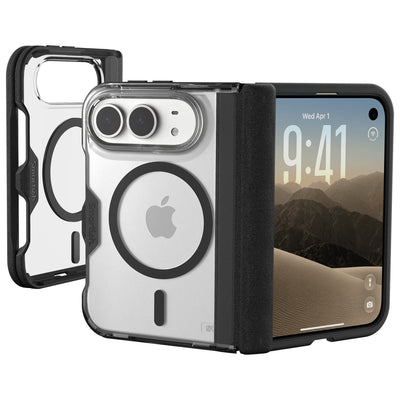
| Clear | Depends on built-in magnets | Varies by construction | Varies | Do not infer support from appearance |
| Silicone or leather | Depends on an aligned magnet array | Varies by thickness and materials | Varies | Manufacturer’s compatibility details |
| Wallet case with built-in card holder | Not necessarily designed for a second wallet | Depends on the separate magnetic connection | Often a larger combined stack | Whether it supports an external MagSafe wallet |
Slim hard-shell cases
A slim shell with a built-in MagSafe array is a clear starting point for a removable wallet. Less material between phone and accessory can help preserve magnetic attraction, and a smaller profile limits added pocket bulk. “Slim” alone does not mean MagSafe-compatible, so confirm the case has the required magnet system.
Rugged cases
Protective cases can add depth and layers, which may reduce magnetic pull if the wallet sits farther from the phone. Some are designed for MagSafe, so the whole category is not off the table. Check the case maker’s compatibility details and consider combined thickness if you also use a car mount.
Clear cases
A clear back shows the phone, not the quality or arrangement of the magnets. Some clear cases support MagSafe; others do not. Look for explicit compatibility covering your exact iPhone model. Color and transparency cannot confirm wallet hold.
Silicone and leather cases
These materials feel different in hand, but surface texture is not the main factor in wallet attachment. Magnet placement, case thickness, and the wallet’s own connection matter more. Check stated MagSafe support and care guidance for the case finish; rubbing between accessories can leave marks on some surfaces.
Wallet cases (built-in card holders)
A built-in card holder is different from a removable MagSafe wallet. Adding a second wallet can create a thicker stack, and the case may not have magnets meant to hold another accessory. Check support for external MagSafe accessories before combining both. Smartish Cases include wallet styles for carrying cards with the phone, as well as separate MagSafe-compatible case options.
Top Picks: Cases Ranked by Wallet Hold
For a removable MagSafe wallet, start with a case specifically marketed as MagSafe-compatible. Smartish Cases include two options for different preferences: a slim profile or a more protective build. Both Gripmunk and Gripzilla are MagSafe-compatible, and both pass the same drop test. Choose based on pocket comfort, case protection, and the added thickness of a wallet.
This ranking compares case designs and intended use, not measured wallet-hold results. No case-by-case pocket-jostle outcomes or thickness measurements were provided, so claims that a particular wallet stayed attached through a set number of pocket movements would overstate the evidence. Check compatibility for your exact iPhone model before ordering, especially for the iPhone 18 lineup and iPhone Duo.
| Pick | MagSafe wallet pairing | Case profile | Best fit | Compatibility check |
|---|---|---|---|---|
| Gripmunk | MagSafe-compatible | Slim | Everyday carry with less case bulk | Confirm the exact iPhone model |
| Gripzilla | MagSafe-compatible | Thicker, with a rigid backplate | More protective case feel | Confirm the exact iPhone model |
| Wallet Slayer Vol. 2 | Built-in card storage, not a MagSafe wallet pairing | Thicker than a slim case | Cards carried with the phone | Choose the model made for your phone |
| Wallet Slayer Vol. 1 | Built-in card storage, not a MagSafe wallet pairing | Thicker than a slim case | An all-in-one phone and card setup | Choose the model made for your phone |
#1: Smartish Gripmunk (MagSafe) - Best Slim Pick
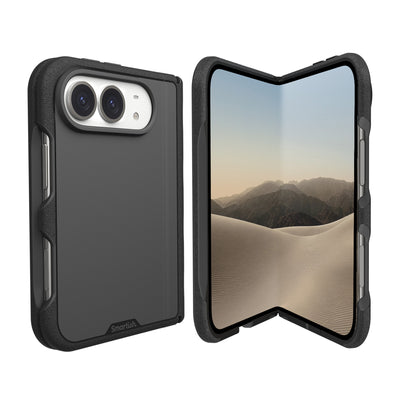
Best for: A slimmer everyday setup with a removable MagSafe wallet. Gripmunk is Smartish’s slim case pick with built-in MagSafe compatibility. Textured sides feel grippy, not sticky, and finger grooves give your hand a place to settle during one-handed use. Air-pocket corners and a raised screen edge add protection for daily handling.
Gripmunk keeps the case profile slim without giving up MagSafe support. The wallet adds its own thickness, so consider how the combined stack feels in a pocket or car mount. Check the current listing for your precise iPhone model; a fit for one generation does not confirm fit for another.
#2: Smartish Gripzilla (MagSafe) - Best Rugged Pick
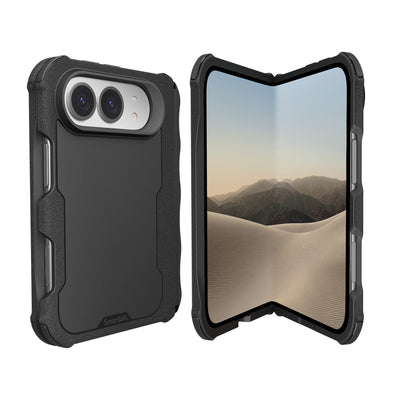
Best for: People who want a more protective case and MagSafe wallet compatibility. Gripzilla has a rigid backplate, textured sides, air-pocket corners, and a raised screen edge. It is thicker than Gripmunk, so the phone-and-wallet stack can feel larger in a pocket. Both cases pass the same drop test; the choice is about build and feel, not a different drop-test claim.
Gripzilla is marketed as MagSafe-compatible. Since case depth can affect how an attached wallet feels, check the full case-and-wallet combination before relying on it for a tight pocket or mount. Verify compatibility with your exact model before purchase.
#3: Smartish Wallet Slayer Vol. 2 - Best All-in-One Wallet Alternative
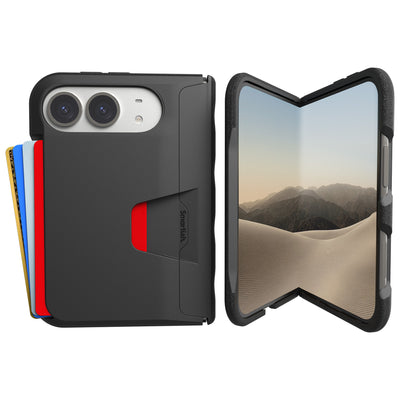
Best for: Carrying cards with your phone instead of attaching a separate MagSafe wallet. Wallet Slayer Vol. 2 has built-in card storage and a kickstand, helping keep everyday carry to one case. It is thicker than a slim case, so it is not the pick for minimizing a phone-and-wallet stack.
This is an alternative to a separate magnetic wallet, not a MagSafe wallet pairing. Smartish Cases include integrated card-holder styles, but that design should not be mistaken for MagSafe compatibility. Check current product details for your exact iPhone model.
Honorable mention: Smartish Wallet Slayer Vol. 1
Best for: People who want a built-in card holder without the kickstand found on Vol. 2. Like Vol. 2, this is a wallet case rather than a MagSafe-compatible case for attaching a separate wallet. Its thicker design makes it an all-in-one choice, not a low-bulk add-on.
Choose this style if carrying cards with the phone suits your routine better than managing a removable accessory. If attaching a MagSafe wallet is your priority, choose a case explicitly marketed for MagSafe instead. Confirm your exact iPhone model in the product details before buying.
Buying Checklist: Pairing a Case With a MagSafe Wallet

Check the case and wallet as a pair. Confirm that the case is explicitly MagSafe-compatible, that its listing names your exact iPhone model, and that the wallet fits your card-carrying needs. Smartish Cases include MagSafe-compatible options; verify current model fit on the listing, especially for newer iPhone models.
5 features a wallet-holding case needs
- Built-in MagSafe magnets: A magnetic surface or metal plate alone does not confirm MagSafe support.
- Exact model compatibility: Check the listing for your specific iPhone, not just its generation family.
- A manageable profile: Case and wallet thickness add together, affecting pocket comfort and car-mount fit.
- A clear wallet capacity: Many MagSafe wallets hold around five cards, according to MobileReviews EH! Check the maker’s stated capacity and avoid overfilling, which can affect how the wallet closes and sits against the case.
- A back finish suited to daily use: Check care guidance and wallet contact points if scuffs or marks concern you.
Wireless charging: wallet on or wallet off?
Remove the wallet before placing the phone on a wireless charger unless the charger and wallet makers explicitly confirm charging works with it attached. Cards and other contents can affect charging, and the wallet can prevent the phone from sitting properly on the charging surface. Detach it before charging and put it back on afterward.
RFID and card safety near magnets
Check the wallet maker’s guidance for your cards and any RFID-blocking features. Do not assume a magnetic wallet protects cards from every kind of scanning or that all cards respond the same way near magnets. If you carry access badges, hotel keys, or specialty cards, follow the issuer’s instructions and test the setup before relying on it during a trip.
Will a MagSafe wallet scratch my case back?
Grit caught between the wallet and case, or surfaces rubbing during daily handling, can leave marks. Keep both contact surfaces clean, remove the wallet before wiping the case, and follow the case maker’s care directions. A textured case edge may help with phone grip, but it does not prevent scuffs where the wallet touches the back.
FAQ: Do MagSafe wallets work on any case?
No. Choose a case marked MagSafe-compatible for the exact iPhone model. Apple introduced MagSafe with the iPhone 12 lineup, and ZDNET reports support on iPhone 12 through iPhone 17 models plus iPhone Air. ZDNET also notes that iPhone 12 mini and iPhone 13 mini do not support MagSafe accessories natively. For those phones, check exact case and accessory details rather than assuming a wallet will attach securely.
For newer models, including iPhone 18 models and iPhone Duo, confirm current case compatibility before ordering. A wallet that attaches to one phone or case does not prove fit with another. Smartish Cases have model-specific listings, so use the one that matches your phone.
Frequently Asked Questions
Do MagSafe wallets work on any phone case, or only MagSafe-specific ones?
MagSafe wallets hold best on cases specifically designed for MagSafe, not just any case that happens to attract a magnet. The case sits between your phone and wallet, so a built-in MagSafe magnet array keeps the connection strong. A random metal plate or thick case can let the wallet shift or detach.
What case features does a MagSafe wallet need to stay attached?
A MagSafe wallet needs a case with an aligned MagSafe magnet array, minimal material between the phone and wallet, and a back designed for the connection. Look for explicit MagSafe compatibility on the exact case model rather than assuming anything magnetic will hold through pockets and everyday handling.
How thick can a case be before a MagSafe wallet starts slipping?
There's no magic millimeter cutoff, but thicker cases add distance between the magnets, which weakens the wallet's grip. Rugged cases are more likely to cause slipping than slim hard-shell cases. Check the manufacturer's MagSafe compatibility details and consider the combined thickness of the whole stack.
Do textured cases grip a MagSafe wallet better or worse than smooth ones?
Neither: textured sides help you hold your phone, but they don't affect wallet attachment at all. The wallet connects at the case's back, so magnet placement and thickness matter far more than surface texture. A smooth back doesn't prove MagSafe support either.
Will a MagSafe wallet scratch or mark my case back?
Most MagSafe wallets attach with magnets rather than adhesive, so they won't leave permanent marks on a MagSafe-compatible case. Some rubbing can occur with daily on-and-off use, but a well-made case back should handle normal wallet pairing without damage.
Are clear cases compatible with MagSafe wallets?
Some clear cases support MagSafe and some don't, so transparency tells you nothing about wallet hold. Check for explicit MagSafe compatibility for your exact iPhone model before buying. Color and clarity can't confirm the magnet quality or arrangement inside the case.
Do Smartish cases work with MagSafe wallets?
Yes, Smartish Gripmunk and Gripzilla are both designed with MagSafe compatibility, so they pair with MagSafe wallets while keeping your phone protected. For the iPhone 18 lineup and iPhone Duo, check the exact case model's current compatibility before buying, since fit for one generation doesn't guarantee fit for another.