




Best cases that don't interfere with MagSafe performance
Best cases that don’t interfere with MagSafe need more than a compatibility label. The magnet ring must align with the phone’s charging coil, hold accessories securely, and leave charging and NFC functions working normally. Check ring placement, case material, and thickness, then test the case with the charger and accessories you use.
Key Takeaways
- A MagSafe case earns its keep when the magnet ring lines up perfectly with the charging coil, so accessories snap on and stay put.
- Both Gripmunk and Gripzilla are built with MagSafe in mind, and they pass the same drop test despite the difference in thickness.
- Thicker cases like the Wallet Slayer line trade some MagSafe convenience for wallet function, so pick based on how you actually carry your stuff.
- Case thickness and material matter as much as the label, since a poorly placed magnet ring can weaken your accessory grip.
- Before committing, test any case with your charger and accessories to make sure charging and NFC features still work normally.
At Smartish, we design Cases around practical details like grip, protection, and everyday handling. For MagSafe, those details matter only if your charger and accessories connect as intended.
What Actually Makes a Case MagSafe-Compatible (Hint: It's a Magnet Ring, Not a Label)
A MagSafe-compatible case has a magnet array positioned to line up with the iPhone’s charging coil. That alignment helps center a MagSafe charger and supports a secure connection with compatible accessories. A printed label alone does not tell you how well the ring holds, how quickly your phone charges, or whether other functions work as expected.
The magnet array, explained in plain English
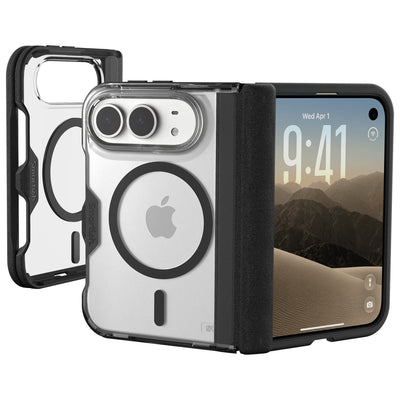
The magnet array is a ring of magnets built into the case around the phone’s wireless charging area. When it lines up with a charger, it helps center and hold the charger against the phone. The same connection lets compatible wallets, stands, and mounts attach. An off-center ring can weaken the hold, even if the case is marketed as MagSafe-compatible.
How case thickness and materials slow your charging
Wireless charging passes through the case, so added distance or a material that disrupts the magnetic connection can affect charging speed. Research on case compatibility identifies non-metal cases thinner than about 3 mm as a general range that tends to work reliably. Metal plates can interfere with alignment; thick leather and some magnet-based mounts can also slow or block charging. Thickness is a clue, not a performance promise.
The magnet strength sweet spot: too weak, balanced, too strong
Weak magnets may let a phone slip from a car mount or charging stand. A well-aligned, balanced ring should hold compatible accessories in place without making them difficult to remove. Stronger is not always better: on some Galaxy phones, overly strong case magnets may trigger false S Pen warnings or affect pen function. For iPhone, check accessory hold and charging behavior instead of judging a case by magnet strength alone.
Magnet strength spectrum: Too weak can mean slipping accessories. Balanced means a dependable hold and easy removal. Too strong can cause device-specific issues, including reported S Pen interference on some Galaxy phones.
Compatibility notes for iPhone 18 Pro, Pro Max, Duo, and iPhone 17
MagSafe performance depends on the case matching the exact phone model, not just the product family. Apple announced iPhone 18 Pro, iPhone 18 Pro Max, and iPhone Duo in September 2026. Don’t assume a case made for iPhone 17 fits any of those models, or that a case designed for one iPhone 18 model fits another. Confirm exact model compatibility before buying.
How We Evaluated Every Case: Charging Speed, Magnet Hold, and Real Accessory Stress

A MagSafe logo is not a performance result. A useful evaluation checks charging behavior, accessory hold, and whether normal phone functions remain reliable. Smartish’s published Cases guide discusses MagSafe case features, but shoppers should still check a specific case with their own charger, mount, and phone model. We separate test criteria from measured results rather than presenting unverified timings or scores.
The stopwatch test: full 15W vs. dropped charging rates
MagSafe can support wireless charging up to 15W, while standard Qi charging through a case may be around 7.5W, according to the supplied compatibility research. These are maximum or typical rate comparisons, not promises for every phone, charger, or battery state. For a fair check, use the same charger and power adapter with and without the case, note charging behavior over the same interval, and compare like with like.
The shake test: car mounts, stands, wallets, and bedside chargers
Check whether the charger centers on the phone, then attach the accessories you rely on: a car mount, stand, wallet, or bedside charging puck. Move the phone through ordinary handling rather than giving it an exaggerated shake. Look for slipping, uneven attachment, or a charger that loses contact when the phone shifts. The New York Times Wirecutter’s MagSafe accessory coverage also treats accessory fit as part of the practical experience, not just a case label.
Apple Pay and NFC behavior with magnets near the ring
With the case on, try an ordinary Apple Pay transaction and any NFC task you use regularly. If contactless functions become inconsistent, remove the case and repeat the same action. Research identifies unshielded or misaligned magnets near the phone’s coil as a possible source of NFC interference. A single failed tap can have other causes, so compare repeated attempts before blaming the case.
Protection and price: why a thin, well-aligned ring beats a thick case
Case choice involves trade-offs among protection, grip, thickness, charging, and accessory hold. A thinner case with a properly placed ring can reduce the gap between charger and phone, while added thickness may make magnetic attachment less reliable. At Smartish, Cases are designed with practical protection features such as air-pocket corners and raised screen edges. Compare those details with exact-model compatibility and real accessory behavior, not a broad claim that one case does everything.
- Check the case’s exact phone-model fit and magnet-ring placement.
- Compare charging with and without the case using the same equipment.
- Test the accessories you use, including mounts, stands, and wallets.
- Confirm Apple Pay or other NFC tasks still work as expected.
Top Picks: Cases That Keep MagSafe Charging Fast and Magnets Strong
A useful MagSafe case should do more than attach to a charger. It should hold steady on the accessories you use, allow charging to work as expected, and offer the protection and feel you want. Smartish Cases have practical details such as air-pocket corners and raised screen edges. Check the product listing for your exact iPhone model; compatibility is model-specific.
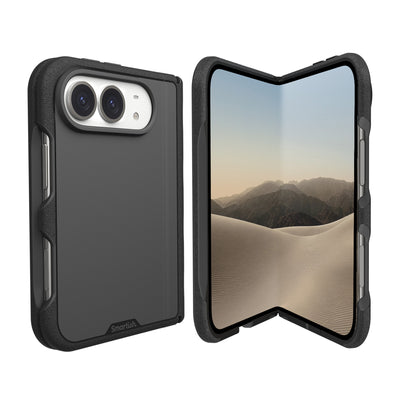
The Smartish Gripmunk with MagSafe is the slim pick, while Gripzilla has a thicker protective build. Wallet Slayer Vol. 2 adds a wallet and kickstand, but is not marketed as MagSafe-compatible. Choose by how you use your phone, not by a label alone.
| Pick | Charging and accessory fit | Protection and everyday use | Best match |
|---|---|---|---|
| Best overall: Smartish Gripmunk with MagSafe | MagSafe-compatible design for charging and magnetic accessories | Slim profile, grippy sides, air-pocket corners, raised screen edge, raised camera ring | Everyday use with MagSafe chargers, mounts, and stands |
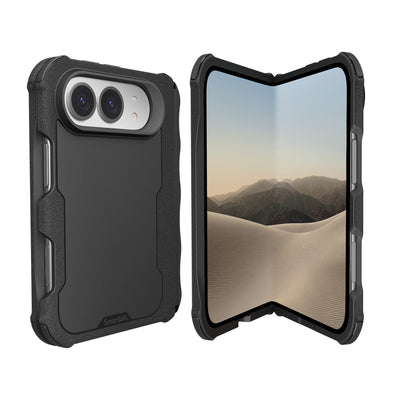
| Best for protection: Smartish Gripzilla MagSafe | MagSafe-compatible design; supports magnetic accessory use | Thicker build with a rigid backplate, air-pocket corners, raised screen edge, raised camera ring | People who favor a more protective feel |
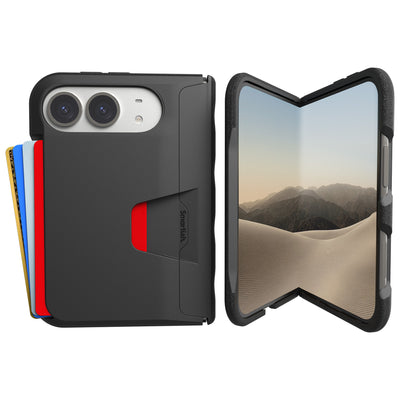
| Best wallet option: Wallet Slayer Vol. 2 | Not marketed as MagSafe-compatible | Wallet-style case with a built-in kickstand; thicker than a slim case | Carrying cards and watching hands-free without relying on a separate MagSafe wallet |
Best overall: Smartish Gripmunk with MagSafe, slim and grippy
Best for: Anyone who wants a slim case for everyday MagSafe charging and accessory use. Gripmunk is designed for MagSafe accessories while keeping a low-profile feel. Textured sides help with grip, and air-pocket corners and a raised screen edge add practical protection without turning the phone into a pocket brick.
Try it with a MagSafe charger, car mount, or stand, and check that each accessory centers and holds as expected. Gripmunk and Gripzilla pass the same drop test, so a slimmer build does not mean giving up that shared test standard. For a flexible daily setup, this is the one I’d start with.
Best for protection: Smartish Gripzilla MagSafe, a thicker protective build
Best for: People who want a more substantial case for commutes, errands, and outdoor days. Gripzilla is thicker than Gripmunk and has a rigid backplate, air-pocket corners, a raised screen edge, and a raised camera ring. It is MagSafe-compatible, so you can use compatible chargers and accessories with a more protective feel.
Both Smartish MagSafe case styles pass the same drop test, but the extra thickness may feel different in a pocket or hand. Choose Gripzilla for its protective build and Gripmunk for a slimmer profile. The right fit depends on your routine; more thickness does not automatically mean better accessory performance.
Best wallet option: Wallet Slayer Vol. 2 with kickstand
Best for: Anyone who likes carrying cards with a phone and wants a built-in kickstand for hands-free viewing. Wallet Slayer Vol. 2 combines those jobs, so there is no separate magnetic wallet to attach or remove. It is thicker than a slim case, a trade-off for its wallet function and stand.
This case is not marketed as MagSafe-compatible. If magnetic charging or attached accessories are central to your setup, choose a MagSafe-compatible option. Pick Wallet Slayer Vol. 2 when card storage and the kickstand matter more than magnetic attachment. Smartish Cases come in different formats for different routines; this one focuses on carrying and viewing convenience.
Honorable mention: iPhone 17 and iPhone 16 fit notes
For iPhone 17 or iPhone 16, choose a case listing that names your exact model. Similar-looking iPhones do not establish case compatibility: camera placement, buttons, and overall fit can differ. Confirm the model selection before buying, then check that your charger and accessories attach properly once the case is on.
Don’t assume a case for iPhone 17 or iPhone 16 fits iPhone 18 Pro, iPhone 18 Pro Max, or iPhone Duo. Each needs verified, exact-model fit. If a listing does not clearly name your phone, pause before ordering; a magnetic ring cannot fix a case that does not fit the device.
The 3-Minute At-Home MagSafe Test Kit
Use the same charger, power adapter, and accessories with and without your case. This quick check can help spot charging slowdowns, a loose magnetic hold, or an NFC hiccup. It is a comparison, not a lab measurement: battery level, temperature, and charger conditions can affect what you observe.
Step 1: The charger stopwatch test
- Start each comparison at a similar battery level. Connect the charger, wait for charging to begin, and note the battery percentage.
- Leave the screen off for a consistent interval, then check the percentage again. Repeat with the case on and off, using the same charger and power adapter.
- Look for a clear difference in charging behavior, not a promised wattage. MagSafe supports up to 15W, while standard Qi charging through a case may be around 7.5W, according to the supplied compatibility research. Your actual rate depends on the phone, charger, adapter, and conditions.
Step 2: The accessory shake test
Attach the phone to the MagSafe charger, car mount, stand, or wallet you use most. Check that the accessory centers and stays in place during ordinary handling: lift the phone, tilt it gently, and set it back down. Don’t swing it around. Watch for slipping, uneven contact, or a charger that disconnects when the phone shifts. Try each accessory separately to identify which connection is causing trouble.
Step 3: The Apple Pay and standby check
Try an ordinary Apple Pay purchase or another NFC task you use, then leave the phone on its charger briefly and check that charging continues. If something fails, remove the case and repeat the same action. A single unsuccessful tap can have other causes, so compare repeated attempts before drawing a conclusion.
What to Look For (and What to Avoid) in a MagSafe Case

Choose a case by checking exact phone fit, materials, magnetic alignment, and behavior with your accessories. Smartish Cases are designed for everyday handling, but compatibility still depends on the specific case and phone model. Look for clear product information, then run the quick checks above instead of treating a MagSafe label as a performance score.
Red flags: metal plates, mystery magnets, white patches on clear cases
Metal plates can interfere with magnetic alignment and charging, while thick materials add distance between charger and phone. Be cautious with listings that do not explain magnet placement or exact-model fit. On clear cases, inspect photos and product details for visible rings, patches, or cutouts that may not suit your preferences. Appearance does not establish charging performance, so test the case with your charger and accessories.
Matching the case to your accessories: car mount, stand, wallet, charging pad
Start with the accessory you use most. A car mount needs a dependable hold during ordinary driving; a stand should stay attached as you reposition the phone; a wallet should sit flat; and a charging pad should connect consistently. A case that works with one accessory may not suit another. Confirm the exact phone fit, then check each part of your setup at home before taking it on a commute.
FAQs: Can magnets be too strong? Do cases block Apple Pay? How fast should MagSafe charge through a case?
- Can case magnets be too strong?
- Yes. On some Galaxy phones, overly strong case magnets may trigger false S Pen warnings or affect pen function. For iPhone, judge the case by accessory hold and charging behavior.
- Do cases block Apple Pay?
- They can contribute to NFC problems if magnets near the phone’s coil are unshielded or misaligned. Test Apple Pay with and without the case before assuming the case is responsible.
- How fast should MagSafe charge through a case?
- MagSafe supports up to 15W, while standard Qi charging through a case may be around 7.5W, according to the supplied compatibility research. Actual speed varies with the phone, charger, adapter, and conditions.
Frequently Asked Questions
Is MagSafe slower with a case?
MagSafe can be slower with a case, but a well-designed one should not slow it down much. Non-metal cases thinner than about 3 mm tend to charge reliably. To check yours, charge with the same charger and adapter with and without the case and compare over the same interval.
Are MagSafe cases bad for battery?
MagSafe cases are not bad for your battery. Wireless charging, including through a compatible case, is managed by your iPhone's software and stops the charge when the battery is full. Case thickness or misaligned magnets can affect charging speed, but not battery health.
Does MagSafe get weaker over time?
MagSafe magnets themselves do not meaningfully weaken over time. If your charger or accessories feel less secure, the usual suspects are a case with a poorly placed magnet ring, added thickness, or a misaligned charger. Test the same setup without the case to isolate the issue.
Is there a downside to MagSafe?
The main downsides of MagSafe are slower charging than a cable and finicky compatibility with cases. Thick cases, metal plates, or misaligned magnet rings can weaken the hold or slow charging. A slim, non-metal case with a properly placed magnet ring avoids most of these problems.
Why is MagSafe discontinued?
MagSafe has not been discontinued. Apple's magnetic charging and accessory system is still supported on current iPhones, including the iPhone 18 Pro, iPhone 18 Pro Max, and iPhone Duo announced in September 2026. Any claims otherwise are outdated or mistaken.
How do I know if a case is truly MagSafe compatible?
A truly MagSafe-compatible case has a magnet ring aligned with the phone's charging coil, not just a logo on the box. Check the ring placement and thickness, then test it: attach your charger, mounts, and wallets, and confirm Apple Pay and NFC still work normally.
Does case thickness affect MagSafe charging?
Case thickness affects MagSafe charging because the wireless signal has to pass through the case. Added distance and disruptive materials like metal plates can slow or block charging. Thinner non-metal cases under about 3 mm tend to work reliably.