


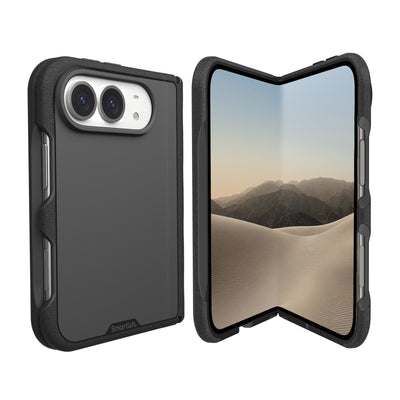
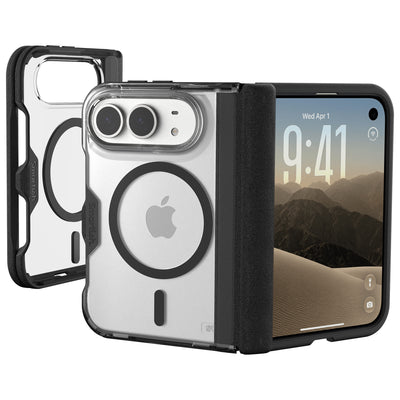
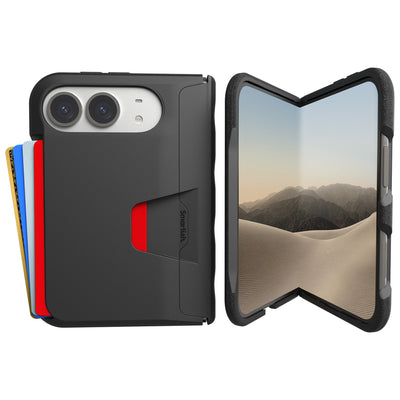
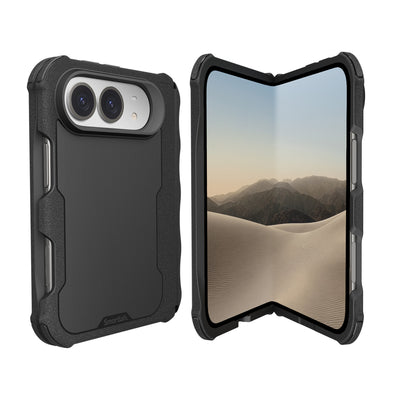

Best cases for people who use MagSafe accessories frequently
For Best cases for people who use MagSafe accessories frequently, match the case to the gear you attach most: choose a slim magnetic case for mounts and stands, or a thicker option if extra case protection matters more than keeping your phone light. The magnetic ring needs to line up with your iPhone’s MagSafe system, and case thickness can affect how securely accessories connect.
Key Takeaways
- Match your case to your accessory habits: Gripmunk keeps things slim for mounts and stands, while Gripzilla adds more protection for rougher days.
- Both Gripmunk and Gripzilla are MagSafe compatible, so you get a strong magnetic connection without sacrificing drop protection.
- Case thickness can weaken how securely accessories snap on, so pick the slimmest option that still fits your lifestyle.
- A misaligned magnetic ring means accessories that slide, spin, or fall off mid-commute, so a case built for MagSafe is worth it.
Smartish makes two MagSafe-compatible Cases to consider: Gripmunk and Gripzilla. TechGearLab recognized Gripmunk for its blend of protection and price in its testing of iPhone cases. That recognition is useful context, not a substitute for checking whether a specific accessory stays attached.
Choose Gripmunk with MagSafe if a slim feel and routine use with mounts or stands are your priorities. Choose Gripzilla if you want a more protective case and are comfortable with a thicker feel. Both are marketed as MagSafe compatible and pass the same drop test. Compatibility labeling does not tell you exactly how a case will perform with every wallet, car mount, battery pack, or stand, so test your setup.
Gripmunk with MagSafe: best slim pick for mounts and stands
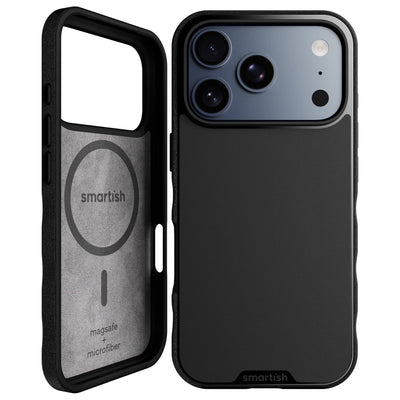
Gripmunk suits people who attach accessories often and prefer a slim case. Textured sides and finger grooves help with handling, while air-pocket corners and raised edges provide everyday protection. A raised camera ring helps keep the lenses off a flat surface when the phone rests on its back. TechGearLab included Gripmunk in its iPhone case testing and recognized its balance of protection and price.
Gripzilla MagSafe: best for bigger accessory stacks and more protection
Gripzilla is the thicker, more protective pick. Its rigid backplate and protective design suit people who want more case around their phone, and its MagSafe compatibility supports magnetic accessories. The trade-off: a thicker case may feel bulkier and add material between the phone and accessory. Check your particular mount or wallet instead of assuming every attachment will feel the same.
Comparison table: magnet hold, protection, price, and best accessory pairing
Smartish lists both Gripmunk and Gripzilla as MagSafe compatible, but no verified hold-strength measurement or current price is provided here. Use the comparison as a starting point, confirm current pricing, and test your accessories. The Cases collection includes both styles.
| Case | MagSafe information | Protection and feel | Useful pairing | Price |
|---|---|---|---|---|
| Gripmunk | Marketed as MagSafe compatible; no quantified hold rating stated | Slim profile, air-pocket corners, raised edges | Mounts and stands when a lighter case is preferred | Check current listing |
| Gripzilla | Marketed as MagSafe compatible; no quantified hold rating stated | Thicker build, rigid backplate, air-pocket corners, raised edges | Accessory users who also want a more protective case | Check current listing |
Why Your Case's Magnet Ring Decides Whether Accessories Stay Put

For Best cases for people who use MagSafe accessories frequently, the magnet ring is more than a label. Apple’s MagSafe system uses magnets, a magnetometer, and NFC in the back of the iPhone. A MagSafe case has a built-in magnet array intended to align accessories through the case. Wirecutter’s MagSafe explainer describes the system; a secure, centered connection matters for wallets, mounts, and chargers.
What MagSafe actually is, and why the case's magnet array matters
MagSafe uses magnetic alignment to help an accessory attach in the intended position. The case’s ring needs to sit in the right place relative to the iPhone’s magnets. If an accessory lands off-center, it may feel less secure or a charger may not line up as intended. “MagSafe compatible” identifies the intended connection type, but gives no universal measure of how firmly each accessory will hold.
Magnet array alignment versus magnet count: where hold strength comes from
A larger magnet count alone does not prove a stronger connection. Placement and alignment affect how the case and accessory meet; the accessory’s design and the surfaces in contact also matter. Look for a case designed with a MagSafe magnet array, then assess the connection with your wallet or mount. A phone that stays aligned during ordinary handling is more useful than a bold magnet claim without a clear, comparable test.
Case thickness and material: what can affect wallet grip and mount hold
Extra material between the phone and accessory can affect magnetic attachment, and thicker cases can add distance between a phone and wireless charger. Material and construction matter alongside thickness, so a case label cannot predict how a particular accessory will behave. If a wallet slides or a mounted phone droops, check alignment, case fit, and accessory pairing. A thicker case may suit your protection needs, with a trade-off in feel and charging.
The 60-second hold test to run on any case before you commit
This quick home check can reveal fit issues before you rely on a setup during a commute. It is a practical comparison, not a lab measurement or a promise that an accessory will stay attached in every situation.
- Attach your usual wallet, mount, or battery pack to the case on your iPhone.
- Check that the accessory sits centered and feels secure with gentle handling.
- Hold the phone normally, then tilt it slowly in different directions over a soft surface.
- For a car mount, test the connection while parked before using it on a drive.
- For a charger, confirm that the phone aligns and begins charging; check for unusual warmth during ordinary use.
TechGearLab tested more than 50 iPhone cases across five years for its 2026 rankings, including three Smartish models. That review offers case context, but it does not replace checking your own wallet, stand, mount, or charger. Best cases for people who use MagSafe accessories frequently suit both your daily accessory stack and your preferred balance of protection and bulk.
Match the Case to Your Accessory Stack
The right MagSafe case depends on what you attach most often. A car mount needs a steady connection over bumps; a wallet needs dependable alignment during handling; a battery pack needs room to sit flat. Stands and grips bring their own fit questions. Smartish’s MagSafe-compatible Gripmunk and Gripzilla offer two profiles: one slimmer, one thicker. Choose the pairing that works with your accessories and the amount of case you want to carry.
Car commuters: keeping your phone planted on vent and dashboard mounts
A magnetic mount needs a centered connection and stable surface. Check that the phone sits flat, then confirm the angle holds when you tap the screen. More material between phone and mount may affect how secure the connection feels. Gripmunk’s slimmer build may suit drivers who prefer a lower-profile setup; Gripzilla offers a thicker, more protective design as a trade-off.
Test a vent or dashboard mount while parked. Adjust it to your preferred viewing angle and check that the phone stays aligned through normal interaction. A connection that feels solid in your hand does not prove every mount will hold on a rough road, so assess the specific mount and case together.
Wallet users: why wallets slip on some cases
A MagSafe wallet needs proper magnetic alignment and good contact with the case. If it shifts during ordinary handling, check that it is centered and flush. Case construction and added thickness can affect how the wallet feels. A loaded wallet may feel different from an empty one, so test the setup you actually carry.
Smartish Wallet Slayer Vol. 1 and Wallet Slayer Vol. 2 store cards inside the case; they are not MagSafe-compatible cases. They hold cards in the case rather than attaching a separate MagSafe wallet to the back. Choose between an integrated card-carrying setup and a removable magnetic wallet.
Battery pack and charging: does a case slow MagSafe wireless charging or add heat?
MagSafe wireless charging can reach up to 15W on supported iPhones, according to Apple’s MagSafe documentation. That is below wired fast charging, and actual charging depends on the iPhone, charger, power source, and conditions. A case adds material between phone and charger; extra thickness can affect charging efficiency and may contribute to warmth. Wirecutter’s MagSafe accessory explainer describes alignment’s role in wireless charging.
Check that a battery pack sits flat and stays attached as you handle the phone. Center a charger and confirm charging begins. Some warmth during wireless charging can occur, but if the phone or pack feels unusually hot, disconnect it and check the device and charger guidance. A thinner case may suit frequent charging, though fit and protection still matter.
Content creators: stands and grips for hands-free shooting
Stands help with video calls, desk recording, and hands-free viewing; magnetic grips can make one-handed filming more comfortable. Look for a centered attachment that does not wobble when you touch the screen. A slimmer case can be easier to handle during longer shoots. A thicker case may offer more protection, though added size can change how a stand or grip feels.
Before recording, set the phone at the needed angle and check that the accessory stays in place as you tap controls or rotate the device. Test a stand and grip separately if you use both. A MagSafe case is a useful starting point, but the accessory’s shape and your shooting position determine whether the combination feels steady.
How to Buy a MagSafe Case You Won't Regret: A Short Checklist
Choose a case by checking its magnetic design, protection details, fit for your iPhone, and feel with your accessories. A label cannot tell you whether a wallet will stay centered or a mount will hold the phone at the right angle. Smartish Cases include MagSafe-compatible options; confirm the exact model and current listing before buying. Use this checklist to make sure the setup works in daily use.
“MagSafe compatible” vs. certified: the label gap that trips people up
“MagSafe compatible” indicates that a case is designed for magnetic accessories, but does not say how firmly a particular wallet or mount will attach. Look for clear information about the case’s magnetic design, then test your accessory pairing. Apple documents MagSafe alignment and charging; a case label is not a substitute for checking your own setup.
Protection specs to check: drop testing, raised edges, corner coverage
Check practical details: drop testing, air-pocket corners, raised screen edges, and a raised camera ring. Smartish Gripmunk and Gripzilla are both drop tested and have air-pocket corners and raised screen edges. The camera ring helps keep the lenses off a flat surface when the phone rests on its back. Match protection to your routine, from commuting to outdoor plans, and consider case thickness.
Grip, fit, and price: what fair value looks like
A case should feel secure without becoming awkward to pocket. Textured sides can help with grip; precise cutouts should leave ports accessible, and covered buttons should remain comfortable to press. Compare the current price with features you will use, including magnetic accessory support and protection details. Check the listing instead of relying on an old sale or an undated price elsewhere.
Quick fit check for your iPhone model
Buy for the exact iPhone model printed on your device or shown in its settings. iPhone 18 Pro, iPhone 18 Pro Max, iPhone Duo, and iPhone 17 are distinct models; do not assume a case designed for one fits another. Check the product listing for an explicit match. Smartish Cases come in different model fits, so verify the specific case and device combination.
MagSafe Case FAQs

How strong should a MagSafe case's magnets be?
No universal hold-strength number predicts how every wallet, mount, or battery pack will perform. The case and accessory need to align and sit securely. Check that the accessory stays centered during normal handling, and test a car mount while parked before driving.
Will a thick or rugged case weaken MagSafe hold or charging?
Added material can affect the connection, so a thicker case may change magnetic hold or wireless charging performance. The effect depends on the case and accessory pairing. Choose a thinner profile if low bulk or frequent wireless charging matters most, then test your setup.
Do MagSafe wallets stay on with a third-party case?
They can if the case is designed for MagSafe and the wallet aligns and attaches securely. The label alone does not confirm how two specific products work together. Check that the wallet sits flat and does not shift during ordinary handling.
Does a case slow down wireless charging or cause heat buildup?
A case can affect charging by adding material between phone and charger. Apple states that MagSafe wireless charging reaches up to 15W on supported iPhones; actual charging depends on the phone, charger, and conditions. Some warmth can occur. If a phone or charger feels unusually hot, disconnect it and check the device maker’s guidance.
Do all Smartish cases work with MagSafe accessories?
No. Smartish Gripmunk and Gripzilla are marketed as MagSafe compatible. Check the exact case listing for your iPhone model and accessory. Wallet Slayer Vol. 1 and Wallet Slayer Vol. 2 carry cards inside the case rather than serving as MagSafe-compatible cases.
Frequently Asked Questions
What makes a case good for someone who uses MagSafe accessories constantly?
A good MagSafe-heavy case pairs a well-aligned magnet ring with a thickness you're willing to live with. Gripmunk with MagSafe is the slim pick for mounts and stands, while Gripzilla trades some slimness for a more protective build. Both are marketed as MagSafe compatible and pass the same drop test.
How strong should a MagSafe case's magnets be, and how can I tell before buying?
There's no universal hold-strength number for MagSafe cases, so magnet count claims don't tell you much. Alignment and placement matter more than the total number of magnets. Run a quick 60-second hold test: attach your wallet or mount, check that it sits centered, then tilt the phone over a soft surface.
Will a thick or rugged case weaken MagSafe charging or mount hold?
Extra case material can add distance between your phone and an accessory, which may affect how securely it attaches or how well a wireless charger lines up. That's the trade-off with a thicker case like Gripzilla: more protection around your phone, potentially a looser feel with some accessories. Always test your specific setup.
Do MagSafe wallets stay on with a third-party case?
Yes, if the case has a built-in magnet array that lines up with the iPhone's MagSafe system. 'MagSafe compatible' means the connection type is intended, not that every wallet will hold the same. If a wallet slides or feels off-center, check the case fit and try a different pairing.
Does a MagSafe case slow down wireless charging or cause heat buildup?
A MagSafe case shouldn't slow charging if the magnets align your phone and charger properly, though extra thickness can add distance between the two. After you attach your charger, confirm the phone starts charging and check for unusual warmth during ordinary use. If something feels off, realign and test again.
Gripmunk or Gripzilla: which Smartish case is better for heavy MagSafe users?
Choose Gripmunk with MagSafe if you attach mounts and stands often and want a slim feel. Choose Gripzilla if you want a thicker, more protective case with a rigid backplate and don't mind the bulk. Both pass the same drop test, so it comes down to feel versus protection.
How do I test a MagSafe case with my accessories before relying on it?
Attach your usual wallet, mount, or battery pack, confirm it sits centered and feels secure, then tilt the phone slowly in different directions over a soft surface. For a car mount, test the connection while parked before driving. For a charger, confirm it aligns and begins charging during normal use.